API Integration for Contact Forms, CRMs, and Admin Dashboards
A practical guide for businesses that need API integration for contact forms, CRMs, admin dashboards, backend systems, MySQL databases, React websites, PHP applications, and business workflow automation.

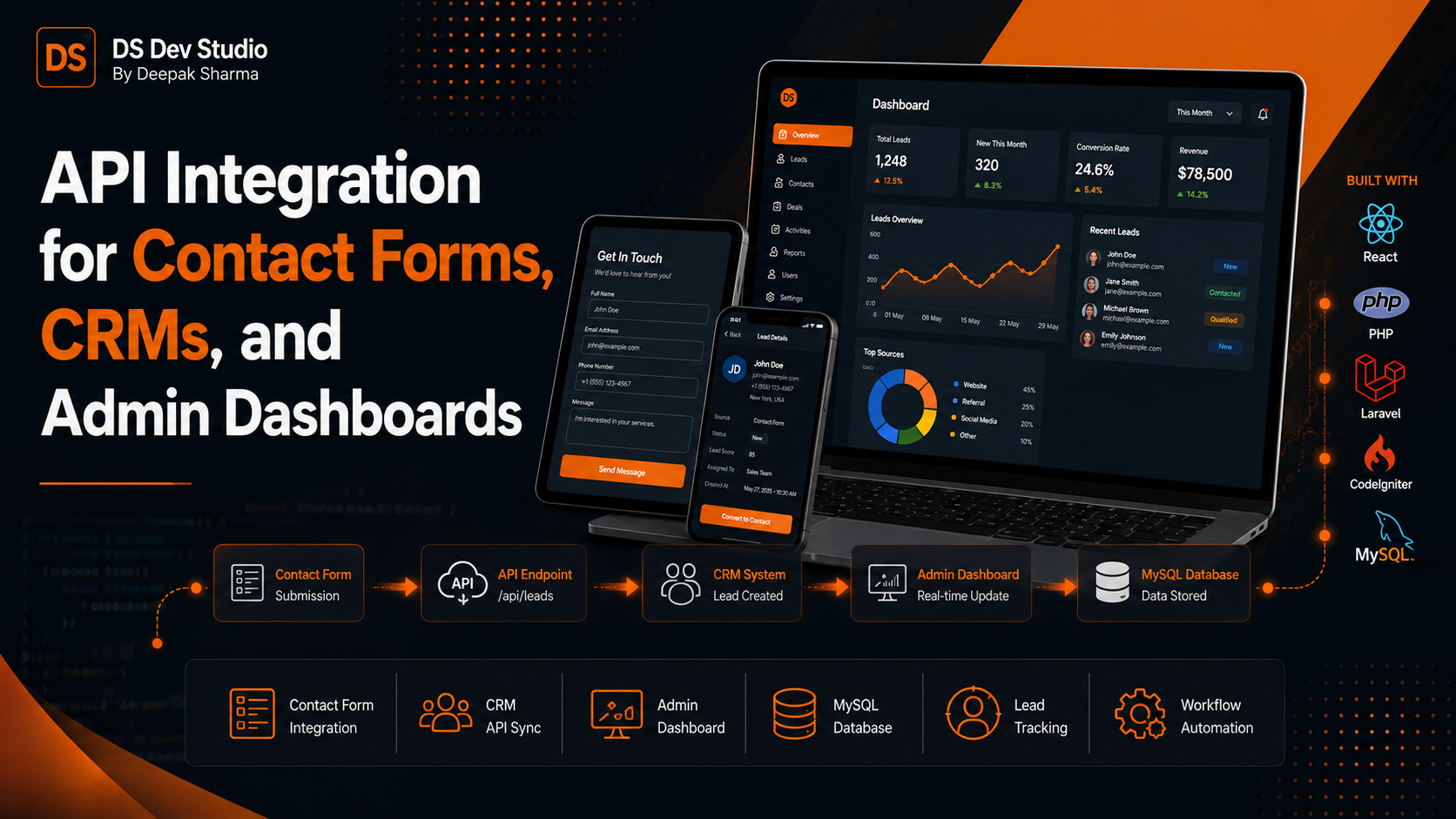
API Integration helps businesses connect websites, contact forms, CRMs, admin dashboards, databases, and third-party tools so data can move automatically between systems. A business website becomes more useful when it does more than display information. It should collect enquiries, send form data, store records, update CRM dashboards, trigger email notifications, and support business workflows without manual copying.
Many small businesses receive leads from contact forms, landing pages, WhatsApp campaigns, social media links, Google Business Profile, email campaigns, and paid ads. If every enquiry only goes to an email inbox, tracking becomes difficult. API integration can send the same data to a CRM, MySQL database, admin dashboard, Google Sheet, email notification system, or internal lead tracking tool.
For businesses that use React websites, PHP backends, Laravel systems, CodeIgniter applications, WordPress forms, custom admin panels, or CRM web applications, API integration is often the bridge between frontend and backend. The user submits information on the website, and the backend system receives, validates, stores, and processes that data.
DS Dev Studio by Deepak Sharma helps businesses with API integration, contact form integration, CRM API integration, admin dashboard integration, React frontend development, PHP backend systems, Laravel development, CodeIgniter projects, MySQL databases, admin panels, CRM modules, business websites, and custom web applications. This guide explains how API integration works for contact forms, CRMs, and admin dashboards.
What is API Integration?
API Integration means connecting two or more software systems so they can exchange data. API stands for Application Programming Interface. In simple business terms, an API allows your website, CRM, dashboard, database, or third-party tool to communicate with another system in a structured way.
For example, when a visitor submits a contact form on a website, the frontend can send that data to an API. The API can validate the form, store the lead in a MySQL database, send an email notification, add the lead to a CRM dashboard, and return a success message to the user. This is a common example of API integration for business websites.
An API Integration Developer builds these connections so data does not remain trapped in one place. Instead of manually copying leads from emails to spreadsheets or CRM systems, the data can flow automatically. This saves time, reduces mistakes, and creates a more organized business process.
Why API Integration matters for business websites
API integration matters because business websites are no longer only online brochures. A modern business website often needs to collect data, send notifications, store enquiries, connect with dashboards, update records, and support customer follow-up. Without integration, important lead data can become scattered across multiple tools.
A contact form without proper backend integration may only send an email. If the email is missed, the lead can be lost. If many team members handle enquiries, it becomes difficult to know who followed up. If the business runs multiple campaigns, it may not know which page or source created the lead. API integration helps solve these issues.
A Business Website Developer should plan how enquiry data will move after the user submits a form. The journey should not stop at the frontend. The data should go to the right backend system, CRM, admin dashboard, or database so the business can act on it properly.
API integration for contact forms
Contact form integration is one of the most common uses of API integration. A contact form collects user details such as name, phone number, email, service requirement, message, location, budget, timeline, or preferred contact method. API integration sends this information to a backend system for processing.
A basic contact form may send an email notification. A more advanced contact form can store the data in MySQL, create a lead record in a CRM, update an admin dashboard, send a confirmation message, and track the lead source. This makes the form much more useful for business operations.
A Backend Developer Freelancer can build contact form APIs using PHP, Laravel, CodeIgniter, Node, or other backend technologies. For DS Dev Studio projects, PHP, Laravel, CodeIgniter, MySQL, and React are practical options for contact form and CRM workflows.
- Send contact form data to email notifications.
- Store form submissions in a MySQL database.
- Add leads directly to a CRM dashboard.
- Send enquiry details to Google Sheets or business tools.
- Track source information from landing pages and campaigns.
- Show success and error messages to users.
- Validate required fields before storing data.
- Prevent duplicate or incomplete lead records.
How contact form API workflow works
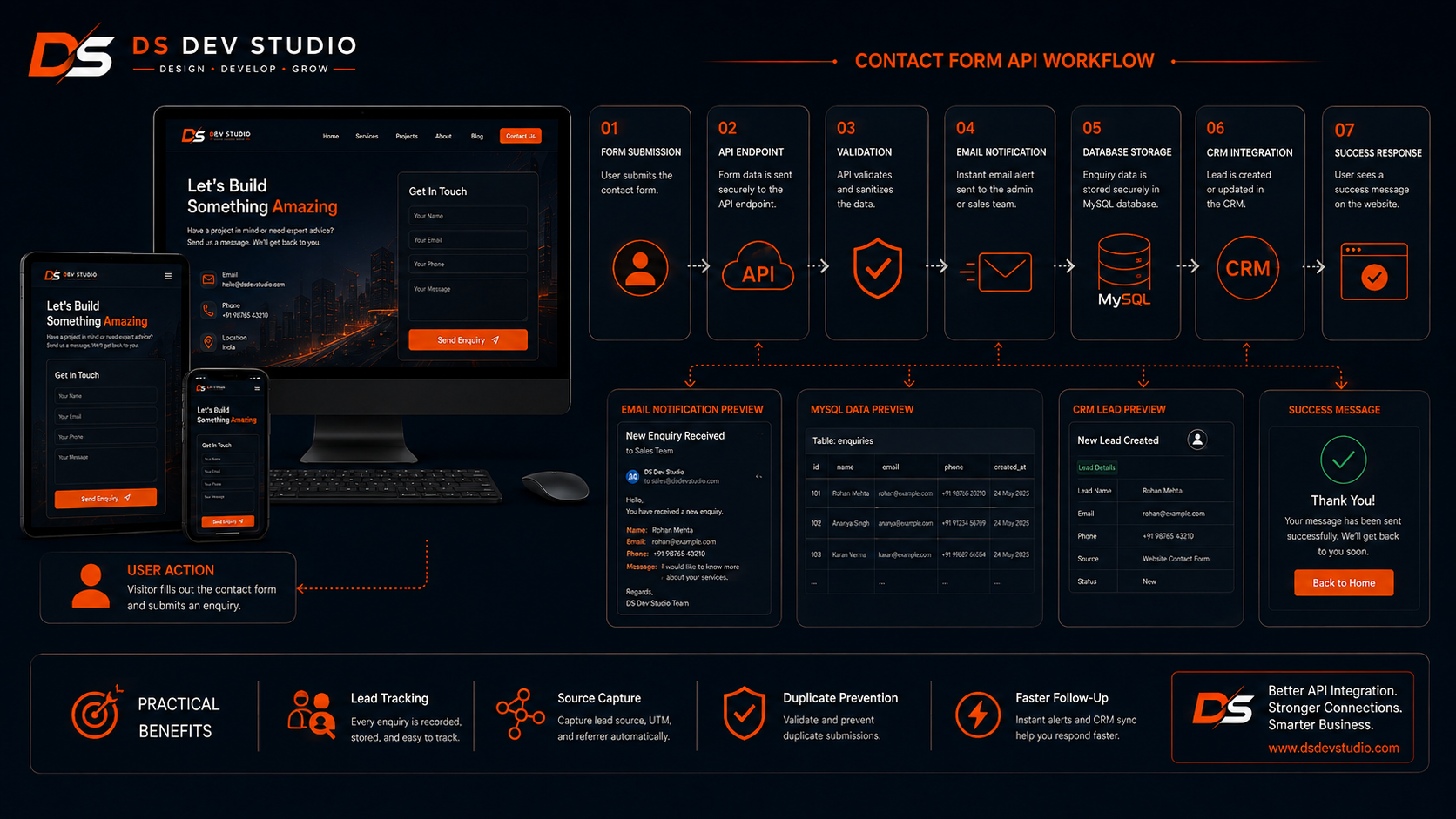
A contact form API workflow usually starts on the frontend. A visitor fills out the form on a website or landing page. When the user clicks submit, the frontend sends the form data to a backend API endpoint. The backend receives the data and checks whether all required fields are valid.
After validation, the backend can store the record in a database, send an email alert, add the lead to a CRM, or trigger another business workflow. If everything is successful, the API returns a success response. The website then shows a message such as “Your enquiry has been submitted successfully.”
If something goes wrong, the API should return a clear error response. For example, if the email format is wrong, the phone number is missing, or the server cannot store the data, the user should see a helpful message. A professional API integration should not leave users confused after form submission.
API integration for CRM systems
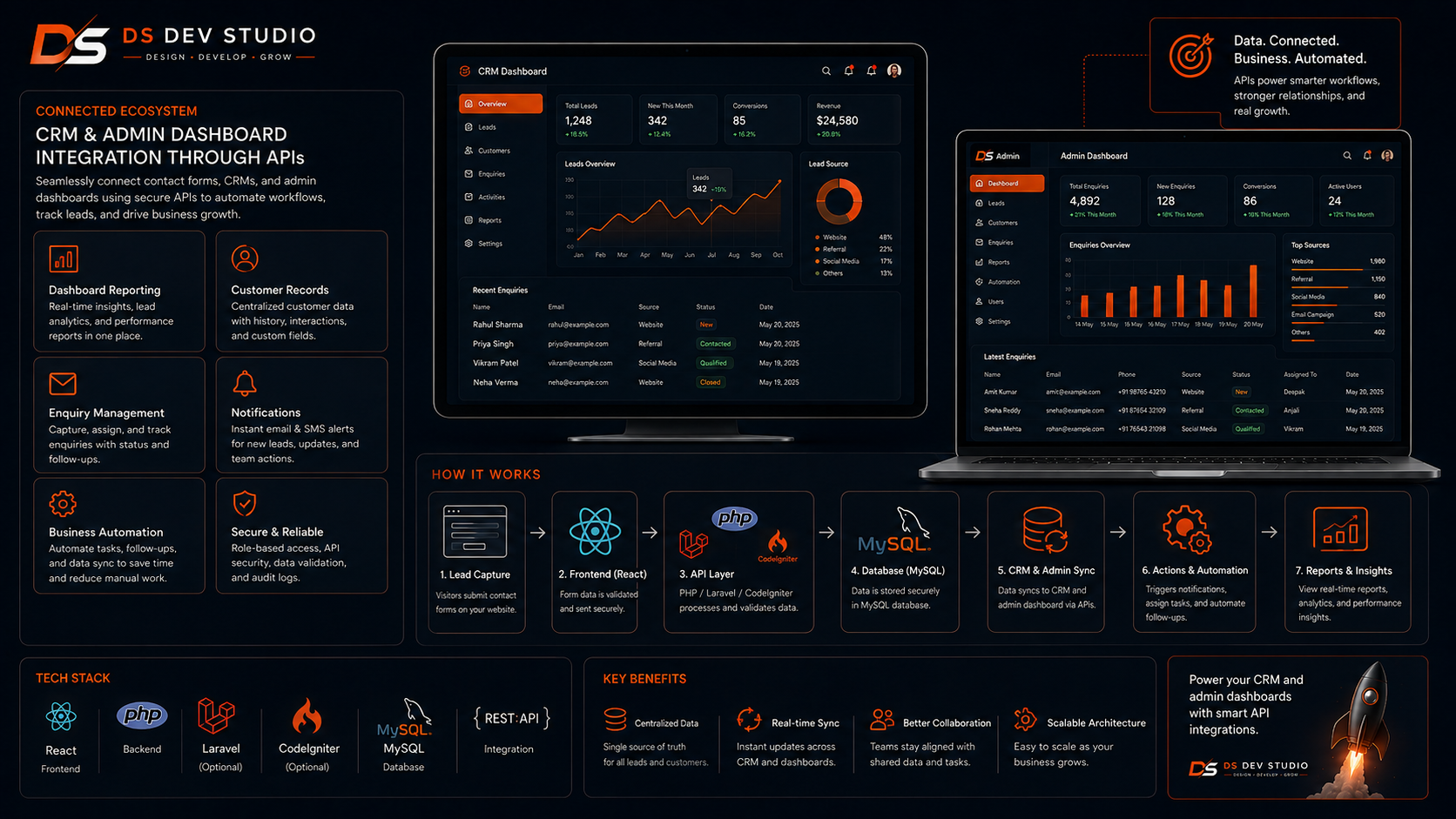
CRM API Integration helps businesses send lead and customer data into a CRM system automatically. CRM stands for customer relationship management. A CRM stores leads, customers, follow-ups, notes, statuses, assigned users, sources, and reports. API integration connects the CRM with websites, landing pages, forms, and other tools.
For example, a website contact form can send data to a CRM API. The CRM can create a new lead with name, phone, email, service, source, message, and status. The sales or support team can then open the CRM dashboard and follow up with the lead. This reduces manual entry and improves response time.
A CRM Web Application Developer can build custom CRM APIs using PHP, Laravel, CodeIgniter, and MySQL. These APIs can receive data from React websites, WordPress forms, landing pages, admin dashboards, or third-party services.
API integration for admin dashboards
Admin dashboard integration helps businesses view and manage data in a private dashboard. An admin dashboard may show leads, customers, enquiries, follow-ups, reports, services, users, projects, bookings, payments, or website content. APIs connect the dashboard with the backend database and frontend interface.
For example, a React dashboard can request lead data from a Laravel API. The API pulls records from MySQL and sends them to the dashboard. The dashboard displays the leads in a searchable table with filters, status labels, and action buttons. When the user updates a record, the dashboard sends the update back to the API.
An Admin Panel Developer should build API integration carefully because admin dashboards often handle important business data. The system should include authentication, permissions, validation, error handling, and secure database queries.
Common API integration use cases for businesses
Businesses use API integration for many practical workflows. Some integrations are simple, such as sending form data to email. Others are more advanced, such as connecting website forms with a CRM, dashboard, database, WhatsApp API, email marketing tool, or payment gateway. The right use case depends on the business process.
A small business may need a contact form connected to email and Google Sheets. A growing service business may need website forms connected to a custom CRM. A company may need React dashboards connected to Laravel APIs and MySQL databases. An agency may need multiple landing pages connected to one lead management system.
- Website contact form to CRM lead creation.
- Landing page form to MySQL database storage.
- React frontend to Laravel backend API.
- CodeIgniter CRM to admin dashboard data tables.
- WordPress form to Google Sheets or CRM.
- Lead form to email notification and dashboard record.
- Admin dashboard to customer record updates.
- CRM to WhatsApp, SMS, or email notification tools.
- Payment form to transaction status dashboard.
- Booking form to calendar, database, or admin panel.
Frontend and backend roles in API integration
API integration usually involves both frontend and backend work. The frontend is the part users interact with, such as a React website, WordPress page, landing page, contact form, or admin dashboard. The backend receives requests, validates data, stores records, and returns responses.
A React Developer Freelancer may build the form, dashboard table, filters, loading states, and success messages. A Backend Developer Freelancer may build the API endpoint, validation, database logic, authentication, and email notifications. In many small business projects, a Full Stack Web Developer Freelancer can handle both frontend and backend.
Good integration requires both sides to work together. The frontend should send the right data format. The backend should return clear responses. The user should see proper feedback. The business should receive clean data in the right system.
API integration with React websites
React websites often use APIs to submit forms, load content, show dashboards, display user data, manage service records, or connect with backend systems. React is useful because it can create interactive user interfaces while the backend handles data and business logic.
For example, a React contact form can send data to a PHP API. A React dashboard can fetch lead data from a Laravel API. A React admin panel can update customer records through CodeIgniter API endpoints. This separation makes the frontend more flexible and the backend more organized.
A React Developer Freelancer should include loading states, validation messages, error handling, and success messages. If an API request takes time, the user should know that the form is submitting. If the request fails, the user should know what happened.
API integration with PHP backend systems
PHP backend systems are commonly used for contact forms, CRMs, admin panels, and business applications. A PHP Developer Freelancer can build APIs that receive form submissions, store records in MySQL, send notifications, and return structured responses to the frontend.
PHP can be used directly for simple APIs, but frameworks like Laravel and CodeIgniter provide better structure for larger systems. Laravel is useful for structured backend applications, authentication, validation, migrations, and APIs. CodeIgniter is useful for lightweight PHP applications and existing CRM systems.
For business websites, PHP APIs can support lead capture, enquiry tracking, contact forms, dashboard records, user login, CRM modules, reports, and third-party connections. The backend should be built with clean validation and safe database handling.
Laravel API integration
Laravel is a strong option for API integration because it provides structure for routing, controllers, validation, middleware, authentication, database models, and error handling. A Laravel Developer Freelancer can build clean APIs for contact forms, CRMs, dashboards, admin panels, and custom web applications.
A Laravel API can receive website form data, validate it, store it in MySQL, send notifications, and return a response. It can also provide data to React dashboards, mobile apps, CRM screens, reporting tools, and third-party systems.
Laravel is useful when the business needs a structured backend system that may grow over time. If the project includes user roles, CRM modules, reports, dashboards, and APIs, Laravel can provide a strong foundation.
CodeIgniter API integration
CodeIgniter is useful for API integration in lightweight PHP business applications and existing CRM systems. A CodeIgniter Developer Freelancer can build or improve APIs that connect websites, forms, dashboards, and databases. This is especially useful when a business already has an existing CodeIgniter CRM or admin panel.
A CodeIgniter API can receive contact form submissions, update lead records, fetch customer data, provide dashboard reports, and connect with React frontend screens. It can also connect with external systems such as Google Sheets, email tools, SMS platforms, or other business applications.
Many businesses do not need to rebuild an existing CodeIgniter application from zero. A developer can add API endpoints, improve validation, optimize queries, and connect the existing system with new frontend or third-party tools.
MySQL database integration
MySQL database integration is often part of API integration. When a contact form or CRM sends data to the backend, that data usually needs to be stored in a database. A MySQL Database Developer can plan tables, fields, relationships, indexes, and data rules for clean storage.
For example, a contact form table may store name, phone, email, service, message, source, page URL, status, created date, and assigned user. A CRM may store leads, customers, follow-ups, notes, services, sources, users, and reports in related tables.
Good database planning makes API integration more reliable. If the database structure is messy, reports, filters, and dashboards become difficult. Clean MySQL design helps the business use the data properly after it is collected.
Validation and error handling in API integration
Validation and error handling are critical for API integration. Validation checks whether the data is correct before it is stored or processed. For example, required fields should not be empty, email should follow proper format, phone number should be checked where needed, and files should follow allowed types and size limits.
Error handling makes the system more reliable. If the API cannot save data, the frontend should show a clear error message. If a required field is missing, the user should know what to fix. If an external tool fails, the system should handle the failure instead of losing data silently.
A professional API Integration Developer should plan success responses, error responses, validation messages, logging, and fallback handling. Good error handling improves user experience and helps developers find issues faster.
Security in API integration
Security is important because APIs may handle customer data, lead information, login sessions, admin actions, and business records. A poorly secured API can expose sensitive data or allow unauthorized actions. Security should be planned from the beginning.
Basic API security includes input validation, safe database queries, authentication, authorization, CSRF protection where relevant, rate limiting, secure file uploads, and proper permission checks. Admin dashboard APIs should not allow unauthorized users to read or update records.
Public contact form APIs should also be protected from spam and abuse. Depending on the project, this may include captcha, rate limits, honeypot fields, validation rules, or spam filtering. The right approach depends on the website and risk level.
Lead source tracking with API integration
Lead source tracking helps businesses understand where enquiries come from. A form can capture source information such as page URL, campaign name, UTM source, UTM medium, UTM campaign, referral page, landing page name, or form type. This data can be sent to the CRM through an API.
For example, if a lead comes from a landing page campaign, the CRM can store that source. Later, the business can check which campaigns generated enquiries. This helps business owners make better marketing decisions and improve future campaigns.
A Website Developer Freelancer can add hidden fields, source tracking, and API mapping so lead source data is not lost. This is especially useful for businesses using ads, email campaigns, WhatsApp links, social media, and multiple landing pages.
Admin dashboard reporting through APIs
APIs can provide data for admin dashboard reports. A dashboard may show total leads, new enquiries, pending follow-ups, converted customers, source-wise leads, service-wise leads, monthly records, and user performance. The frontend requests report data from the backend API.
The backend API can calculate report numbers from MySQL and send them to the dashboard. The dashboard can display them as cards, tables, charts, filters, or date-based summaries. This helps business owners understand performance without opening raw database records.
Report APIs should be optimized carefully. If a report pulls too much data every time, the dashboard may become slow. A Backend Developer Freelancer should use efficient queries, indexes, pagination, and caching where suitable.
API integration for business automation
API integration can support business automation by reducing manual work. Instead of manually copying form submissions into a CRM, sending follow-up emails, updating spreadsheets, or assigning leads, APIs can automate parts of the workflow. This saves time and improves consistency.
For example, a website lead can automatically create a CRM record, notify the business owner, assign the lead to a team member, store source details, and show the record in the admin dashboard. This creates a smoother workflow from website enquiry to follow-up.
Business automation should be practical. Not every step needs automation from day one. A Custom Web Application Developer can start with important workflows such as form submission, lead storage, email alerts, and CRM display. More automation can be added later.
When should a business hire an API Integration Developer?
A business should hire an API Integration Developer when website forms, CRMs, dashboards, databases, or third-party tools need to communicate with each other. If data is being copied manually between systems, API integration can reduce effort and errors.
You should also hire API support when your contact forms are not connected properly, leads are getting lost, your CRM does not receive website enquiries, your admin dashboard needs live data, or your React frontend needs a backend connection.
- Hire an API Integration Developer when contact forms need backend connection.
- Hire one when website leads should go directly to a CRM.
- Hire one when admin dashboards need live data from MySQL.
- Hire one when React frontend needs Laravel or CodeIgniter APIs.
- Hire one when WordPress forms need external tool integration.
- Hire one when lead source tracking is needed.
- Hire one when reports, filters, and dashboards need backend data.
- Hire one when business workflows need automation.
What to prepare before API integration project
Before starting an API integration project, prepare the full data flow. Explain where the data comes from, where it should go, which fields are needed, what should happen after submission, and which users need access. Clear planning helps the developer build the right integration.
For a contact form integration, define form fields such as name, phone, email, service, message, source, and page URL. For CRM integration, define lead fields, statuses, assigned users, follow-up process, and reports. For admin dashboards, define what data should be shown and which actions users can perform.
- List all forms, CRMs, dashboards, and tools that need integration.
- Define required data fields for each form or module.
- Clarify where data should be stored, such as MySQL, CRM, Google Sheets, or admin panel.
- Prepare API documentation if connecting with third-party tools.
- Define success messages, error messages, and notification requirements.
- Clarify user roles, permissions, and dashboard access.
- Share reporting needs such as lead source, status, date, and service filters.
- Discuss security, validation, spam protection, testing, deployment, and maintenance.
What to check before hiring an API Integration Developer
Before hiring an API Integration Developer, check whether they understand frontend forms, backend APIs, MySQL databases, validation, authentication, error handling, React, PHP, Laravel, CodeIgniter, admin dashboards, and CRM workflows. API integration requires both technical knowledge and business process understanding.
Ask how the developer will handle success responses, error responses, duplicate submissions, database storage, email notifications, CRM mapping, source tracking, and testing. Good API integration should be reliable and easy to maintain.
Also ask about future changes. Businesses often need extra fields, new forms, CRM changes, dashboard reports, or third-party integrations later. The developer should build the integration in a way that can be updated without breaking existing workflows.
Common API integration mistakes to avoid
One common mistake is building contact forms without proper backend storage. If the form only sends an email, leads can be missed. Storing leads in a database or CRM creates a better tracking process. Even simple businesses can benefit from structured lead storage.
Another mistake is weak validation and error handling. If users submit incomplete data or the API fails silently, the business may lose important enquiries. The system should show clear messages and handle failures properly.
Other mistakes include no source tracking, no duplicate handling, no API security, slow dashboard queries, poor database structure, unclear field mapping, no testing, and no maintenance plan. A skilled API Integration Developer can help avoid these problems.
How DS Dev Studio can help
DS Dev Studio by Deepak Sharma can help businesses with API integration for contact forms, CRMs, admin dashboards, React websites, PHP backends, Laravel systems, CodeIgniter applications, WordPress forms, MySQL databases, and custom web applications.
Deepak Sharma Web Developer work includes API integration, PHP, Laravel, CodeIgniter, MySQL, ReactJS, HTML, CSS, JavaScript, WordPress customization, backend development, frontend development, admin panels, CRM systems, responsive websites, and full stack web development. This is useful for businesses that need connected website and backend workflows.
If you want API integration for contact forms, CRMs, and admin dashboards, DS Dev Studio can help plan the data flow, build APIs, connect frontend forms, store data in MySQL, update CRM records, create dashboard views, add validation, improve error handling, and prepare the system for future business automation.
Conclusion
API Integration helps businesses connect contact forms, CRMs, admin dashboards, databases, websites, and third-party tools into one organized workflow. Instead of losing enquiries in email inboxes or manually copying data between systems, businesses can use APIs to send leads from website forms to CRMs, store records in MySQL, show data in dashboards, trigger notifications, and track lead sources. A strong API integration should include validation, error handling, security, source tracking, database planning, and reliable frontend feedback. DS Dev Studio by Deepak Sharma can help businesses with API integration, contact form integration, CRM workflows, admin dashboard APIs, React frontend development, PHP backend systems, Laravel development, CodeIgniter applications, MySQL databases, and custom web applications. With the right API integration approach, your business website can become more connected, automated, and useful for long-term lead and customer management.
Useful internal links
Frequently asked questions
Can I hire Deepak Sharma as an API Integration Developer?+
Yes. You can hire Deepak Sharma for API integration, contact form integration, CRM API integration, admin dashboard integration, React frontend APIs, PHP backend APIs, Laravel APIs, CodeIgniter APIs, MySQL database integration, and custom web applications.
What is API integration for contact forms?+
API integration for contact forms sends form data from a website or landing page to a backend system, CRM, database, email notification, Google Sheet, or admin dashboard for proper lead tracking.
Can API integration connect website forms with a CRM?+
Yes. A website form can send lead data to a CRM through an API. The CRM can then store the lead, assign status, track source, add follow-up details, and show the record in an admin dashboard.
Can DS Dev Studio build APIs for admin dashboards?+
Yes. DS Dev Studio can build backend APIs for admin dashboards that fetch, update, filter, and manage data from MySQL databases, CRM systems, PHP backends, Laravel systems, or CodeIgniter applications.
Which technologies are useful for API integration?+
Useful technologies include React for frontend interfaces, PHP for backend logic, Laravel for structured APIs, CodeIgniter for lightweight PHP systems, MySQL for database storage, and APIs for connecting CRMs, dashboards, forms, and third-party tools.