API Integration Developer Guide for React, PHP, and CRM Websites
A practical guide for businesses that want to hire an API Integration Developer for React websites, PHP backends, CRM systems, admin panels, contact forms, dashboards, and custom web applications.

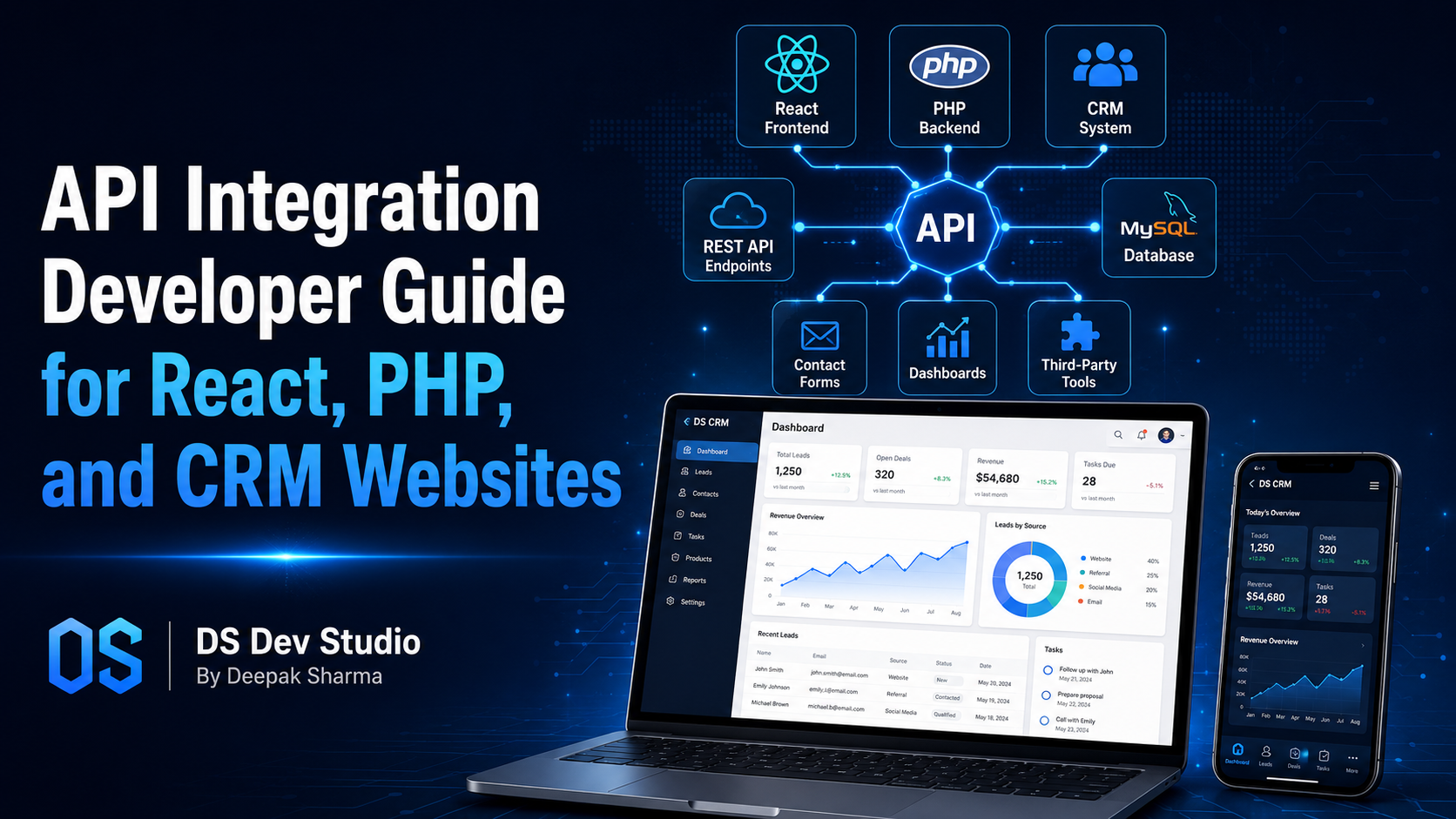
An API Integration Developer helps businesses connect websites, web applications, CRM systems, dashboards, contact forms, payment tools, email platforms, databases, and third-party services. For many modern business websites, simply showing information is not enough. Businesses need websites that can send data, receive data, store records, update dashboards, trigger notifications, and connect different tools together.
API integration is especially useful for React websites, PHP backends, Laravel systems, CodeIgniter applications, CRM websites, admin panels, and custom web applications. A user may submit a form on a React website, the data may go to a PHP backend, the backend may store it in MySQL, and the same record may appear inside a CRM dashboard. This complete flow is possible through proper API development and integration.
For small businesses, service companies, agencies, consultants, startups, and growing teams, API integration can reduce manual work. Instead of copying leads from emails into spreadsheets, manually sending updates, or switching between different platforms, APIs can move information automatically. This improves speed, accuracy, and business workflow.
DS Dev Studio by Deepak Sharma helps businesses with API integration, React frontend development, PHP backend development, Laravel systems, CodeIgniter projects, MySQL databases, CRM modules, admin panels, contact forms, business websites, and custom web applications. This guide explains how an API Integration Developer can help connect React, PHP, and CRM websites in a practical and business-focused way.
What does an API Integration Developer do?
An API Integration Developer connects different software systems so they can exchange data. API stands for Application Programming Interface. In simple terms, an API works like a structured bridge between one system and another. It allows a website, backend, CRM, dashboard, or third-party tool to send and receive information in a controlled way.
For example, a contact form on a website may send user details to a backend API. The backend may validate the data, store it in a database, send an email notification, and push the same lead into a CRM system. Without API integration, this process may need manual work. With API integration, the flow can happen automatically.
An API Integration Developer may work on REST APIs, third-party API connections, backend endpoints, authentication, data validation, error handling, CRM integrations, payment integrations, email service integrations, Google Sheets connections, dashboard APIs, and custom web application workflows. The goal is to make different systems work together smoothly.
Why API integration matters for business websites
Business websites often need to do more than display pages. A business website may need contact forms, booking forms, quote requests, newsletter signups, payment records, lead tracking, customer records, report dashboards, or CRM workflows. These features need data movement between frontend, backend, database, and external tools.
API integration helps connect these parts. When a visitor submits an enquiry, the data should not disappear into one email inbox only. It can also be stored in a database, shown inside an admin panel, sent to a CRM, shared with a Google Sheet, or used to trigger an email response. This makes the website more useful for business operations.
A Business Website Developer with API knowledge can help turn a normal website into a connected system. The website can collect leads, the backend can process them, and the CRM can help the team manage follow-ups. This is useful for small businesses that want better enquiry handling and more organized workflows.
API integration for React websites
React websites often use APIs to load data, submit forms, manage dashboards, show dynamic content, and connect with backend systems. A React Developer Freelancer can build the frontend interface, while the API Integration Developer connects that interface with backend services. This is common in business websites, admin dashboards, CRM systems, and custom web applications.
For example, a React website may have a service enquiry form. When the user submits the form, React sends the data to a backend API. The API checks the data, stores it in MySQL, sends an email, and returns a success message to the React frontend. This creates a smooth user experience and a reliable backend workflow.
React can also use APIs to display blogs, projects, services, testimonials, user records, dashboard data, lead tables, charts, and reports. A custom React frontend becomes more powerful when it connects with a well-built backend API. This is why React frontend development and API integration often work together.
API integration for PHP backend systems
PHP is widely used for backend development, and it can be used to build APIs for websites, admin panels, CRM systems, and custom web applications. A PHP Developer Freelancer can create backend endpoints that receive data from frontend pages, process business logic, connect with MySQL databases, and return structured responses.
PHP APIs are useful for contact forms, login systems, lead management, dashboard data, reports, file uploads, user records, booking systems, and CRM workflows. They can also connect with third-party services such as email tools, SMS platforms, WhatsApp APIs, payment gateways, Google Sheets, and analytics platforms.
A Backend Developer Freelancer should build PHP APIs with validation, secure access, clear response messages, and proper error handling. APIs should not accept any data blindly. They should check required fields, protect sensitive routes, and return useful responses so the frontend can show proper messages to users.
API integration for CRM websites
CRM websites and CRM web applications depend heavily on data flow. A CRM may collect leads from website forms, landing pages, email campaigns, ads, phone enquiries, or third-party tools. API integration helps bring these records into one system where the business can manage follow-ups, statuses, notes, and reports.
A CRM Web Application Developer can build APIs to create leads, update customer records, assign users, change statuses, add notes, send notifications, and fetch report data. These APIs can connect the CRM with public websites, React dashboards, PHP backends, Google Sheets, email tools, or other business platforms.
For example, a business website may send new enquiries directly to a CRM. The CRM can automatically mark the lead as new, assign it to a sales user, show it in the dashboard, and send an email notification. This reduces manual work and improves response time.
Common API integrations for business websites
Business websites can connect with many different tools through APIs. The right integrations depend on the business model, workflow, and customer journey. A small service business may need contact form integration and lead storage. A growing company may need CRM integration, email automation, WhatsApp alerts, payment records, and dashboard reports.
API integration should solve real business problems. It should not be added only because it sounds technical. A good developer should understand the workflow first and then suggest the integration that makes the process easier, faster, or more organized.
- Contact form integration with backend database.
- Website enquiry integration with CRM systems.
- React frontend integration with PHP or Laravel APIs.
- Google Sheets integration for lead records.
- Email notification integration for form submissions.
- WhatsApp or SMS alert integration for new enquiries.
- Payment gateway integration for order or service records.
- Newsletter and email marketing platform integration.
- Admin dashboard integration with report APIs.
- Third-party business tool integration with custom web applications.
REST APIs and why they are commonly used
REST APIs are commonly used in website and web application development. A REST API uses endpoints to perform actions such as getting data, creating records, updating records, and deleting records. For example, an endpoint can create a new lead, fetch all leads, update lead status, or delete an old record.
In a React and PHP project, React may call REST API endpoints created in PHP, Laravel, or CodeIgniter. The backend receives the request, performs the required action, and returns a response. This structure keeps frontend and backend connected while allowing both parts to remain organized.
A good API Integration Developer should design APIs clearly. Endpoints should have meaningful names, proper request methods, validation, authentication where needed, and consistent response formats. This makes the system easier to maintain and easier to expand later.
API authentication and secure access
API authentication is important when private data or protected actions are involved. A public contact form may not need the same level of access as an admin dashboard, but it still needs validation and spam protection. A CRM API that shows customer records should be protected properly.
Authentication can include API keys, tokens, sessions, JWT, OAuth, or other methods depending on the project. The goal is to make sure only allowed users or systems can access specific data. For example, a public website should not be able to access all CRM records without permission.
A Backend Developer Freelancer should also manage user roles and permissions where needed. An admin may access all records, while a staff user may only access assigned leads. API security should match the actual business workflow and data sensitivity.
Data validation in API integration
Data validation is one of the most important parts of API development. When a frontend sends data to a backend API, the backend should check whether required fields are present, whether the email format is correct, whether phone numbers are valid, whether file uploads are allowed, and whether the data is safe to store.
Without validation, a system can store incomplete, wrong, duplicate, or unsafe data. This can create problems in CRM records, reports, dashboards, and follow-up workflows. Validation helps keep business data cleaner and more reliable.
Validation should happen on both frontend and backend. React can show quick user-friendly messages before submission, but the backend must still validate data because frontend checks can be bypassed. A reliable API Integration Developer always handles backend validation carefully.
Error handling in API workflows
Error handling is important because API requests can fail. A form submission may fail because of missing data, server error, internet issue, third-party API downtime, invalid token, duplicate record, or database problem. If errors are not handled properly, users may see confusing messages or the business may lose data.
A good API should return clear response messages. For example, if a required field is missing, the API should tell the frontend which field needs correction. If a third-party service fails, the system should log the error and show a helpful message. For business workflows, errors should be traceable so they can be fixed.
Error handling is especially important in CRM and backend systems because data accuracy matters. A failed integration should not silently lose customer information. A Backend Developer Freelancer should plan logs, retries, validation messages, and safe fallback behavior where needed.
API integration with MySQL databases
Many API integrations store or fetch data from MySQL databases. MySQL is commonly used for business websites, admin panels, CRM systems, Laravel applications, CodeIgniter systems, and PHP backends. A MySQL Database Developer can plan how data should be stored and connected to API workflows.
For example, when a website form sends data to an API, the backend can store that data in a leads table. The CRM dashboard can call another API to fetch those leads. When a staff user updates the status, another API can update the same record in MySQL. This creates a complete data cycle.
Good database planning is important for API integration. Tables should have proper fields, relationships, indexes, timestamps, and status structures. Poor database design can make APIs slow, reports inaccurate, and future updates difficult.
API integration with Laravel and CodeIgniter
Laravel and CodeIgniter are PHP frameworks often used for backend systems and CRM websites. A Laravel Developer Freelancer can build structured APIs with routes, controllers, validation, middleware, authentication, and database models. Laravel is useful when the API needs clear architecture and future scalability.
A CodeIgniter Developer Freelancer can build and maintain APIs for existing PHP CRM systems. Many businesses already have CodeIgniter-based CRMs, and they may need new API endpoints, third-party integrations, dashboard improvements, or mobile/frontend connections. CodeIgniter can still be practical for lightweight systems and existing projects.
The choice between Laravel and CodeIgniter depends on the project. Laravel may be better for new structured applications. CodeIgniter may be better when improving an existing CodeIgniter CRM. Plain PHP may be enough for smaller backend tasks. A good API Integration Developer should recommend based on real requirements.
API integration for admin panels and dashboards
Admin panels and dashboards often use APIs to show data and perform actions. A dashboard may call APIs to show total leads, recent enquiries, monthly reports, user activity, pending follow-ups, and status-wise data. APIs can also handle actions such as updating records, exporting data, adding notes, or assigning users.
In a React dashboard, API integration is especially important because the frontend usually depends on backend endpoints. Tables, filters, charts, and forms can all use APIs to load and update data. This gives businesses a more interactive and practical dashboard experience.
A Custom Web Application Developer should build dashboard APIs with performance in mind. Large tables should use pagination, filters, search, and optimized queries. The API should not load unnecessary data because that can make dashboards slow.
API integration for contact forms and lead management
Contact forms are one of the most common API integration use cases. A visitor fills out a form on a website, and the form data needs to be processed properly. The API can validate the data, store it in a database, send email notifications, add it to a CRM, and return a success response.
Lead management becomes stronger when contact forms are integrated with CRM workflows. Instead of only receiving emails, the business can view all leads in one dashboard. The team can update status, add notes, assign follow-ups, and track conversion. This makes website enquiries more useful.
A Website Developer Freelancer with API integration skills can create forms that work smoothly across frontend and backend. The form should be responsive, easy to use, protected from spam where possible, and connected to the right backend workflow.
API integration for email and notification systems
Email and notification integrations help businesses respond faster. When a new enquiry comes in, the system can send an email to the business owner, notify a team member, send a confirmation email to the user, or trigger an internal alert. This reduces the chance of missed enquiries.
Some businesses may also need SMS or WhatsApp notifications. For example, when a new lead enters the CRM, the assigned sales person can receive an alert. When a booking is confirmed, the customer can receive a notification. These flows are possible through API integration with notification services.
Notification integrations should be planned carefully so users are not spammed with too many alerts. The system should send useful messages at the right moment. A good API Integration Developer will connect notifications with actual workflow needs.
API integration for payment and booking workflows
Some business websites need payment or booking-related integrations. A service provider may need booking requests, appointment slots, payment records, invoice status, or customer confirmations. APIs can connect the website with payment gateways, booking platforms, calendar tools, or custom backend systems.
Payment and booking integrations require careful handling because data accuracy is important. The system should correctly update booking status, payment status, customer records, email confirmations, and dashboard views. Failed or incomplete transactions should be handled properly.
A Backend Developer Freelancer should plan these workflows with security, validation, and error handling. Payment and booking APIs should not be implemented casually because mistakes can affect customers and business operations.
API performance and scalability
API performance matters when a website or application grows. A slow API can make a React frontend feel slow, delay dashboard loading, and frustrate users. Performance depends on database queries, server logic, response size, caching, pagination, and how much data the API returns.
For example, a CRM with thousands of leads should not return all records at once. The API should support pagination, filters, search, and optimized queries. Reports should be generated efficiently. APIs should return only the data needed by the frontend screen.
Scalability does not mean building an enterprise system from day one. It means planning the API so future growth is possible. A good API Integration Developer should balance current needs with future improvements.
What to prepare before hiring an API Integration Developer
Before hiring an API Integration Developer, prepare your workflow clearly. Explain what systems need to connect, what data should move between them, who will use the system, and what should happen after each action. API work becomes easier when the business process is clear.
For example, if you need website form integration with CRM, explain the form fields, where leads should be stored, who should be notified, what lead status should be used, and what dashboard view is needed. If you need React frontend integration with PHP backend, explain the screens and data flow.
- List the systems that need to connect, such as React website, PHP backend, CRM, or Google Sheets.
- Prepare form fields, data fields, and required records.
- Explain what should happen after a user submits data.
- Clarify whether data should be stored in MySQL or another database.
- Share API documentation if a third-party tool is involved.
- Decide whether authentication, user roles, or protected access is needed.
- Prepare dashboard, report, or admin panel requirements.
- Discuss error handling, notifications, testing, deployment, and support.
What to check before hiring an API Integration Developer
Before you hire API Integration Developer support, check whether the developer understands frontend and backend communication, REST APIs, PHP, Laravel, CodeIgniter, MySQL, React, authentication, validation, error handling, and business workflows. API integration requires both technical skill and workflow understanding.
Ask whether the developer has worked on contact forms, CRM integrations, admin dashboard APIs, third-party APIs, email notifications, payment systems, or custom web applications. Also ask how they handle failed API requests, duplicate data, validation errors, security, and testing.
A good developer should be able to explain the complete flow in simple terms. For example, user submits form, React sends request, PHP API validates data, MySQL stores record, CRM dashboard shows lead, email notification is sent, and frontend displays success message. If the developer can explain the flow clearly, the project is easier to manage.
Common API integration mistakes to avoid
One common mistake is integrating systems without understanding the business workflow. If the data flow is unclear, the integration may technically work but still not help the business. For example, leads may enter the CRM without correct status, source, assigned user, or follow-up data.
Another mistake is ignoring error handling. If a third-party API fails, the system should not lose important data silently. There should be logs, fallback behavior, and clear messages. Failed integrations should be traceable so they can be fixed.
Other mistakes include weak authentication, no backend validation, storing duplicate records, returning too much data, slow dashboard APIs, exposing sensitive information, and skipping testing. API integration should be built carefully because it often connects important business systems.
How DS Dev Studio can help
DS Dev Studio by Deepak Sharma can help businesses with API integration for React websites, PHP backends, Laravel systems, CodeIgniter CRM systems, MySQL databases, admin panels, contact forms, dashboards, third-party tools, and custom web applications. The focus is on creating practical connections that support real business workflows.
Deepak Sharma Web Developer work includes React frontend development, PHP backend development, Laravel and CodeIgniter systems, MySQL database workflows, CRM modules, admin dashboards, responsive websites, WordPress customization, contact forms, and full stack web development. This experience is useful when a business needs frontend, backend, and API integration support together.
If you want to hire API Integration Developer support, DS Dev Studio can help plan the data flow, build backend APIs, connect React frontend screens, integrate CRM systems, store records in databases, trigger notifications, improve dashboards, and test the complete workflow before launch.
Conclusion
An API Integration Developer helps businesses connect React websites, PHP backends, CRM systems, admin panels, databases, contact forms, dashboards, and third-party tools into one working flow. API integration can reduce manual work, improve lead management, connect business systems, support automation, and make websites more useful than simple information pages. For React websites, APIs connect frontend screens with backend data. For PHP, Laravel, and CodeIgniter systems, APIs handle validation, storage, CRM workflows, and third-party services. For CRM websites, APIs help manage leads, users, reports, and notifications. DS Dev Studio by Deepak Sharma can help businesses plan and build API integrations that are practical, secure, responsive, and aligned with real business needs. With the right API integration approach, a business website can become a connected system that supports enquiries, operations, and long-term growth.
Useful internal links
Frequently asked questions
Can I hire Deepak Sharma as an API Integration Developer?+
Yes. You can hire Deepak Sharma for API integration, React frontend connections, PHP backend APIs, Laravel systems, CodeIgniter CRM integrations, MySQL databases, admin panels, contact forms, and custom web applications.
What does an API Integration Developer do?+
An API Integration Developer connects different systems so they can exchange data, such as websites, React frontends, PHP backends, CRM systems, databases, dashboards, email tools, payment gateways, and third-party platforms.
Can DS Dev Studio connect React websites with PHP backends?+
Yes. DS Dev Studio can connect React websites with PHP, Laravel, or CodeIgniter backends using APIs for forms, dashboards, CRM records, user login, reports, and custom web application features.
Can API integration help CRM websites?+
Yes. API integration can help CRM websites by sending website enquiries to CRM dashboards, updating lead status, assigning users, adding notes, sending notifications, and connecting third-party business tools.
What should I prepare before API integration work?+
Prepare the systems that need to connect, required data fields, form details, CRM workflow, API documentation, database needs, authentication requirements, dashboard expectations, and testing priorities.