Business Website Development Checklist for Small Companies
A practical checklist for small companies planning business website development with responsive layouts, service pages, landing pages, blogs, contact forms, SEO-friendly structure, backend features, and launch preparation.

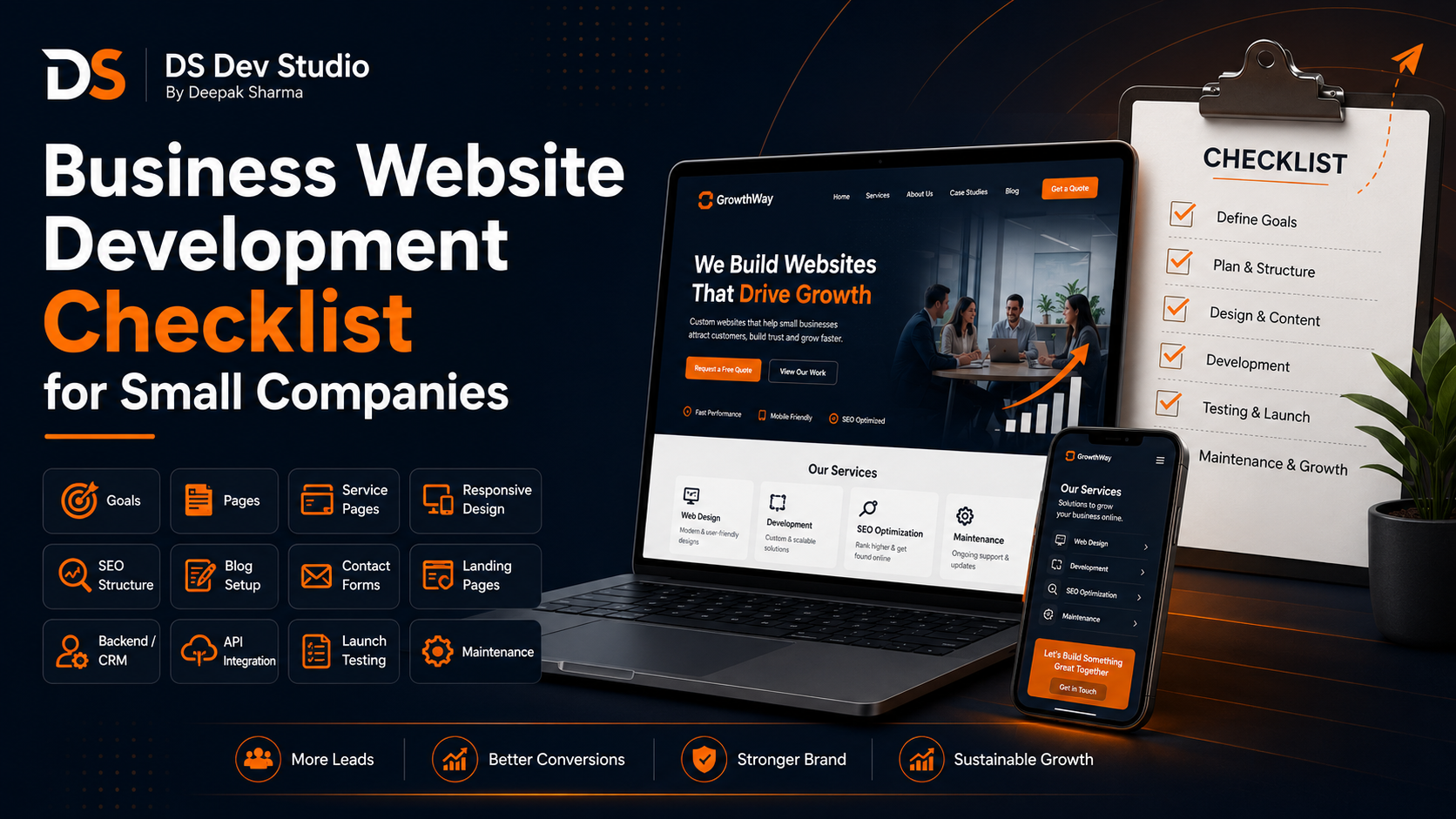
Business Website Development for small companies needs proper planning before design and coding begin. A company website should not only look professional; it should explain services clearly, work smoothly on mobile devices, help visitors trust the business, and guide them toward enquiry. Without a checklist, many small companies miss important details such as service pages, contact forms, SEO-friendly structure, responsive layout, page speed, blog setup, backend needs, and launch testing.
A small company website is often the first serious touchpoint for potential customers. Someone may discover the business through Google Search, LinkedIn, WhatsApp, Instagram, ads, referrals, or offline networking. When that person opens the website, the site should quickly answer important questions: What does the company do? Who does it help? What services are available? Why should the visitor trust the company? How can they contact or request a quote?
Many small companies start website projects without a clear structure. They may have a logo and a few service names, but not a proper page plan, content plan, form workflow, or technology decision. This creates confusion during development. A business website development checklist helps the company and developer stay aligned from planning to launch.
DS Dev Studio by Deepak Sharma helps small companies with business website development, responsive website development, custom website development, React frontend development, WordPress customization, service pages, landing pages, contact forms, PHP backend systems, Laravel development, CodeIgniter projects, API integration, MySQL databases, admin panels, CRM modules, and custom web applications. This guide provides a practical checklist for small companies before starting a business website project.
1. Define the main goal of the website
The first checklist item is the main goal of the website. A business website can support many goals, but one primary goal should guide the project. Some small companies want more enquiries. Some want a professional online presence. Some want to explain services. Some want a portfolio. Some want blogs for online visibility. Some want contact forms connected with a CRM or admin dashboard.
When the goal is clear, the Business Website Developer can plan the right structure. If the goal is lead generation, the website needs strong CTA buttons, simple forms, service pages, landing pages, and enquiry tracking. If the goal is trust building, the website needs testimonials, project examples, about section, process, and case studies. If the goal is content growth, the website needs a blog section and internal linking plan.
- Decide whether the website should generate leads, build trust, explain services, or support campaigns.
- Define the main action visitors should take, such as call, WhatsApp, form submission, quote request, or consultation booking.
- Clarify whether the website needs only public pages or backend features also.
- Write down what a successful website launch means for the company.
2. Identify the target audience
A small company website should be built for the people who will use it. The target audience affects design, content, page structure, CTA text, form fields, and trust signals. A website for local customers should be different from a website for B2B clients, agencies, consultants, students, homeowners, corporate buyers, or startup founders.
For example, local customers may want phone number, WhatsApp, location, service area, reviews, and quick enquiry options. B2B clients may want detailed service pages, case studies, process explanation, company background, and formal contact forms. A Website Developer for Small Business can build a better website when the audience is clearly defined.
- Define who will visit the website.
- List what information visitors need before contacting.
- Identify common questions, doubts, and decision factors.
- Decide whether the tone should be professional, local, technical, simple, or consultant-style.
3. Prepare the required page list
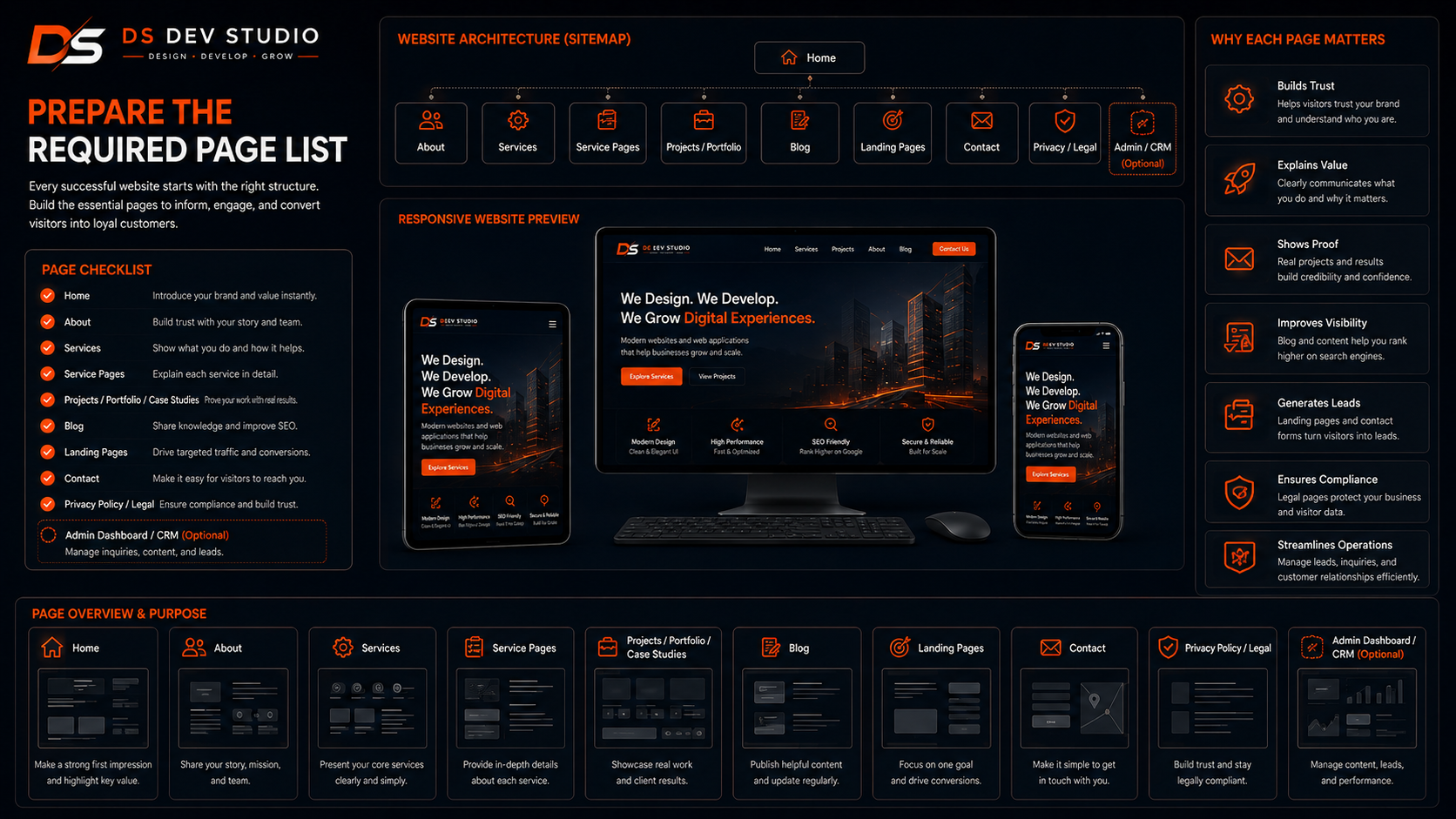
Page planning is one of the most important parts of business website development. A small company should not start with only a vague idea of “make a website.” The company should prepare a clear page list. This helps the Website Developer Freelancer understand the scope and build a proper structure.
A basic small company website may include Home, About, Services, Projects, Blog, and Contact. If the company provides multiple services, each important service should have a dedicated page. If the company runs campaigns, landing pages may be needed. If the website needs lead tracking, CRM or admin dashboard pages may also be required.
- Home page for business overview and main CTA.
- About page for company background and trust building.
- Service pages for each important service.
- Project, portfolio, gallery, or case study page where relevant.
- Blog page for guides, FAQs, and online visibility.
- Landing pages for campaigns or specific offers.
- Contact page with form, phone, email, WhatsApp, and location.
- Privacy policy or basic legal pages if required.
- Admin dashboard or CRM pages if the company needs backend management.
4. Plan the homepage structure
The homepage is the main entry point for many visitors. It should quickly explain what the company does, who it helps, and what action the visitor should take next. A homepage should not be only a large banner and random sections. It should follow a clear business flow.
A strong homepage can include a hero section, service overview, benefits, process, trust signals, project highlights, testimonials, blog previews, FAQs, and contact CTA. On mobile, the homepage should remain easy to scan. A Responsive Website Developer should test all homepage sections across different screen sizes.
- Use a clear headline that explains the company’s main service.
- Add short supporting text that communicates value.
- Place a clear CTA button near the first screen.
- Show main services with links to dedicated service pages.
- Add trust signals such as testimonials, projects, reviews, or experience.
- End the homepage with a strong contact or quote request section.
5. Create dedicated service pages
Service pages are essential for small company websites. A homepage can introduce services, but dedicated service pages explain each offering properly. These pages help visitors understand the service and support SEO Friendly Website Development because each page has a clear topic.
A service page should include what the service is, who needs it, what problems it solves, what is included, how the process works, FAQs, trust points, and CTA buttons. Thin service pages with only a few lines are usually not enough for serious business websites.
For DS Dev Studio, examples of service pages include website development, React frontend development, WordPress customization, landing page development, backend development, API integration, admin panel development, CRM web application development, and custom web application development. Small companies can use the same approach for their own service categories.
6. Plan landing pages for campaigns
Landing pages are useful when a small company wants to promote one specific service, offer, package, or campaign. A landing page is more focused than a homepage. It usually guides visitors toward one action such as requesting a quote, booking a call, submitting an enquiry, or downloading a resource.
A Landing Page Developer can create campaign pages with a clear headline, benefits, trust points, short form, FAQs, and strong CTA. Landing pages can be used for Google Ads, Meta Ads, WhatsApp campaigns, LinkedIn outreach, email campaigns, or local promotions.
- Decide whether campaigns need separate landing pages.
- Keep landing pages focused on one service or offer.
- Use short forms to reduce friction.
- Track source information where possible.
- Connect landing page forms with email, CRM, or admin dashboard.
7. Prepare website content before development
Content preparation is a major checklist item. A developer can create layout and functionality, but the business must provide correct company information. Missing content delays the project and may lead to generic placeholder text. Before development starts, prepare page content as much as possible.
Small companies should prepare business introduction, service descriptions, benefits, process, FAQs, testimonials, project details, contact information, images, and CTA text. The content does not need to be perfect in the first draft, but it should be accurate enough for the developer to build pages around it.
- Business name, short introduction, and detailed about content.
- Service names and service descriptions.
- Benefits of choosing the company.
- Process steps or how the service works.
- Testimonials, reviews, project examples, or proof points.
- Common customer questions and answers.
- Phone, email, WhatsApp, address, and social links.
- CTA text such as Get a Quote, Contact Now, or Book a Call.
8. Prepare branding assets
Branding assets help the developer create a consistent and professional website. Small companies should prepare logo files, brand colors, preferred fonts if available, image style, social media links, and any existing brochure or company profile. If the company does not have a complete brand guide, basic colors and logo files are still useful.
A Custom Website Developer can create a better layout when the brand direction is clear. Consistent colors, headings, buttons, cards, and spacing make the website look more professional. Branding should support readability and trust, not create visual clutter.
9. Plan responsive website development
Responsive Website Development is required for every small company website. Many visitors open websites from mobile phones through Google Search, WhatsApp, Instagram, Facebook, LinkedIn, email, or ads. If the website is difficult to use on mobile, the company can lose enquiries.
A Responsive Website Developer should ensure that text, images, menus, forms, CTA buttons, service cards, tables, blogs, and landing pages work properly on mobile, tablet, laptop, and desktop. Visitors should not need to zoom or scroll sideways.
- Check mobile layout for homepage and service pages.
- Make CTA buttons large enough to tap.
- Keep forms simple on small screens.
- Optimize images for mobile loading.
- Test navigation menu on mobile.
- Check blog readability on phones.
- Ensure landing pages are fast and easy to use.
10. Choose the right website technology
Technology should be selected based on the company’s needs. WordPress is useful when the company wants easy content management, blog publishing, page editing, and dashboard control. A WordPress Developer Freelancer can customize WordPress for small company websites, service pages, blogs, and landing pages.
React is useful when the website needs custom frontend interfaces, reusable components, API-connected forms, dashboards, landing pages, or future web application features. A React Developer Freelancer can build responsive and modern UI components for business websites.
PHP, Laravel, CodeIgniter, MySQL, and APIs are useful when the company needs backend systems, contact form storage, CRM modules, admin panels, user login, reports, or custom web applications. A Full Stack Web Developer Freelancer can help connect frontend and backend requirements.
11. Plan SEO-friendly website structure
SEO-friendly structure should be planned before development starts. An SEO Friendly Website Developer should create clean URLs, proper headings, page titles, meta descriptions, image alt text, internal links, responsive layouts, and fast-loading pages. This helps both users and search engines understand the website.
Small companies should avoid putting every service on one page only. Dedicated service pages, helpful blogs, and internal links create a stronger website structure. SEO-friendly development does not mean keyword stuffing. It means building useful, organized, and technically clean pages.
- Use one clear topic per service page.
- Write useful headings and section titles.
- Create clean and readable URLs.
- Add meta title and meta description for each page.
- Use descriptive alt text for images.
- Add internal links between services, blogs, projects, and contact page.
- Keep pages fast and mobile-friendly.
12. Add a blog section for online visibility
Blogs help small company websites grow online visibility by answering customer questions and supporting service pages. A blog section can publish guides, checklists, FAQs, comparisons, process explanations, mistake-based articles, and service-related topics.
A blog should not be random. It should support the company’s main services and customer needs. For example, a web development business can publish blogs about hiring a website developer, responsive website development, website redesign, service page development, contact forms, API integration, CRM systems, React dashboards, and WordPress customization.
A Business Website Developer should create blog layouts that are readable, responsive, and internally linked with service pages. Blog pages should also include CTA sections so readers can contact after learning.
13. Plan contact forms and enquiry flow
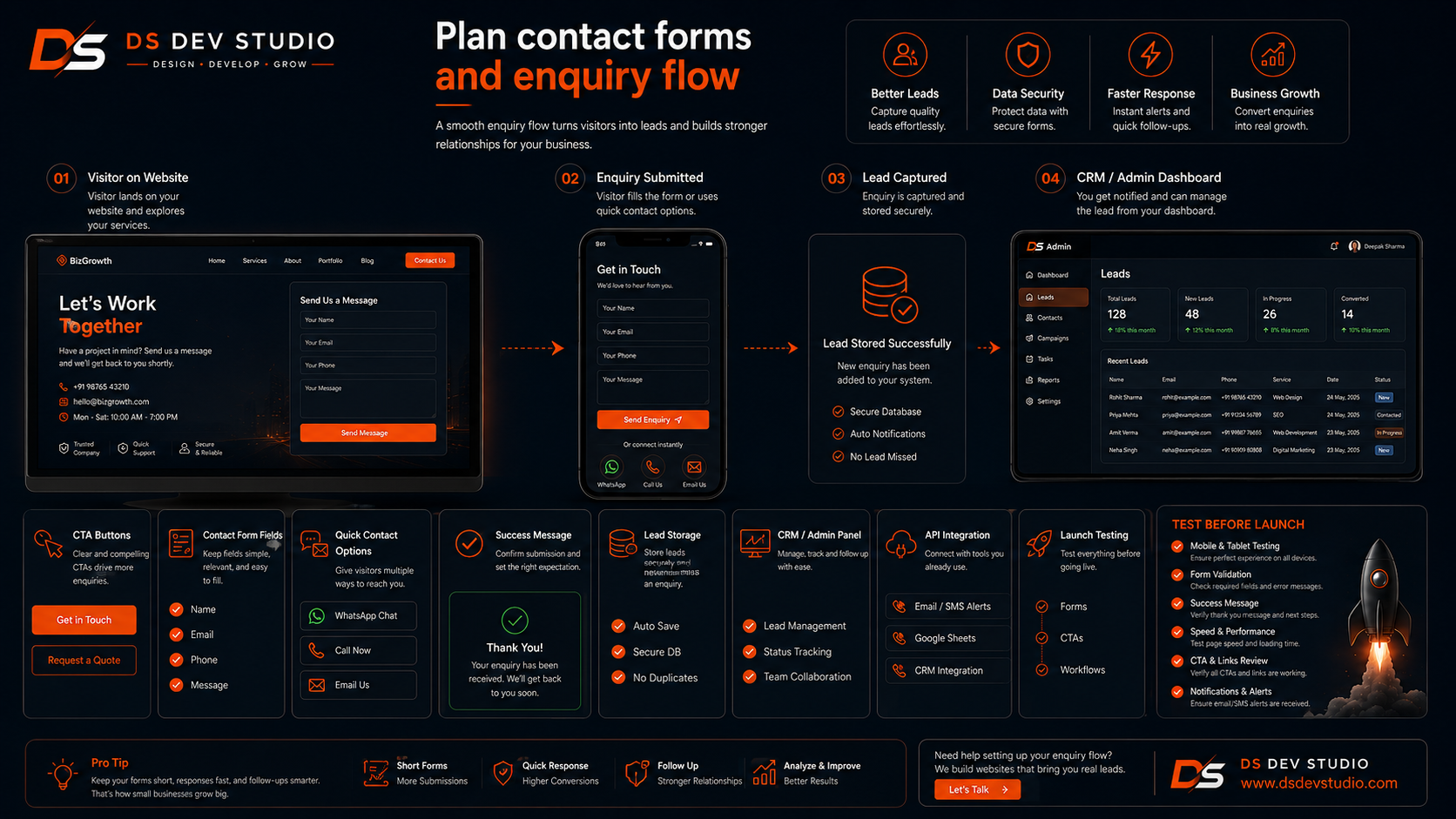
Contact forms are important because they convert website visitors into business enquiries. Small companies should decide what fields are required and where form data should go. A basic form may include name, phone number, email, service requirement, and message. Some companies may need budget, timeline, location, or preferred contact method.
The enquiry flow should also be planned. Should the form send an email? Should the lead be stored in MySQL? Should it go to a CRM? Should it appear in an admin dashboard? Should source information be tracked? These decisions affect backend development and API integration.
- Decide which pages need contact forms.
- Keep forms short and mobile-friendly.
- Add validation for required fields.
- Show clear success and error messages.
- Test email delivery before launch.
- Connect forms with CRM or admin dashboard where needed.
- Track source page, service, or campaign where useful.
14. Decide backend and admin panel needs
Some small company websites only need public pages and contact forms. Others need backend features such as admin panels, CRM systems, user login, lead tracking, reports, file uploads, service management, blog management, or customer records. These needs should be discussed before development starts.
An Admin Panel Developer can build private dashboards for managing website content, leads, services, blogs, testimonials, projects, users, and reports. A CRM Web Application Developer can build systems for lead tracking, customer records, follow-ups, notes, statuses, and source reports.
If backend needs are not planned early, the website may need major changes later. A Backend Developer Freelancer can suggest whether PHP, Laravel, CodeIgniter, MySQL, APIs, or React dashboards are suitable for the project.
15. Plan API integration requirements
API integration is needed when the website must connect with other tools or systems. This can include CRM systems, Google Sheets, email tools, WhatsApp APIs, SMS tools, payment gateways, analytics tools, booking systems, admin dashboards, or custom backend systems.
An API Integration Developer can connect website forms, landing pages, React frontend, PHP backend, Laravel applications, CodeIgniter systems, MySQL databases, and third-party tools. API planning should include validation, error handling, data mapping, source tracking, and testing.
- List all tools that need to connect with the website.
- Define what data should be sent and received.
- Prepare API documentation if using third-party tools.
- Decide whether contact forms should connect with CRM or Google Sheets.
- Plan error handling so leads are not lost silently.
16. Prepare trust signals
Trust signals help visitors feel confident before contacting a small company. A business website should include real proof where possible. Trust signals can include testimonials, reviews, project examples, client logos, certifications, process steps, FAQs, team information, before-after examples, and clear contact details.
Trust signals should be placed naturally across the website. Testimonials can appear after service benefits. Project examples can appear before CTA sections. FAQs can answer doubts near the end of pages. A Custom Website Developer can help place trust elements in a way that supports conversion.
17. Plan website speed and performance
Website speed is important for user experience and conversions. A slow business website can make visitors leave before reading services or submitting a form. Small companies should discuss performance before development begins, not only after launch.
Performance can be improved through optimized images, clean code, reduced unnecessary scripts, proper hosting, plugin control, caching, compressed assets, and efficient backend queries. For WordPress websites, plugin management matters. For React websites, component and asset optimization matters. For backend systems, database and API performance matter.
18. Plan hosting, domain, and deployment
Hosting and deployment should be part of the checklist. A static React website, WordPress website, PHP application, Laravel system, CodeIgniter project, or MySQL-based CRM may need different hosting setups. The company should discuss domain, hosting, SSL, email, database, backup, and deployment access with the developer.
If the company already has hosting, the developer should check whether it supports the required technology. If not, the developer can suggest a suitable option. Deployment should not be left until the final day because DNS, SSL, email, and database setup may need time.
19. Test everything before launch
Testing is essential before launching a business website. A website may look complete but still have broken forms, poor mobile layout, missing links, slow pages, wrong contact details, or backend issues. Testing helps prevent problems after launch.
- Test homepage, about page, service pages, blogs, landing pages, and contact page.
- Check mobile, tablet, laptop, and desktop layouts.
- Submit all contact forms and verify email delivery.
- Check CRM, database, Google Sheets, or admin dashboard integration if used.
- Click phone, WhatsApp, email, CTA, menu, and footer links.
- Check page titles, meta descriptions, headings, URLs, and image alt text.
- Optimize image sizes and loading speed.
- Check spelling, content accuracy, service details, and contact information.
- Verify domain, SSL, hosting, and deployment setup.
20. Plan maintenance and future updates
A business website needs maintenance after launch. Small companies should discuss future updates with the developer. New service pages, blog posts, landing pages, form changes, CRM updates, security improvements, speed optimization, and content changes may be needed later.
Maintenance is especially important for WordPress websites, backend systems, admin panels, CRM modules, and API integrations. A Website Developer Freelancer can provide support for updates, bug fixes, new features, and technical checks. A website should be treated as a growing business asset, not a one-time file.
Common mistakes small companies should avoid
One common mistake is starting website development without a clear page list and content plan. This creates delays and confusion. Another mistake is ignoring mobile users. A website that looks good only on desktop is not enough for modern visitors.
Other mistakes include weak service pages, no CTA buttons, long contact forms, no SEO-friendly structure, slow loading, no internal links, no blog plan, no trust signals, broken forms, poor hosting, no backend planning, no testing, and no maintenance plan. A skilled Business Website Developer can help avoid these problems through better planning and development.
How DS Dev Studio can help
DS Dev Studio by Deepak Sharma can help small companies plan and build business websites with responsive layouts, clear homepage structure, service pages, landing pages, blogs, contact forms, SEO-friendly development, React frontend development, WordPress customization, PHP backend systems, Laravel development, CodeIgniter projects, API integration, MySQL databases, admin panels, CRM modules, and custom web applications.
Deepak Sharma Web Developer work includes HTML, CSS, JavaScript, ReactJS, WordPress, PHP, Laravel, CodeIgniter, MySQL, APIs, frontend development, backend development, responsive UI, business websites, admin dashboards, CRM systems, and full stack web development. This is useful for small companies that need both public website pages and backend business workflows.
If your small company needs business website development, DS Dev Studio can help with planning, design structure, page development, service pages, contact forms, blog setup, backend integration, testing, launch, and future updates. The goal is to build a website that looks professional, works properly on mobile, explains services clearly, and supports real business enquiries.
Conclusion
Business Website Development for small companies should follow a clear checklist. Before building the website, the company should define goals, target audience, required pages, homepage structure, service pages, landing pages, content, branding assets, responsive design needs, technology choice, SEO-friendly structure, blogs, contact forms, backend features, API integrations, trust signals, speed, hosting, testing, and maintenance. A strong small company website should not only look good. It should explain services clearly, work smoothly on mobile, support online visibility, collect enquiries, and connect with business workflows where needed. DS Dev Studio by Deepak Sharma can help small companies with responsive website development, React frontend development, WordPress customization, service pages, landing pages, contact forms, PHP backend systems, Laravel and CodeIgniter projects, MySQL databases, API integration, admin panels, CRM systems, and custom web applications. With the right checklist and development process, a small company website can become a stronger digital asset for trust, visibility, enquiries, and long-term growth.
Useful internal links
Frequently asked questions
Can I hire Deepak Sharma for Business Website Development?+
Yes. You can hire Deepak Sharma for business website development, responsive websites, service pages, landing pages, blogs, contact forms, React frontend development, WordPress customization, backend systems, API integration, admin panels, CRM modules, and custom web applications.
What should a small company prepare before website development?+
A small company should prepare its website goal, target audience, page list, service descriptions, logo, brand colors, images, testimonials, FAQs, contact details, form fields, technology preferences, and future feature requirements.
Why are service pages important for small company websites?+
Service pages are important because they explain each service clearly, help visitors understand the offer, support SEO-friendly website structure, improve internal linking, and guide users toward enquiry.
Should a small company choose WordPress or React?+
WordPress is useful when easy content management and blog publishing are important. React is useful for custom frontend interfaces, reusable components, landing pages, dashboards, and API-connected features. The right choice depends on the business requirement.
Can DS Dev Studio connect website forms with CRM or admin dashboard?+
Yes. DS Dev Studio can connect website forms with email notifications, MySQL databases, Google Sheets, CRM systems, admin dashboards, or custom APIs for better lead tracking and enquiry management.