CodeIgniter CRM Developer Guide for PHP Business Applications
A practical guide for businesses that want to hire a CodeIgniter CRM Developer for PHP business applications, CRM systems, admin panels, lead management, MySQL databases, APIs, and backend workflows.

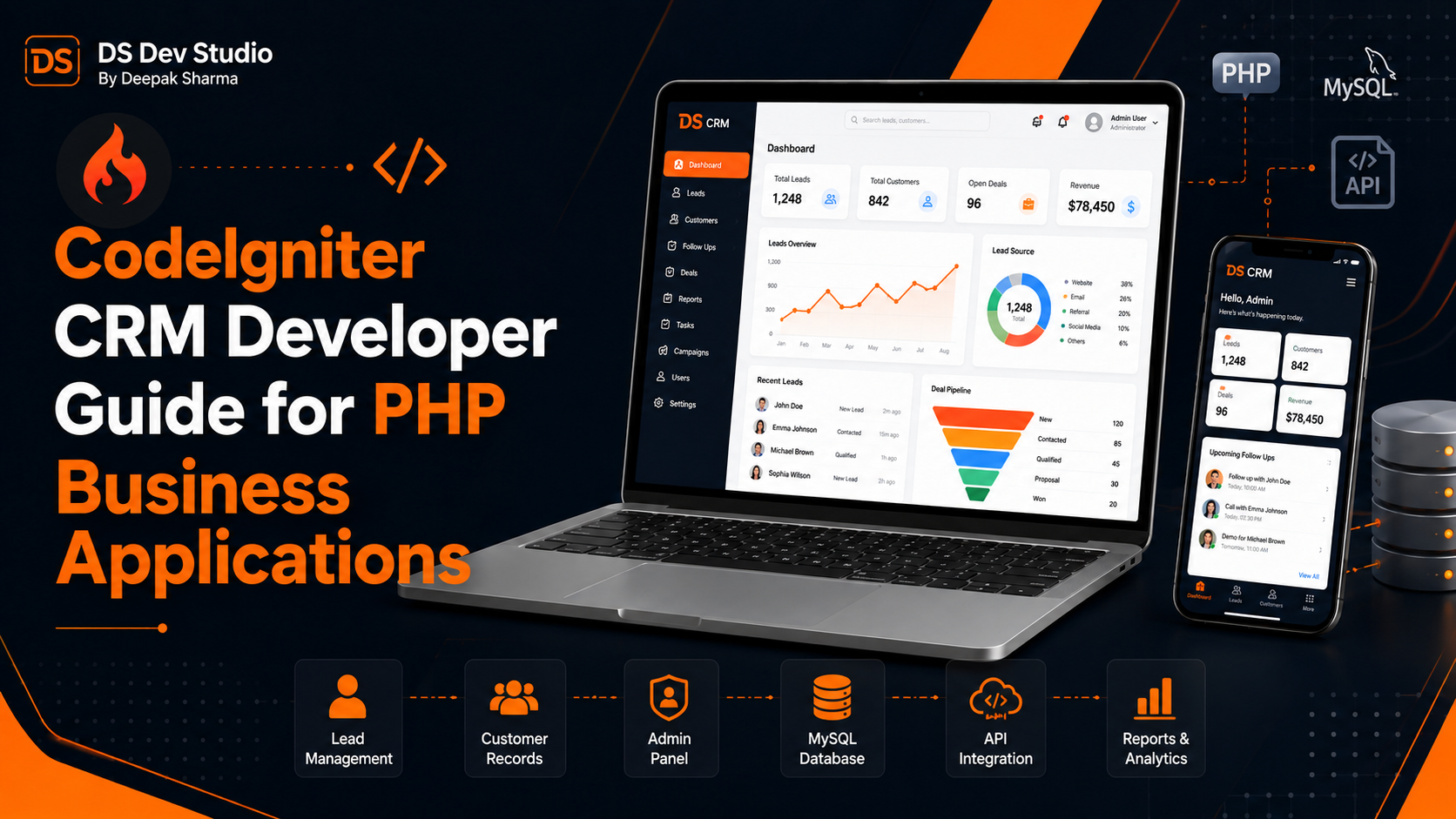
A CodeIgniter CRM Developer helps businesses build, maintain, improve, and customize PHP business applications that manage leads, customers, follow-ups, users, reports, services, enquiries, and daily workflows. Many businesses start with a simple website or spreadsheet-based process, but as enquiries grow, they need a structured CRM system where data can be stored, searched, filtered, updated, and tracked properly.
CodeIgniter is a lightweight PHP framework that is useful for building practical business applications, admin panels, CRM systems, internal dashboards, and database-driven tools. It is especially helpful for businesses that already have an existing PHP CRM system built in CodeIgniter and want improvements, bug fixes, new modules, API integration, database cleanup, or frontend updates without rebuilding everything from zero.
A PHP business application is different from a normal static website. A static website mainly displays information, while a business application stores and processes data. For example, a CRM system can store leads, assign users, track follow-ups, update customer status, add notes, filter records, generate reports, and connect with website forms or third-party APIs. A skilled CodeIgniter Developer Freelancer can build these workflows based on the real business process.
DS Dev Studio by Deepak Sharma helps businesses with CodeIgniter CRM development, PHP backend development, MySQL database systems, admin panels, CRM web applications, API integration, Laravel systems, React frontend development, responsive business websites, WordPress customization, and custom web applications. This guide explains how a CodeIgniter CRM Developer can support PHP business applications and what businesses should prepare before starting such a project.
What does a CodeIgniter CRM Developer do?
A CodeIgniter CRM Developer builds and maintains CRM systems using CodeIgniter and PHP. The work may include lead management modules, customer records, user roles, login systems, dashboards, reports, follow-up tracking, notes, data tables, filters, forms, API endpoints, MySQL database planning, and backend workflow development.
For existing CRM systems, the developer may fix bugs, improve speed, clean database queries, add new fields, create new modules, update forms, improve user permissions, connect APIs, redesign dashboard screens, or modernize old PHP code. Many businesses already have working CodeIgniter systems but need practical improvements as business needs change.
A good Backend Developer Freelancer should understand business logic before changing the code. CRM development is not only about adding screens. The developer should understand how leads enter the system, who handles them, what statuses are used, how follow-ups are tracked, what reports are needed, and which actions users should or should not perform.
Why CodeIgniter is useful for PHP business applications
CodeIgniter is useful for PHP business applications because it is lightweight, fast, and practical for custom backend systems. It does not force unnecessary complexity, which makes it suitable for CRM tools, internal admin panels, lead management systems, service management dashboards, and small to medium-sized business applications.
Many existing PHP systems were built in CodeIgniter because it is easier to understand and maintain compared with fully custom unstructured PHP code. It gives developers a framework structure with controllers, models, views, routing, database handling, helpers, libraries, and configuration files. This structure makes the application easier to improve over time.
For businesses, CodeIgniter can be a practical choice when the requirement is clear and the system needs custom logic. A CodeIgniter Developer Freelancer can build modules around real workflows without adding unnecessary features. This makes CodeIgniter useful for internal business applications where speed, simplicity, and maintainability matter.
What is a CRM web application?
A CRM web application is a system that helps businesses manage customer relationships, leads, enquiries, follow-ups, notes, communication status, and reports. CRM stands for customer relationship management. In simple terms, it helps a business track who contacted them, what they need, who is handling the enquiry, and what should happen next.
A basic CRM may include lead capture, lead listing, customer records, status updates, follow-up dates, notes, assigned users, and simple reports. A more advanced CRM may include user roles, dashboards, activity logs, email notifications, source tracking, API integration, file uploads, customer history, and team performance reports.
A CRM Web Application Developer builds the system based on how the business works. A real estate business, coaching institute, web development agency, service company, clinic, consultant, and local business may all need different CRM workflows. The system should match the business process, not force every business into the same structure.
Common CodeIgniter CRM modules businesses need
A CodeIgniter CRM system is usually divided into modules. Each module manages one part of the workflow. For example, a lead module stores new enquiries. A customer module stores converted customers. A follow-up module tracks communication. A report module shows business performance. A user module manages access.
Modules make the CRM easier to use because users can manage each type of data in a structured way. Instead of handling everything through emails or spreadsheets, the business can open the CRM dashboard and see records in one place.
- Lead management module for new enquiries and service requests.
- Customer management module for converted leads and client records.
- Follow-up module for calls, messages, reminders, and next actions.
- User management module with roles and permissions.
- Service management module for business offerings.
- Source tracking module for website, ads, referrals, social media, and calls.
- Notes and activity log module for customer communication history.
- Report module for leads, conversions, users, services, and dates.
- Settings module for business details and system preferences.
- API module for website forms, React frontend, or external tools.
Lead management in CodeIgniter CRM systems
Lead management is one of the most important parts of a CRM system. A lead is a person or business that has shown interest in your service. Leads may come from website forms, phone calls, WhatsApp, ads, referrals, emails, landing pages, or social media campaigns. A CodeIgniter CRM Developer can build a lead module where these enquiries are stored and managed properly.
A lead record may include name, phone number, email, service requirement, message, source, location, status, assigned user, follow-up date, budget, timeline, and notes. These fields depend on the business. A small business may need only basic fields, while a growing company may need detailed tracking.
Good lead management helps businesses avoid missed enquiries. Instead of searching through emails or WhatsApp messages, the team can check the CRM dashboard, update lead status, add notes, assign responsibility, and track follow-ups. This makes the sales or enquiry process more organized.
Customer management in PHP business applications
Customer management helps businesses store information about people or companies they already serve. A customer record may include contact details, service history, notes, documents, project status, payment status, communication history, and support requests. A PHP business application can keep this information organized in one place.
In many businesses, customer information is scattered across phone contacts, spreadsheets, emails, and chat apps. This becomes difficult as the business grows. A CodeIgniter CRM system can centralize customer data so team members can see the right information when needed.
A CodeIgniter Developer Freelancer can build customer profiles, searchable customer lists, filters, status labels, notes, file uploads, and related records. This improves daily operations and helps the business maintain better customer communication.
User roles and permissions in CodeIgniter CRM
User roles and permissions are important because not every team member should access every CRM feature. An admin may need full access, while a staff member may only need assigned leads. A manager may need reports but not system settings. A content editor may only need blog or service management access.
A CodeIgniter CRM Developer can create role-based access so users only see the modules and actions relevant to them. Common roles may include Super Admin, Admin, Manager, Sales User, Support User, Editor, and Viewer. The exact roles should match the business workflow.
Permissions help protect data and reduce mistakes. For example, a staff user may update lead notes but not delete leads. A manager may view team reports but not change system configuration. Proper access control makes the CRM safer and easier to manage.
MySQL database planning for CodeIgniter CRM
MySQL database planning is the foundation of a CodeIgniter CRM system. If the database is planned poorly, the CRM may become slow, confusing, or difficult to expand. A MySQL Database Developer should plan tables, fields, relationships, indexes, and data rules according to the business workflow.
For example, a CRM may need tables for users, roles, leads, customers, services, lead sources, statuses, notes, follow-ups, files, activities, and reports. These tables should be connected properly. A lead may belong to a service, be assigned to a user, have many notes, and have many follow-up records.
Good database planning supports fast search, filtering, reporting, and future development. If the business later needs new fields, reports, or integrations, a clean database structure makes updates easier.
Forms and validation in CodeIgniter business applications
Forms are used throughout CRM and PHP business applications. Users may add leads, edit customers, create follow-ups, upload files, update statuses, create reports, or manage services. These forms should be simple, clear, and properly validated.
Validation prevents wrong data from entering the system. For example, email fields should follow email format, required fields should not be empty, phone numbers should be checked where needed, dates should be valid, and duplicate records should be handled carefully. Good validation improves data quality.
A PHP Developer Freelancer can build form validation in CodeIgniter using framework features and custom logic. The system should also show clear error messages so users know what needs to be fixed. A CRM should be easy for business users, not only technical people.
Data tables, search, filters, and pagination
CRM systems often contain large amounts of data. Without search, filters, and pagination, users may struggle to find records. A CodeIgniter CRM Developer can build data tables that allow users to search leads, filter by status, sort records, view date ranges, and open details quickly.
For example, a lead table can include filters for service, source, assigned user, status, date, and follow-up due date. A customer table can include filters for location, service type, active status, or assigned manager. These filters help users work faster.
Pagination is also important for performance. Loading thousands of records at once can slow down the CRM. A Backend Developer Freelancer should use efficient queries, indexes, and pagination so the system remains usable as data grows.
Dashboard reports in CodeIgniter CRM
Dashboard reports help business owners and managers understand what is happening in the CRM. A dashboard can show total leads, new enquiries, pending follow-ups, converted customers, service-wise leads, source-wise leads, user performance, monthly records, and recent activities.
Reports should answer real business questions. How many leads came this month? Which source is bringing enquiries? Which service is most requested? Which leads are pending follow-up? Which team member is handling more records? These insights can help improve decision-making.
A CodeIgniter Developer Freelancer can build reports using MySQL queries, filters, date ranges, charts, summary cards, and export options where needed. Reports should be accurate, fast, and easy to understand.
API integration for CodeIgniter CRM systems
API integration helps a CodeIgniter CRM connect with websites, landing pages, React frontends, mobile apps, and third-party tools. An API allows data to move between systems. For example, a website enquiry form can send lead data directly into the CRM using an API.
An API Integration Developer can connect CodeIgniter with email tools, Google Sheets, SMS platforms, WhatsApp APIs, payment gateways, analytics tools, or external CRM systems. These integrations reduce manual work and improve response time.
API integration should include validation, authentication, error handling, and clear response messages. If an API fails, the system should handle the error properly instead of silently losing data. This is important because CRM data is valuable for the business.
CodeIgniter CRM with React frontend
CodeIgniter can work with React when a business needs a modern frontend interface. CodeIgniter can handle backend logic, database operations, APIs, authentication, and business rules. React can handle the user interface, dashboard cards, forms, tables, filters, and interactive components.
This setup is useful when an existing CodeIgniter backend needs a better frontend experience. A React Developer Freelancer can create a modern UI while the CodeIgniter backend continues to manage data. This can be a practical modernization approach without replacing the entire system.
For example, a CodeIgniter CRM can provide lead records through APIs. React can display them in a clean dashboard with filters and status buttons. When a user updates a lead, React sends the update to the CodeIgniter backend, and the backend saves it in MySQL.
Improving existing CodeIgniter CRM systems
Many businesses already have existing CodeIgniter CRM systems. These systems may still work, but they may need improvements. Common issues include slow loading, outdated UI, messy database queries, missing filters, weak permissions, broken forms, poor reports, duplicate data, and limited mobile usability.
A CodeIgniter Developer Freelancer can review the existing system and improve it step by step. The developer may fix bugs, optimize queries, clean code, add new modules, update forms, improve dashboard layout, add reports, improve API connections, or modernize parts of the frontend.
Improving an existing system can be more practical than rebuilding everything from zero. However, if the old CRM is very poorly structured, a rebuild may be better. A developer should review the code, database, and workflow before recommending the right approach.
CodeIgniter CRM security basics
Security is important in CRM systems because they store business and customer data. A CodeIgniter CRM Developer should protect login pages, user sessions, forms, APIs, file uploads, and database operations. Weak security can expose important records or allow unauthorized access.
Basic security practices include password hashing, session protection, input validation, output escaping, CSRF protection, role-based permissions, secure file uploads, and safe database queries. CodeIgniter provides features that can help with these tasks when used correctly.
Security should be planned from the beginning. Every user should not have full admin access. Sensitive data should be protected. Forms should not accept unsafe input. APIs should not expose data without proper checks.
CodeIgniter CRM performance optimization
Performance matters because CRM systems are used regularly by business teams. If dashboards load slowly, tables freeze, or reports take too long, users may stop using the CRM properly. A good CodeIgniter CRM should remain fast and practical as data grows.
Performance can be improved through optimized MySQL queries, proper indexing, pagination, caching where useful, clean controller logic, efficient model methods, and reduced unnecessary scripts. Large reports should be handled carefully so they do not slow down the entire system.
A MySQL Database Developer should check whether tables have proper indexes and whether queries are pulling only the data needed. Small database improvements can make a big difference in CRM speed.
CodeIgniter CRM for website enquiry management
A CodeIgniter CRM can connect with a business website to manage enquiries. Instead of receiving form submissions only by email, the CRM can store every enquiry in a database. The business can then track source, status, assigned user, follow-up, and notes from the admin panel.
This is useful for businesses that receive leads from multiple pages such as homepage, service pages, landing pages, blog CTAs, and contact forms. Each form can send data to the CRM with source information. This helps the business understand which pages are generating enquiries.
A Business Website Developer and CRM Web Application Developer can work together to connect the public website with the backend CRM. This creates a more complete digital system for lead generation and follow-up management.
When should a business hire a CodeIgniter CRM Developer?
A business should hire a CodeIgniter CRM Developer when it needs a custom PHP CRM system, improvements to an existing CodeIgniter application, lead management, customer records, dashboard reports, user roles, API integration, MySQL database fixes, or backend workflow automation.
You should also hire CodeIgniter support when your current CRM is slow, outdated, missing important features, difficult to use, or not matching your business process. A developer can review the system and suggest whether to improve, restructure, or rebuild specific parts.
- Hire a CodeIgniter developer when you need a PHP CRM system.
- Hire one when your existing CodeIgniter CRM needs bug fixes or improvements.
- Hire one when leads and customer records need proper tracking.
- Hire one when your business needs dashboard reports and filters.
- Hire one when users need roles, permissions, and secure access.
- Hire one when website forms need to connect with a CRM database.
- Hire one when APIs are needed for React frontend or third-party tools.
- Hire one when your PHP business application needs long-term maintenance.
What to prepare before starting a CodeIgniter CRM project
Before starting a CodeIgniter CRM project, prepare your business workflow clearly. Explain how leads come in, who handles them, what statuses are used, what follow-up process is followed, what reports are needed, and what user roles should exist. Clear workflow planning helps the developer build the right system.
If you already have an existing CRM, prepare a list of issues and required changes. This may include slow pages, broken forms, missing filters, wrong reports, duplicate data, poor UI, missing permissions, API problems, or database errors. Share sample screenshots and explain the problem clearly.
- List required modules such as leads, customers, follow-ups, users, services, and reports.
- Define fields for each module such as name, phone, email, service, status, and source.
- Prepare user roles such as admin, manager, staff, editor, and viewer.
- Explain workflow steps such as lead assignment, follow-up, conversion, or closure.
- Share reporting needs such as date filters, status reports, and source reports.
- Clarify API needs for website forms, React frontend, Google Sheets, or third-party tools.
- Prepare existing CRM issues if the project is an improvement task.
- Discuss hosting, deployment, backup, security, maintenance, and future updates.
What to check before hiring a CodeIgniter developer
Before hiring a CodeIgniter developer, check whether they understand PHP, CodeIgniter structure, MySQL databases, CRUD modules, admin panels, authentication, user roles, forms, validation, APIs, reports, and CRM workflows. CRM development requires backend logic and business understanding, not only page design.
Ask about experience with existing PHP systems. Improving an old CodeIgniter CRM often requires reading existing code, understanding database structure, finding bugs, and making changes carefully. The developer should not break working features while adding new ones.
Also discuss maintenance. CRM systems usually need ongoing updates, new fields, report changes, user role changes, bug fixes, and API improvements. A CodeIgniter Developer Freelancer should write clean code and keep the system easier to maintain.
Common CodeIgniter CRM mistakes to avoid
One common mistake is building a CRM without understanding the workflow. If statuses, fields, users, and reports are not planned properly, the CRM may become confusing. Workflow planning should happen before coding starts.
Another mistake is poor database design. If tables are not connected properly or queries are not optimized, the CRM can become slow and difficult to expand. MySQL database planning is important from the beginning.
Other mistakes include weak validation, no user permissions, slow tables, missing search filters, unclear error messages, poor API handling, unsafe file uploads, no backup plan, no activity logs, and no maintenance plan. A skilled CodeIgniter CRM Developer can help avoid these problems.
How DS Dev Studio can help
DS Dev Studio by Deepak Sharma can help businesses with CodeIgniter CRM development, PHP business applications, existing CodeIgniter system improvements, MySQL database fixes, admin panels, lead management dashboards, CRM modules, API integration, backend workflows, and custom web applications.
Deepak Sharma Web Developer work includes CodeIgniter, PHP, Laravel, MySQL, APIs, ReactJS, HTML, CSS, JavaScript, responsive UI, WordPress customization, backend development, frontend development, admin panels, CRM systems, and full stack web development. This is useful for businesses that need both existing PHP application support and future frontend or backend upgrades.
If you want to hire a CodeIgniter CRM Developer for PHP business applications, DS Dev Studio can help review your existing system, plan CRM modules, design MySQL tables, fix backend issues, add user roles, build reports, connect APIs, improve dashboard usability, and prepare the application for long-term business use.
Conclusion
A CodeIgniter CRM Developer can help businesses build and improve PHP business applications that manage leads, customers, users, follow-ups, reports, APIs, and database-driven workflows. CodeIgniter is useful for practical CRM systems because it is lightweight, flexible, and suitable for custom PHP backend development. A strong CodeIgniter CRM should include clear modules, proper MySQL database planning, user roles, validation, searchable tables, filters, reports, secure forms, API integration, and practical dashboard design. DS Dev Studio by Deepak Sharma can help businesses with CodeIgniter CRM development, PHP backend systems, MySQL database fixes, API integration, existing CRM improvements, admin panels, React frontend support, and custom web applications. With the right CodeIgniter development approach, a PHP business application can become more organized, reliable, and useful for long-term business operations.
Useful internal links
Frequently asked questions
Can I hire Deepak Sharma as a CodeIgniter CRM Developer?+
Yes. You can hire Deepak Sharma for CodeIgniter CRM development, PHP business applications, existing CRM improvements, admin panels, MySQL databases, API integration, reports, backend workflows, and custom web applications.
What does a CodeIgniter CRM Developer build?+
A CodeIgniter CRM Developer builds PHP-based CRM systems with lead management, customer records, follow-ups, user roles, dashboards, reports, forms, APIs, MySQL databases, and backend workflows.
Is CodeIgniter suitable for CRM systems?+
Yes. CodeIgniter is suitable for CRM systems when the business needs a lightweight PHP framework for custom backend workflows, admin panels, MySQL database management, forms, reports, and API connections.
Can DS Dev Studio improve an existing CodeIgniter CRM?+
Yes. DS Dev Studio can improve existing CodeIgniter CRM systems by fixing bugs, optimizing database queries, adding modules, improving reports, updating forms, connecting APIs, and improving dashboard usability.
Can CodeIgniter CRM connect with React frontend?+
Yes. A CodeIgniter backend can provide APIs for a React frontend. React can handle the user interface, while CodeIgniter manages backend logic, database operations, authentication, validation, and CRM workflows.