Contact Form Development Guide for Business Websites
A practical guide for businesses that need contact form development for websites, landing pages, service pages, CRM systems, admin dashboards, API integration, MySQL databases, and better lead management.


Contact Form Development is one of the most important parts of a business website because it helps turn visitors into real enquiries. A website can have good design, service pages, blogs, and landing pages, but if visitors cannot contact the business easily, the website may fail to support lead generation. A contact form gives users a simple way to share their name, phone number, email, service requirement, and message without leaving the website.
For small businesses, service providers, consultants, agencies, freelancers, local businesses, and companies, contact forms are not only design elements. They are business tools. A form can collect enquiries, send email notifications, store lead details, connect with CRM systems, update admin dashboards, and help teams follow up properly. A well-built form can reduce missed leads and make the website more useful.
Many business websites use basic forms, but not all forms are planned correctly. Some forms are too long, some do not work on mobile, some fail silently, some do not validate data, some send messages to the wrong email, and some do not store leads anywhere. These issues can damage customer experience and business follow-up. A Backend Developer Freelancer or API Integration Developer can build a reliable form workflow that supports real business needs.
DS Dev Studio by Deepak Sharma helps businesses with contact form development, responsive website development, service pages, landing pages, React frontend development, WordPress customization, PHP backend systems, Laravel development, CodeIgniter projects, API integration, MySQL databases, admin panels, CRM modules, and custom web applications. This guide explains how contact form development works for business websites and what businesses should plan before adding forms.
What is Contact Form Development?
Contact Form Development means designing and building website forms that allow users to send information to a business. A contact form may appear on a contact page, homepage, service page, landing page, blog CTA section, quote request page, booking page, or consultation page. The form collects user details and sends them to the business through a backend process.
A simple form may only send an email. A more advanced form can validate user input, prevent spam, store data in a MySQL database, create a CRM lead, send an email notification, trigger an API workflow, update an admin dashboard, and show a confirmation message to the visitor. The right form setup depends on the business requirement.
A Website Developer Freelancer should build contact forms with both frontend and backend in mind. The frontend form should be easy to use, mobile-friendly, and clear. The backend should validate data, handle errors, send notifications, and store or forward enquiries properly. Both parts are important for a reliable form.
Why contact forms are important for business websites
Contact forms are important because they create a direct enquiry path for visitors. A visitor may read a service page, check a blog, view projects, and then decide to contact. If the contact process is difficult, the visitor may leave. A clear form makes the next step simple.
Forms also help businesses collect structured information. Instead of receiving incomplete messages, a form can ask for specific fields such as name, phone number, email, service requirement, timeline, budget, and message. This helps the business understand the enquiry before replying.
Contact forms also support tracking. If forms are connected with a CRM or admin dashboard, the business can see where leads came from, which service was requested, who followed up, and what status the lead has. This is more organized than depending only on emails or WhatsApp messages.
Common types of contact forms for business websites
Different business pages need different types of forms. A general contact page form may collect basic information. A service page form may ask which service the user needs. A landing page form may focus on quote requests. A booking form may ask for preferred date and time. A CRM-connected form may collect source and status data automatically.
A Business Website Developer should not use the same form structure everywhere without thinking. The form should match the page goal. A short blog CTA form may need only name, phone, and message. A detailed project enquiry form may need budget, timeline, website type, and service requirement.
- General contact form for basic enquiries.
- Service page enquiry form for specific services.
- Landing page lead form for campaigns and offers.
- Quote request form for project-based businesses.
- Consultation booking form for calls and appointments.
- Support request form for existing customers.
- Newsletter or blog enquiry form for content pages.
- CRM-connected lead form for structured lead tracking.
- Admin dashboard form for internal data entry.
- Multi-step form for detailed project requirements.
Important fields in a business website contact form
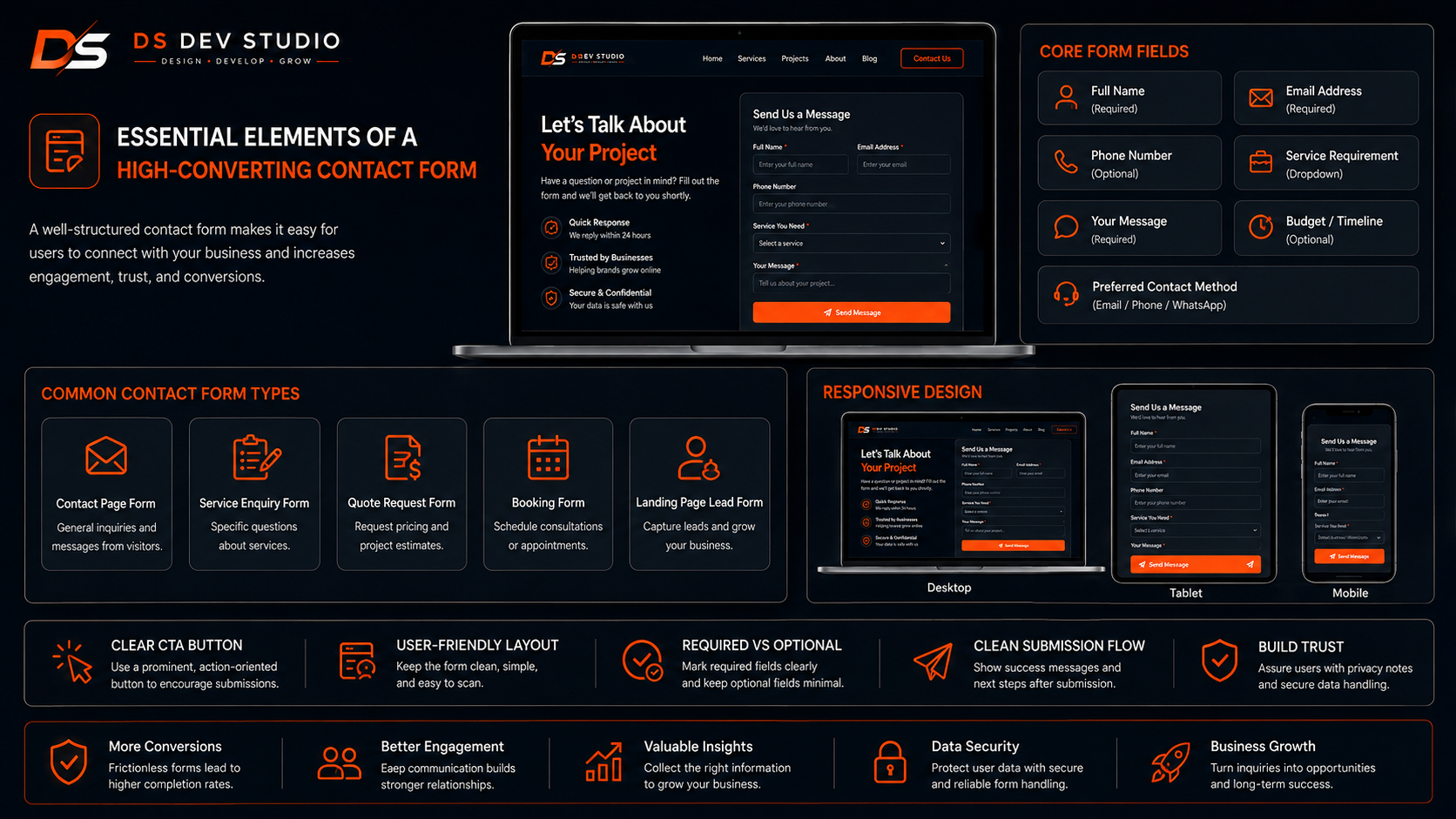
The form fields should match the information the business needs for first response. Asking too little can create incomplete enquiries. Asking too much can reduce submissions. The goal is to collect enough information without making the form difficult.
A basic business contact form usually includes name, phone number, email, service requirement, and message. Some businesses may also need city, company name, budget, timeline, preferred contact method, or file upload. A form for website development may ask about website type, current website link, required pages, and project goal.
A Custom Website Developer should help decide which fields are required and which are optional. Required fields should be limited to the most important information. Optional fields can be added when they help the business understand the enquiry better.
- Name for identifying the visitor.
- Phone number for quick follow-up.
- Email address for written communication.
- Service requirement to understand the enquiry type.
- Message field for detailed information.
- Company name where B2B context is useful.
- Budget or timeline where project planning needs it.
- Location when local service area matters.
- Preferred contact method such as call, email, or WhatsApp.
- Hidden source field for campaign or page tracking.
Frontend design for contact forms
The frontend design of a contact form affects how many users complete it. A form should look clean, simple, and trustworthy. Field labels should be clear. Placeholder text should not replace important labels. Buttons should be visible. Error messages should be easy to understand.
A form should also match the website design. It should use consistent colors, typography, spacing, and button style. A form that looks different from the rest of the website can feel unprofessional. A Frontend Developer Freelancer can design forms that fit naturally inside service pages, landing pages, and contact pages.
Good form design also reduces friction. Users should know what information is required, how to submit, and what happens after submission. A clear submit button such as “Send Enquiry,” “Request Quote,” or “Book Consultation” is better than a vague button like “Submit.”
Responsive contact form development
Responsive Website Development is important for contact forms because many users submit enquiries from mobile devices. A form that works on desktop but breaks on mobile can reduce leads. On mobile, fields should be easy to tap, text should be readable, and the submit button should be clearly visible.
Mobile forms should avoid unnecessary complexity. If the form has too many columns on desktop, it should stack properly on mobile. Field spacing should be comfortable. Dropdowns, radio buttons, checkboxes, and file upload fields should be easy to use on small screens.
A Responsive Website Developer should test the form on different screen sizes before launch. Contact forms should be tested on homepage, service pages, landing pages, blogs, and contact pages where they appear.
Form validation for better data quality
Form validation checks whether submitted data is correct before it is accepted. Validation improves data quality and prevents incomplete or incorrect enquiries. For example, a required name field should not be empty, an email field should follow email format, and a phone field should not contain invalid characters.
Validation can happen on the frontend and backend. Frontend validation gives quick feedback to users. Backend validation protects the system and confirms the data before storage or email sending. Both are important. A form should not depend only on frontend validation because users or bots can bypass it.
A Backend Developer Freelancer can create validation rules using PHP, Laravel, CodeIgniter, or custom API logic. Good validation helps prevent wrong data, duplicate records, spam submissions, and broken workflows.
Success messages and error messages
Success and error messages are important for user experience. After submitting a form, users should know whether the enquiry was sent successfully. If something fails, they should know what to fix or what went wrong. A form that gives no response after submission creates confusion.
A good success message can say that the enquiry was received and the business will respond soon. A good error message should be specific, such as “Please enter a valid email address” or “Phone number is required.” Generic error messages can frustrate users.
For API-connected forms, the frontend should handle loading states, success responses, validation errors, and server errors. A React Developer Freelancer can build smooth form interactions where users see clear feedback during and after submission.
Contact form backend development
The backend is the part that receives and processes form submissions. When a user submits a form, the backend can validate the data, send an email, store the record in a database, create a CRM lead, trigger an API call, or return a response to the frontend. Without backend logic, a form is only a visual element.
A PHP Developer Freelancer can build backend form handling using PHP, Laravel, CodeIgniter, or custom APIs. The backend should be secure, reliable, and tested. It should not accept unsafe input or lose enquiries silently.
For business websites, backend form development can include email notifications, MySQL storage, CRM integration, admin dashboard display, lead source tracking, spam protection, and error logging. These features make the form more useful for business operations.
Email notifications for contact forms
Email notifications are one of the most common contact form features. When a visitor submits a form, the business receives an email with enquiry details. This helps the business respond quickly. The email should include all important fields clearly, such as name, phone, email, service, message, source, and page URL where relevant.
However, email alone may not be enough for businesses that receive many enquiries. Emails can be missed, filtered, deleted, or forgotten. That is why many businesses also store form submissions in a database or CRM system. Email notifications are useful, but they should not be the only lead tracking method for growing businesses.
A Backend Developer Freelancer can set up reliable email delivery and format enquiry emails professionally. The form should also be tested to make sure emails are reaching the correct address.
Saving form submissions in MySQL database
Saving form submissions in a MySQL database helps businesses track leads more reliably. Instead of depending only on emails, every enquiry can be stored as a record. This allows the business to search, filter, export, update, and report on enquiries later.
A MySQL Database Developer can create tables for form submissions, leads, services, sources, statuses, assigned users, notes, and follow-ups. A basic form table may store name, phone, email, service, message, source, page URL, status, and submission date.
Database storage is useful when the website connects with admin panels or CRM systems. It creates a foundation for lead tracking and customer record management.
CRM integration for contact forms
CRM integration connects contact forms with a customer relationship management system. When a user submits a form, the CRM can create a lead record automatically. The business can then update status, assign users, add notes, set follow-up dates, and track progress.
This is useful for businesses that receive enquiries from multiple pages and campaigns. A CRM helps prevent missed follow-ups. It also helps business owners understand which pages, services, and sources are generating leads.
A CRM Web Application Developer can connect contact forms with custom CRM systems using PHP, Laravel, CodeIgniter, MySQL, and APIs. A form can become part of a complete lead management workflow instead of only sending messages.
Admin dashboard for form submissions
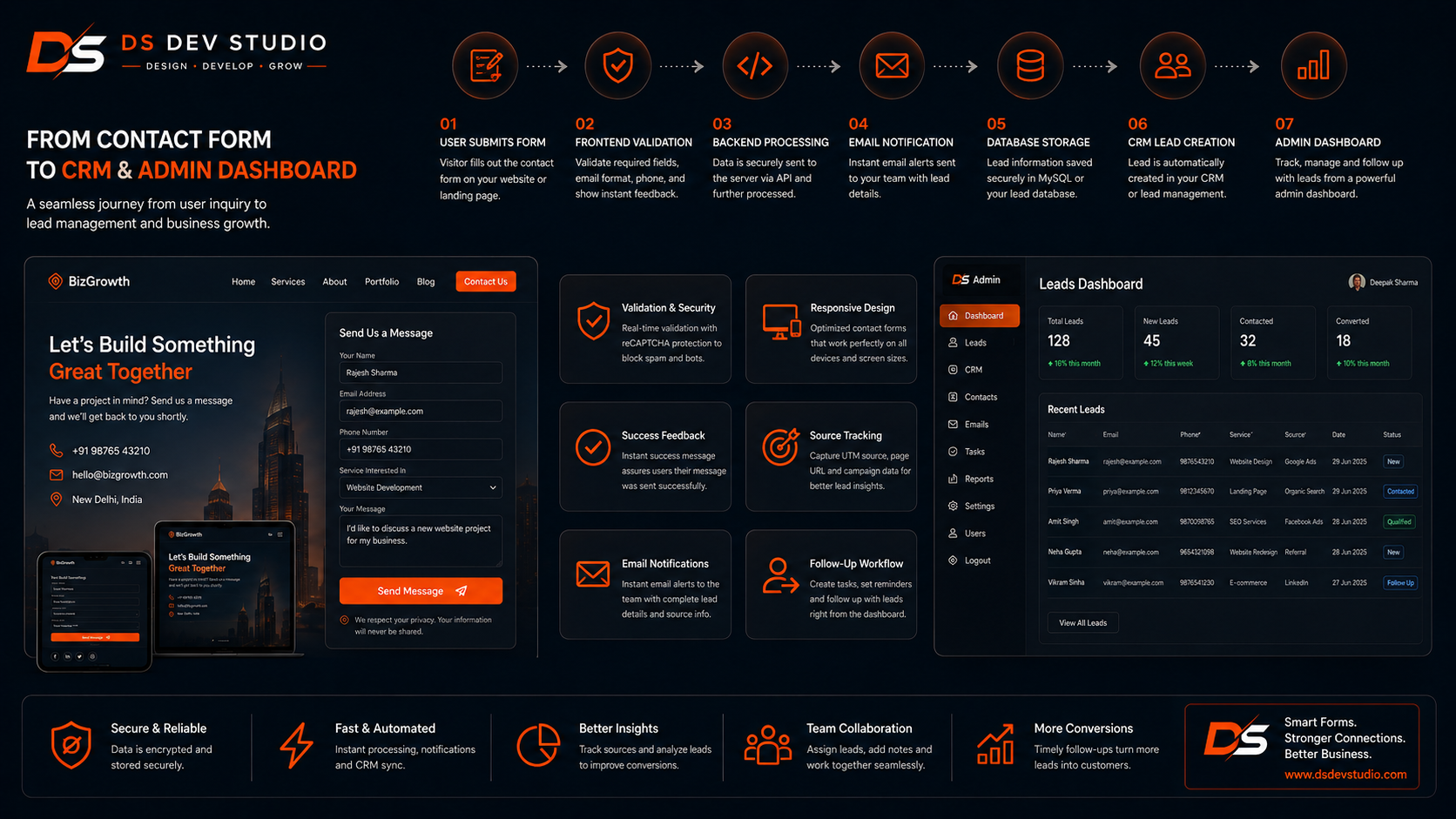
An admin dashboard allows business users to view and manage form submissions from a private panel. Instead of checking email inboxes, users can log in and see all enquiries in one place. The dashboard can show new leads, pending follow-ups, converted customers, service-wise enquiries, and date-based reports.
An Admin Panel Developer can create dashboards with searchable tables, filters, status dropdowns, notes, assignment options, and export features. This helps businesses manage enquiries more professionally.
A dashboard is especially useful for businesses with teams. Managers can check lead status, staff can update follow-ups, and business owners can view reports. This creates better visibility across the enquiry process.
API integration for contact forms
API Integration allows contact forms to connect with other systems. A form can send data to a CRM, Google Sheets, admin dashboard, email platform, WhatsApp API, SMS tool, payment system, or third-party business application. This reduces manual data entry and improves workflow speed.
For example, a React contact form can send data to a Laravel API. The API can validate the request, store the lead in MySQL, send an email notification, and return a success response. A CodeIgniter CRM can also receive form data through an API and show it in a dashboard.
An API Integration Developer should build integrations with validation, authentication where needed, error handling, logging, and testing. The goal is to make sure every important enquiry reaches the correct destination.
Lead source tracking in contact forms
Lead source tracking helps businesses understand where enquiries come from. A form can capture hidden data such as page URL, service page name, landing page name, campaign source, UTM parameters, referral source, or form location. This data can be stored with the lead.
For example, if a visitor submits a form from a landing page about website redesign, the CRM can record that source. If another visitor submits from a blog about API integration, that source can also be tracked. This helps the business understand which pages are supporting enquiries.
A Website Developer Freelancer can add hidden fields and source mapping to contact forms. A CRM or admin dashboard can then use this data for reports. This is useful for businesses that run ads, publish blogs, use service pages, or share campaign links.
Spam protection for business contact forms
Spam protection is important because public contact forms can receive fake submissions, bot messages, and unwanted data. Too much spam can waste time and make real leads harder to manage. A contact form should include basic spam protection without making the user experience difficult.
Spam protection can include captcha, honeypot fields, rate limiting, backend validation, blocked keywords, IP checks, or form submission timing checks. The right method depends on the website and expected risk. Some businesses need simple protection, while high-traffic websites may need stronger controls.
A Backend Developer Freelancer should balance security and usability. If spam protection is too difficult, real users may avoid submitting the form. If protection is too weak, the business may receive too much spam.
Contact forms on service pages
Service page contact forms can improve enquiries because users can contact directly after reading about a service. Instead of forcing visitors to open a separate contact page, a short form can appear near the CTA section of each important service page.
A service page form can automatically include the service name in a hidden field. For example, if the visitor submits from a React frontend development page, the backend can record that the enquiry is related to React. This helps the business understand the lead context quickly.
Service page forms should be short and relevant. If a visitor is already reading a specific service page, the form should make it easy to continue the conversation. CTA text such as “Discuss This Service” or “Request a Quote” can work well.
Contact forms on landing pages
Landing page forms are built for focused lead generation. A landing page usually promotes one service, offer, campaign, or target audience. The form should match that goal. It should not distract users with unnecessary fields or unrelated content.
A Landing Page Developer can build forms for quote requests, consultation booking, demo requests, callback requests, course enquiries, local service bookings, or project enquiries. The form should be easy to use on mobile and should send data to the right backend system.
Landing page forms should also capture source information. If a business runs ads or WhatsApp campaigns, it should know which campaign created the lead. API integration and CRM tracking can help with this.
WordPress contact form development
WordPress contact form development is useful for small business websites that need easy content management. A WordPress Developer Freelancer can set up forms on contact pages, service pages, landing pages, and blog CTA sections. WordPress forms can send emails, store submissions, and connect with other tools depending on setup.
WordPress forms should be customized carefully. The form should match the website design, work on mobile, validate fields, and show clear success messages. Too many plugins should be avoided because they can slow the website or create maintenance issues.
Advanced WordPress contact forms can connect with Google Sheets, CRM systems, email platforms, or custom APIs. A developer can also create custom PHP handling if plugin-based forms are not enough.
React contact form development
React contact form development is useful for custom websites, landing pages, dashboards, and API-connected business systems. A React Developer Freelancer can build reusable form components that can be used across homepage, service pages, landing pages, blogs, and admin panels.
React forms can provide a smooth user experience with instant validation, loading states, error messages, success messages, dropdowns, file uploads, conditional fields, and multi-step layouts. However, React forms still need backend APIs to process and store submissions properly.
A React form can send data to PHP, Laravel, CodeIgniter, or another backend API. The backend can then validate data, store it in MySQL, send notifications, and update CRM or admin dashboard records.
Laravel contact form backend
Laravel is useful for contact form backend development because it provides structured routing, validation, controllers, models, middleware, email handling, database support, and API development. A Laravel Developer Freelancer can build reliable form workflows for business websites and custom applications.
A Laravel form backend can receive form data, validate required fields, store leads in MySQL, send email notifications, prevent spam, handle errors, and return API responses to React or other frontends. Laravel is also useful when forms are part of a CRM or admin panel system.
For growing businesses, Laravel can support advanced features such as user roles, lead statuses, follow-up records, dashboard reports, and API connections. This makes it practical for larger lead management workflows.
CodeIgniter contact form backend
CodeIgniter is useful for lightweight PHP contact form backends and existing CRM systems. A CodeIgniter Developer Freelancer can build form handling, validation, email notifications, database storage, and API endpoints for business websites and internal applications.
If a business already has a CodeIgniter CRM, contact forms can be connected directly to that system. A website form can create a new lead in the CRM, store source data, send alerts, and show the record in the admin dashboard.
CodeIgniter can be a practical choice for businesses that need simple, fast, and custom PHP form workflows without unnecessary complexity.
Contact form testing before launch
Testing is essential before launching contact forms. A form may look complete but still fail if email settings are wrong, validation is missing, API connection fails, CRM mapping is incorrect, or mobile layout breaks. Every form should be tested properly before the website goes live.
Testing should include submitting valid data, submitting incomplete data, checking error messages, checking success messages, confirming email delivery, checking database storage, checking CRM records, and testing on mobile devices. If the form includes file uploads, those should also be tested.
A Business Website Developer should test forms on all pages where they appear. This includes contact page, service pages, landing pages, homepage CTA sections, blog pages, and admin dashboards.
- Submit the form with valid data.
- Submit the form with missing required fields.
- Check frontend and backend validation messages.
- Confirm email notification is received correctly.
- Confirm lead data is stored in MySQL if database storage is used.
- Confirm CRM or admin dashboard record is created.
- Check mobile layout and button usability.
- Test spam protection and duplicate submission handling.
- Check hidden fields such as source, page URL, or service name.
- Confirm success and error messages are clear.
Common contact form mistakes to avoid
One common mistake is making the contact form too long. If the form asks too many questions before the first conversation, visitors may leave. A form should collect only the information needed to start the enquiry process. Additional details can be collected later.
Another mistake is not testing email delivery. A form may show success to users but fail to send emails to the business. This can lead to lost enquiries. Forms should be tested after setup and checked again after hosting or email changes.
Other mistakes include poor mobile design, weak validation, no error handling, no spam protection, no lead storage, no CRM connection, unclear button text, missing success messages, no source tracking, and no maintenance plan. A skilled Contact Form Developer can help avoid these issues.
When should a business hire a developer for contact forms?
A business should hire a developer for contact forms when it needs reliable enquiry handling, custom form fields, CRM integration, admin dashboard records, API connections, database storage, spam protection, or responsive form design. Basic forms may be easy to add, but business-critical forms need proper planning.
You should also hire developer support when your current form is broken, not sending emails, receiving spam, not working on mobile, or not connected with lead tracking. A developer can review the full form workflow and fix the issue properly.
- Hire a developer when your website needs reliable enquiry forms.
- Hire one when forms should connect with CRM or admin dashboard.
- Hire one when form submissions should be stored in MySQL.
- Hire one when React forms need PHP, Laravel, or CodeIgniter APIs.
- Hire one when WordPress forms need customization or integration.
- Hire one when forms need spam protection and validation.
- Hire one when lead source tracking is required.
- Hire one when existing forms are broken or not delivering emails.
What to prepare before contact form development
Before starting contact form development, prepare the form purpose, required fields, page placement, notification email, lead storage requirement, CRM workflow, and success message. Clear planning helps the developer build the form correctly from the beginning.
Also decide what should happen after submission. Should the business receive an email? Should the data go to MySQL? Should a CRM lead be created? Should the visitor see a thank-you message? Should the lead source be tracked? These decisions shape the backend workflow.
- List where the form will appear: contact page, service page, landing page, or blog.
- Define required fields such as name, phone, email, service, and message.
- Decide optional fields such as budget, timeline, location, or company name.
- Prepare the email address that should receive notifications.
- Decide whether submissions should be stored in MySQL.
- Clarify whether forms should connect with CRM or admin dashboard.
- Prepare success message and error message requirements.
- Discuss spam protection, validation, API integration, and testing.
How DS Dev Studio can help
DS Dev Studio by Deepak Sharma can help businesses with contact form development for business websites, landing pages, service pages, blogs, WordPress websites, React websites, PHP backends, Laravel systems, CodeIgniter applications, CRM systems, admin dashboards, and custom web applications.
Deepak Sharma Web Developer work includes HTML, CSS, JavaScript, ReactJS, WordPress, PHP, Laravel, CodeIgniter, MySQL, APIs, responsive website development, frontend development, backend development, admin panels, CRM systems, and full stack web development. This is useful for businesses that need reliable forms connected with practical backend workflows.
If you need contact form development for your business website, DS Dev Studio can help plan the fields, design responsive forms, add validation, connect email notifications, store data in MySQL, integrate with CRM or admin dashboards, add source tracking, improve spam protection, and test the full form workflow before launch.
Conclusion
Contact Form Development is essential for business websites because forms help collect enquiries, support lead generation, and connect visitors with the business. A strong contact form should be simple, responsive, clear, validated, secure, and connected with the right backend workflow. Businesses should plan form fields, email notifications, database storage, CRM integration, admin dashboard access, API workflows, source tracking, spam protection, and testing before launch. DS Dev Studio by Deepak Sharma can help businesses with contact form development, React forms, WordPress forms, PHP backend handling, Laravel and CodeIgniter systems, MySQL database storage, API integration, CRM workflows, admin panels, service pages, landing pages, and responsive business websites. With the right contact form setup, your business website can collect leads more reliably, reduce missed enquiries, and support better customer follow-up.
Useful internal links
Frequently asked questions
Can I hire Deepak Sharma for Contact Form Development?+
Yes. You can hire Deepak Sharma for contact form development, responsive forms, WordPress forms, React forms, PHP backend handling, Laravel forms, CodeIgniter forms, MySQL storage, CRM integration, admin dashboard integration, and API workflows.
What should a business contact form include?+
A business contact form usually includes name, phone number, email, service requirement, and message. Depending on the business, it may also include location, company name, budget, timeline, preferred contact method, or hidden source tracking fields.
Can DS Dev Studio connect contact forms with CRM?+
Yes. DS Dev Studio can connect contact forms with CRM systems, MySQL databases, Google Sheets, admin dashboards, email notifications, or custom APIs for better lead tracking and follow-up management.
Can contact forms be built in React or WordPress?+
Yes. Contact forms can be built in React for custom websites and API-connected interfaces. They can also be built in WordPress for content-managed business websites. The backend can be handled with PHP, Laravel, CodeIgniter, or custom APIs.
Why is form validation important?+
Form validation is important because it prevents incomplete, incorrect, duplicate, or unsafe data from entering the system. It improves data quality, user experience, and backend reliability.