CRM Web Application Developer Guide for Lead and Customer Management
A practical guide for businesses that want to hire a CRM Web Application Developer for lead management, customer records, follow-ups, dashboards, admin panels, backend workflows, and custom CRM systems.

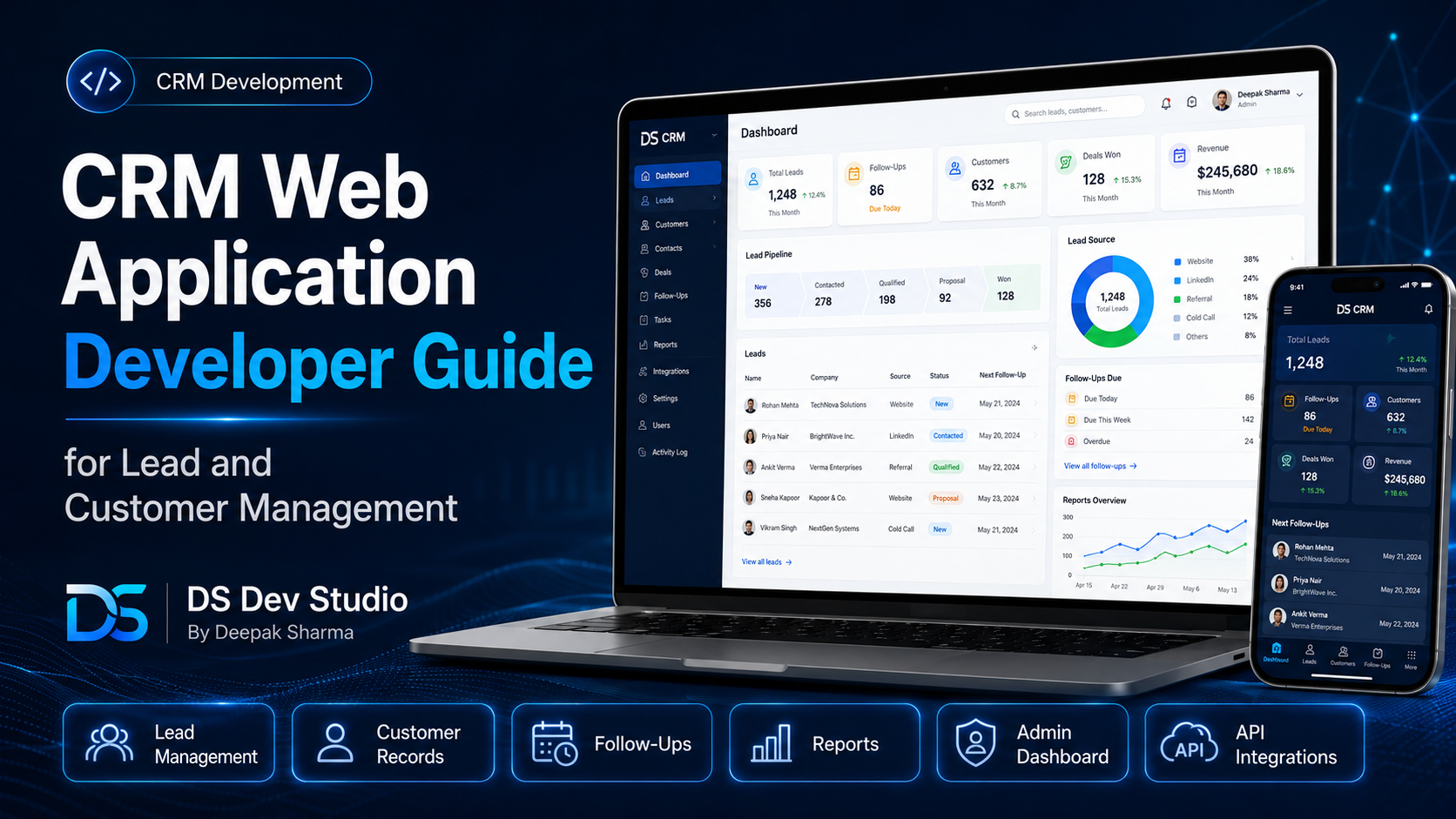
A CRM Web Application Developer helps businesses build custom systems for managing leads, customers, follow-ups, communication notes, sales activity, user roles, reports, and business workflows. A CRM is not just a place to store names and phone numbers. For a growing business, it becomes a central system where enquiries are tracked, customers are organized, follow-ups are managed, and teams can see what action is needed next.
Many small businesses start with emails, WhatsApp messages, Excel sheets, Google Sheets, or manual notes to manage leads. This may work in the beginning, but as enquiries increase, tracking becomes harder. Leads can be missed, follow-ups can be delayed, customer details can become scattered, and reporting becomes difficult. A custom CRM web application can solve these problems by bringing lead and customer data into one organized dashboard.
A CRM web application can be built around the exact workflow of the business. It can include lead capture forms, customer records, status updates, assigned users, follow-up dates, notes, reminders, source tracking, reports, exports, and admin controls. A skilled CRM Web Application Developer can connect the public website, backend database, admin dashboard, and API integrations into one working system.
DS Dev Studio by Deepak Sharma helps businesses with CRM web application development, lead management systems, customer management systems, admin panels, PHP backend development, Laravel systems, CodeIgniter projects, MySQL databases, React frontend interfaces, API integration, responsive websites, and custom web applications. This guide explains how a CRM Web Application Developer can help businesses manage leads and customers more effectively.
What does a CRM Web Application Developer do?
A CRM Web Application Developer builds software systems that help businesses manage customer relationships and lead workflows. The developer creates the frontend screens, backend logic, database structure, APIs, admin panel, user roles, reports, and integrations required for the CRM to work properly. The final system can help the team store, search, update, and manage business records from one dashboard.
For example, when a new enquiry comes from a website contact form, the CRM can automatically store the lead in a database. The lead can appear in the admin dashboard with name, email, phone number, service requirement, source, status, and created date. A team member can then add notes, update status, assign a follow-up date, and track progress until the lead converts or closes.
A good Custom CRM Developer should understand the business process before writing code. A CRM for a web development agency may need service requirement fields, project budget, technology preference, and follow-up notes. A CRM for a clinic may need appointment history and patient enquiry categories. A CRM for a real estate business may need property interest, budget range, location, and site visit status. The CRM should match the workflow, not force the business into a generic structure.
Why businesses need a CRM web application
Businesses need CRM web applications when manual lead and customer tracking becomes difficult. If enquiries are coming from websites, landing pages, calls, ads, social media, referrals, and emails, it becomes hard to manage everything in one place without a system. A CRM creates a structured way to collect, organize, update, and review customer information.
A CRM also improves follow-up discipline. Many leads are not lost because the business has a bad service. They are lost because follow-up is late, records are unclear, or the team does not know who is responsible. A custom CRM can show pending follow-ups, lead status, assigned users, and activity history so the team can act on time.
For business owners and managers, a CRM dashboard gives better visibility. They can see how many leads came this month, which sources are working, which leads are pending, which users are handling enquiries, and how many leads converted. This type of information is difficult to manage properly with scattered spreadsheets.
Lead management in a CRM web application
Lead management is one of the most important parts of a CRM. A lead is a potential customer who has shown interest in a service or product. A lead may come from a website form, phone call, email, WhatsApp message, advertisement, referral, event, landing page, or social media campaign. A Lead Management System Developer can build a CRM flow that captures and tracks these leads clearly.
A lead management module can include lead name, email, phone, company name, service requirement, budget range, message, source, status, assigned user, follow-up date, notes, and activity history. These fields can be customized based on the business. For some businesses, location matters. For others, project type, urgency, or lead source may be more important.
The CRM should allow users to update lead status as the conversation progresses. Common statuses include new, contacted, interested, follow-up, proposal sent, converted, not interested, and closed. These statuses help the business understand where every lead stands and what action is needed next.
- Capture leads from website forms, landing pages, or manual entry.
- Store important lead details in a structured database.
- Assign leads to team members or sales users.
- Track lead status from new enquiry to conversion.
- Add notes, call updates, and follow-up reminders.
- Filter leads by date, status, source, service, or assigned user.
- Generate reports for monthly leads and conversion activity.
- Export lead records when required.
Customer management in a CRM system
Customer management starts when a lead becomes a real customer or when the business needs to maintain long-term customer records. A Customer Management System Developer can build modules that store customer details, service history, communication notes, invoices, project records, support requests, and follow-up activity.
Customer records help businesses avoid repeated questions and scattered information. When a customer contacts the business again, the team can open the CRM and see previous details. This can include what service was requested, what was delivered, what notes were added, what files were uploaded, and what next action is pending.
For service businesses, customer management can improve retention and service quality. A CRM can help track renewal dates, support issues, project stages, feedback, follow-ups, and future opportunities. The system becomes more useful when it connects lead history with customer history in one place.
CRM dashboard for business visibility
A CRM dashboard gives a quick overview of business activity. Instead of opening every record manually, users can see important numbers in summary cards, charts, tables, and reports. A dashboard can show total leads, new leads, pending follow-ups, converted leads, active customers, monthly enquiries, lead sources, and user-wise activity.
A useful dashboard should not be overloaded with unnecessary charts. It should show information that helps the business take action. For example, if many leads are pending follow-up, the dashboard should make that clear. If one lead source is performing well, the business should be able to see it. If a user has many untouched leads, the manager should know.
A CRM Web Application Developer can build dashboards using React, PHP, Laravel, CodeIgniter, MySQL, and APIs depending on the project. The frontend displays dashboard cards and tables, while the backend calculates the data and fetches records from the database.
Admin panel features for CRM systems
A CRM web application usually includes an admin panel where users can manage records. The admin panel is the private area of the CRM. It can include modules for leads, customers, users, roles, reports, settings, sources, statuses, services, notes, follow-ups, and activity logs.
An Admin Panel Developer should build the CRM interface so that daily work is easy. Users should be able to search records, apply filters, update statuses, add notes, assign users, set follow-up dates, and export reports without confusion. A CRM is only useful if the team can actually use it consistently.
The admin panel should also protect important actions. Not every user should be able to delete records, export customer data, change settings, or manage users. Role-based access helps keep the CRM secure and organized.
- Secure login for admin and team users.
- Lead and customer management modules.
- User roles for admin, manager, sales user, or staff.
- Status updates and follow-up management.
- Notes and activity history for each record.
- Search, filters, sorting, and pagination.
- Dashboard summaries and report views.
- Email or notification alerts.
- CSV or Excel export options.
- Settings for sources, statuses, services, and users.
Frontend development for CRM web applications
The frontend of a CRM web application controls how users see and interact with the system. It includes dashboards, tables, forms, filters, buttons, modals, navigation, cards, charts, and responsive layouts. A clean frontend is important because CRM users may work in the system every day.
React is often useful for CRM frontend development because it allows reusable components and dynamic interfaces. A React Developer Freelancer can create components such as lead tables, customer forms, dashboard cards, status labels, filters, charts, sidebars, and modal windows. These components make the CRM interface easier to maintain and expand.
CRM UI should be clean and practical. Large tables should have pagination. Forms should have clear labels. Status labels should be visible. Buttons should be easy to understand. Users should be able to complete important actions quickly. The goal is not only modern design; the goal is better daily workflow.
Backend development for CRM systems
The backend is the foundation of a CRM web application. It handles databases, APIs, authentication, permissions, validation, reports, business logic, file uploads, and notifications. Without a strong backend, the CRM may look good but fail during real use.
A Backend Developer Freelancer can build CRM backend systems using PHP, Laravel, CodeIgniter, MySQL, APIs, and related tools. Laravel is useful for structured CRM applications with user roles, validation, migrations, APIs, and reports. CodeIgniter is useful for lightweight systems or existing PHP CRM applications. Plain PHP may work for smaller CRM modules.
The backend should be planned around business logic. For example, when a lead status changes to follow-up, the system may need to store follow-up date and show the lead in pending follow-up reports. When a lead converts, it may need to become a customer record. These workflows require clear backend planning.
MySQL database planning for CRM applications
MySQL database planning is very important for CRM web applications because the database stores the core business records. A CRM may need tables for leads, customers, users, roles, statuses, sources, notes, follow-ups, activities, services, files, reports, and settings. These tables should be connected logically.
A MySQL Database Developer should plan table relationships carefully. A lead may have many notes. A customer may have many projects. A user may be assigned to many leads. A lead may have one source and one current status. These relationships should be reflected properly in the database design.
Poor database planning can create slow reports, duplicate records, missing history, and difficult future updates. A CRM should be built with clean data structure from the beginning so the system can grow with the business.
API integration for CRM web applications
API integration helps a CRM connect with websites, landing pages, forms, dashboards, email tools, Google Sheets, WhatsApp APIs, SMS services, payment systems, and other business platforms. An API Integration Developer can create the data flow between these systems so the CRM becomes more connected.
For example, a website contact form can send enquiry details to a CRM API. The API can validate the data, store the lead in MySQL, send an email notification, and return a success message to the frontend. The same lead can appear inside the CRM dashboard for follow-up.
CRM APIs should include validation, authentication, error handling, and clear response formats. If the CRM handles private customer data, API access should be protected. A public website should not be able to access all CRM records without permission.
CRM user roles and permissions
User roles are important in CRM systems because different team members need different access. An admin may manage all leads, users, settings, and reports. A manager may view team activity and assign leads. A sales user may only view and update assigned leads. A support user may only manage customer support records.
Role-based permissions protect business data and reduce mistakes. Not everyone should be able to delete records, export customer information, change CRM settings, or manage user accounts. The CRM should control access based on the user role and business responsibility.
A CRM Web Application Developer should plan roles early because permissions affect database design, backend logic, API access, and frontend menus. If roles are added later without planning, the system can become complicated.
Lead source tracking and reporting
Lead source tracking helps businesses understand where enquiries are coming from. Sources may include website forms, Google Search, ads, social media, referrals, events, email campaigns, WhatsApp, direct calls, or landing pages. When sources are tracked properly, the business can understand which channels are generating leads.
A CRM can show source-wise reports such as total leads from each source, converted leads by source, pending leads by source, and monthly lead trends. This helps business owners make better marketing decisions. Without source tracking, it becomes difficult to know which channels are actually working.
A Lead Management System Developer can add source fields, UTM tracking where needed, landing page tracking, and report filters. This is useful for businesses that run campaigns or publish content regularly.
Follow-up management in CRM systems
Follow-up management is one of the most valuable CRM features. Many leads need multiple conversations before they convert. If follow-ups are managed manually, important leads can be forgotten. A CRM can show upcoming follow-ups, overdue follow-ups, completed follow-ups, and user-wise follow-up activity.
A follow-up module can include follow-up date, follow-up time, notes, assigned user, status, and reminder option. The dashboard can show pending follow-ups so users know what to do next. Managers can also review whether team members are handling leads on time.
For service businesses, follow-up management can directly affect conversion. A CRM Web Application Developer can build follow-up workflows that make the sales process more organized and less dependent on memory.
CRM reports and exports
Reports help businesses understand CRM performance. A custom CRM can include reports for total leads, new leads, contacted leads, converted leads, lost leads, source-wise leads, user-wise leads, pending follow-ups, monthly enquiries, customer count, and activity history. Reports should be designed around real business questions.
Export options can also be useful. Businesses may need CSV or Excel exports for analysis, backup, reporting, or offline review. However, exports should be controlled through permissions because customer data may be sensitive. Not every user should be allowed to export all CRM records.
A Custom Web Application Developer should build reports that are clear, fast, and useful. Reports should use filters such as date range, status, source, assigned user, and service type. This allows the business to review specific data instead of scrolling through everything manually.
Security basics for CRM web applications
Security is important because CRM systems store customer data, lead records, communication notes, phone numbers, emails, and internal business information. A CRM should include secure login, password protection, backend validation, user role access, safe APIs, session handling, and controlled error messages.
Data should not be exposed through public URLs, weak API routes, or unrestricted dashboard pages. File uploads should be handled carefully. Forms should validate input. Sensitive actions such as deleting records, exporting data, or changing settings should be restricted to authorized users.
A Backend Developer Freelancer should include security basics from the beginning of CRM development. Businesses should also discuss backup and recovery options because CRM data is valuable. Before major changes, database backups should be taken.
CRM performance and scalability
CRM performance matters because users work with records every day. If lead tables are slow, searches take too long, or reports freeze, the team may stop using the CRM properly. Performance depends on database design, backend queries, API responses, frontend loading, and pagination.
A CRM with thousands of records should not load everything at once. It should use pagination, filters, optimized queries, search indexing where needed, and efficient report logic. APIs should return only the data required for the current screen. This keeps the CRM faster and easier to use.
Scalability does not mean building a very complex enterprise CRM from day one. It means planning the system so more users, records, modules, and integrations can be added later. A good CRM Web Application Developer can build a first version that solves the main workflow and can grow over time.
Custom CRM vs ready-made CRM tools
Businesses often compare custom CRM development with ready-made CRM tools. Ready-made CRM tools can be useful when the business can follow their fixed workflow and needs quick setup. They may include many features, but some small businesses find them too complex, expensive, or not aligned with their process.
A custom CRM is useful when the business needs a system built around specific workflows, fields, modules, reports, and integrations. It can be simpler than a large CRM platform because it only includes what the business needs. It can also connect with the existing website, forms, dashboards, and backend systems.
The right choice depends on your requirement. If a ready-made CRM fits your process, it may be faster. If your business has a unique workflow or needs a custom dashboard, a Custom CRM Developer may be a better option. DS Dev Studio can help plan practical CRM systems based on business needs.
Technologies used for CRM web application development
CRM web applications can be built using different technologies depending on the project. React can be used for frontend dashboards and reusable UI components. PHP can be used for backend logic and form handling. Laravel can be used for structured backend systems. CodeIgniter can be used for lightweight PHP CRM systems or improving existing applications. MySQL can be used for database storage.
APIs connect the frontend and backend. For example, React can call Laravel or PHP APIs to fetch lead records, update statuses, add notes, and show reports. The backend can store records in MySQL and return structured responses to the frontend. This creates a connected CRM system.
A Full Stack Web Developer Freelancer can help when the CRM requires frontend, backend, database, and API development together. A specialized Backend Developer Freelancer can help when the main work is database logic, APIs, reports, and backend workflows.
What to prepare before hiring a CRM Web Application Developer
Before hiring a CRM Web Application Developer, prepare your workflow clearly. Explain how leads enter your business, who handles them, what statuses are used, what customer details need to be stored, what follow-up process you follow, and what reports you need. This helps the developer build the CRM around your real process.
You should also prepare existing spreadsheets, lead forms, customer lists, current tools, screenshots, and workflow notes if available. If you already use a CRM but want a custom version, explain what is missing or difficult in the current tool. If you have an existing PHP, Laravel, or CodeIgniter CRM, share what needs improvement.
- List how leads currently enter your business.
- Prepare lead fields such as name, email, phone, source, service, and message.
- Define lead statuses such as new, contacted, follow-up, converted, or lost.
- Explain user roles such as admin, manager, sales user, or support user.
- List customer details that need to be stored.
- Prepare follow-up workflow and reminder requirements.
- Clarify dashboard cards, reports, filters, and export needs.
- Share existing spreadsheets, CRM access, forms, or workflow notes.
- Discuss APIs, website form integration, notifications, and database needs.
- Clarify hosting, timeline, testing, deployment, and maintenance expectations.
What to check before hiring a CRM developer
Before hiring a CRM developer, check whether they understand lead management, customer management, admin panels, backend development, database planning, APIs, user roles, reports, and business workflows. CRM development is not only about creating forms and tables. It is about building a system that supports real business operations.
Ask about experience with PHP, Laravel, CodeIgniter, MySQL, React, API integration, admin dashboards, CRM modules, authentication, permissions, reports, and performance optimization. Also ask how the developer handles backups, testing, validation, deployment, and future updates.
Some CRM projects cannot be shown publicly because they are private business systems. In that case, the developer can explain modules and workflows they have built. Focus on whether the developer can understand your business process and convert it into a useful technical system.
Common CRM development mistakes to avoid
One common mistake is building a CRM without defining the workflow. If lead stages, user roles, required fields, and reports are unclear, the CRM may not match daily business needs. Workflow planning should happen before database and screen development.
Another mistake is adding too many features in the first version. A CRM with too many unused modules can become confusing. It is better to start with core lead and customer management, then add advanced features based on real usage.
Other mistakes include poor database design, weak permissions, missing validation, slow lead tables, unclear reports, no follow-up reminders, no source tracking, and no maintenance plan. A CRM should be practical, secure, and easy for the team to use every day.
How DS Dev Studio can help
DS Dev Studio by Deepak Sharma can help businesses with CRM web application development, lead management systems, customer management modules, admin panels, business dashboards, PHP backend systems, Laravel development, CodeIgniter projects, MySQL databases, API integration, React frontend interfaces, reports, user roles, and custom web applications.
Deepak Sharma Web Developer work includes both frontend and backend development. This is useful for CRM projects because a CRM needs clean dashboard UI, backend logic, database structure, API workflows, user permissions, reports, and integration with business websites or landing pages.
If you want to hire a CRM Web Application Developer for lead and customer management, DS Dev Studio can help plan the workflow, design the database, build dashboard screens, create lead and customer modules, connect website forms, add follow-up tracking, create reports, and prepare the CRM for future improvements.
Conclusion
A CRM Web Application Developer can help businesses manage leads, customers, follow-ups, notes, statuses, reports, users, and business workflows from one organized system. A custom CRM can reduce manual work, improve follow-up discipline, organize customer records, support better reporting, and connect website forms with backend dashboards. For small businesses and growing teams, CRM development becomes useful when spreadsheets, emails, and scattered messages are no longer enough. DS Dev Studio by Deepak Sharma can help businesses build CRM web applications using React, PHP, Laravel, CodeIgniter, MySQL, APIs, admin panels, dashboards, and custom backend systems. With the right CRM development approach, a business can manage leads and customers more clearly, improve team productivity, and build a stronger foundation for long-term customer management.
Useful internal links
Frequently asked questions
Can I hire Deepak Sharma as a CRM Web Application Developer?+
Yes. You can hire Deepak Sharma for CRM web application development, lead management systems, customer management modules, admin panels, dashboards, PHP backend systems, Laravel projects, CodeIgniter applications, MySQL databases, APIs, and custom web applications.
What does a CRM Web Application Developer do?+
A CRM Web Application Developer builds systems for managing leads, customers, follow-ups, notes, statuses, users, reports, dashboards, databases, APIs, and backend workflows for businesses.
Can DS Dev Studio build a custom lead management system?+
Yes. DS Dev Studio can build custom lead management systems with website form capture, lead status tracking, assigned users, follow-up dates, notes, source tracking, dashboard reports, and database storage.
Which technologies are used for CRM web applications?+
CRM web applications can be built using React, PHP, Laravel, CodeIgniter, MySQL, REST APIs, HTML, CSS, JavaScript, Tailwind CSS, Bootstrap, and other tools depending on the project requirement.
Should I choose a custom CRM or ready-made CRM software?+
Choose a ready-made CRM if it fits your process and you need quick setup. Choose a custom CRM if your business needs specific workflows, custom fields, dashboards, reports, integrations, and control over the system structure.