Laravel Admin Panel Developer Guide for Database-Driven Systems
A practical guide for businesses that want to hire a Laravel Admin Panel Developer for database-driven systems, dashboards, CRM modules, backend workflows, APIs, MySQL databases, and custom web applications.

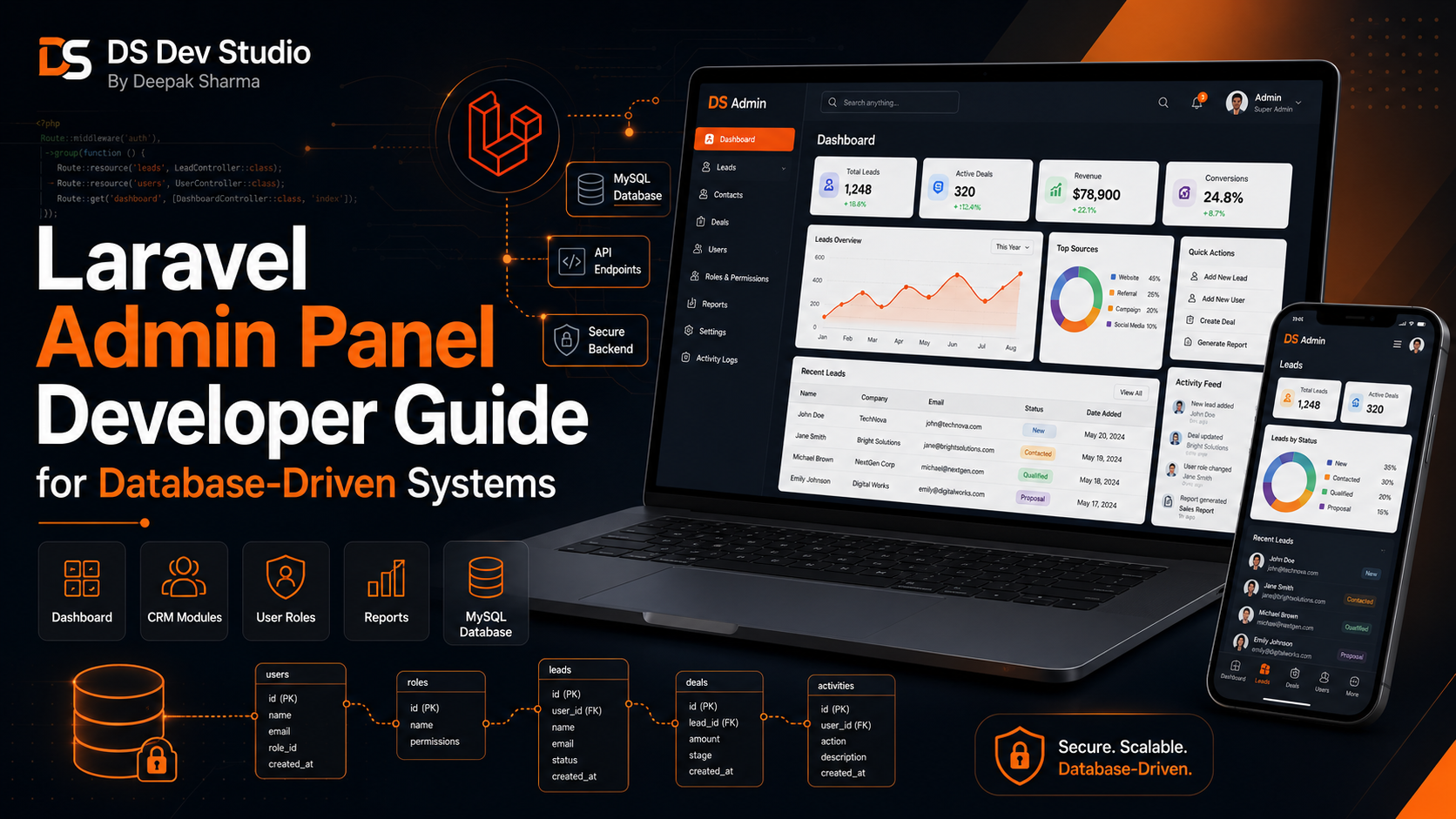
A Laravel Admin Panel Developer helps businesses build secure, organized, and database-driven backend systems for managing leads, customers, users, services, reports, content, bookings, enquiries, and internal workflows. Many businesses start with a simple website, but as enquiries and operations grow, they need a private dashboard where data can be stored, managed, filtered, updated, and reviewed properly.
Laravel is a practical PHP framework for building structured admin panels and business web applications. It supports routing, controllers, models, authentication, validation, database migrations, middleware, API development, role-based access, and clean backend architecture. This makes Laravel useful for businesses that need more than a basic contact form or static website.
A database-driven system means the application depends on stored data. For example, a CRM system stores leads, customers, follow-ups, notes, users, and status updates. An admin panel may store services, blogs, projects, enquiries, reports, and form submissions. A Laravel Developer Freelancer can build these systems with MySQL database structure and practical backend workflows.
DS Dev Studio by Deepak Sharma helps businesses with Laravel admin panel development, PHP backend development, MySQL database systems, CRM web applications, API integration, custom web applications, React frontend development, responsive business websites, WordPress customization, and full stack development. This guide explains how a Laravel Admin Panel Developer can build database-driven systems for business operations.
What does a Laravel Admin Panel Developer do?
A Laravel Admin Panel Developer builds private backend dashboards where business users can manage data and workflows. The work can include authentication, user roles, dashboard cards, data tables, forms, filters, CRUD modules, file uploads, reports, API endpoints, database design, permissions, and backend validation.
CRUD stands for create, read, update, and delete. Most admin panels use CRUD functionality. For example, an admin can add a new service, view all leads, update customer status, delete a wrong record, upload images, edit a blog post, or assign a follow-up to a team member. A Custom Admin Panel Developer builds these actions in a structured and secure way.
A Laravel Developer Freelancer should understand business workflows before writing code. The developer should know what data needs to be stored, who will use the system, which records need approval, what reports are needed, what user roles are required, and how the dashboard should support daily operations.
Why Laravel is useful for admin panel development
Laravel is useful for admin panel development because it provides a structured way to build backend systems. Instead of writing unorganized PHP code, Laravel encourages a cleaner architecture with routes, controllers, models, views, migrations, validation, middleware, and reusable logic. This makes the system easier to maintain as it grows.
Admin panels often become complex over time. A simple lead list may later need user roles, status tracking, notes, email notifications, reports, filters, exports, API connections, and dashboards. Laravel provides a strong foundation for adding these features without making the code messy.
For businesses, Laravel is practical because it works well with MySQL databases, custom APIs, authentication, file uploads, reporting systems, and backend workflows. A Backend Developer Freelancer can use Laravel to build systems that are more organized than simple form handling or basic PHP scripts.
What is a database-driven system?
A database-driven system is an application where important information is stored in a database and managed through an interface. Instead of keeping data only in emails, spreadsheets, or manual files, the business can manage records from a centralized admin panel. This improves organization and reduces confusion.
For example, a service business may receive enquiries from its website. A database-driven system can store each enquiry with name, phone, email, service type, message, source, status, assigned user, and follow-up date. Team members can open the admin panel, update status, add notes, and track progress.
MySQL is commonly used for Laravel database-driven systems. A MySQL Database Developer can plan tables, relationships, indexes, and data rules so the system remains clean and efficient. Laravel then connects with the database through models and queries.
Common business use cases for Laravel admin panels
Laravel admin panels can be used by many types of businesses. Service providers can manage leads and customers. Agencies can manage projects and enquiries. Coaching institutes can manage students, batches, courses, and admissions. Clinics can manage appointments. Local businesses can manage bookings, contact requests, and reports.
Admin panels are also useful for content management. A business can manage services, blogs, projects, testimonials, FAQs, team members, and landing page content from a dashboard. This is helpful when the website needs regular updates but the business does not want to edit code every time.
- Lead management dashboards for business enquiries.
- CRM systems for customers, follow-ups, and notes.
- Admin panels for services, blogs, projects, and testimonials.
- Booking and appointment management systems.
- Student, course, and admission management systems.
- Product, order, and inventory management modules.
- Report dashboards for sales, leads, users, and performance.
- Role-based dashboards for admins, managers, and team members.
- API-connected systems for React websites and mobile apps.
- Custom business automation tools for daily workflows.
Laravel admin panel modules businesses commonly need
A Laravel admin panel is usually divided into modules. Each module handles one type of data or workflow. For example, a CRM system may have modules for leads, customers, users, follow-ups, notes, reports, and settings. A website admin panel may have modules for blogs, services, projects, FAQs, and enquiries.
Modules make the system easier to use. Instead of mixing all data in one screen, users can open the correct module and manage records clearly. A Laravel Admin Panel Developer should plan modules according to the business process, not only based on technical convenience.
- Dashboard overview module with important summary cards.
- User management module with roles and permissions.
- Lead management module with statuses and follow-ups.
- Customer management module with profiles and notes.
- Service management module for website or business services.
- Blog management module for articles and categories.
- Project management module for portfolio and case studies.
- Report module with filters and date-based data.
- Settings module for business details and system configuration.
- API module for connecting frontend websites and external tools.
Dashboard design for Laravel admin panels
The dashboard is the first screen users usually see after login. It should show important information clearly. A good dashboard may include total leads, new enquiries, pending follow-ups, active customers, monthly reports, recent activities, top services, and quick action buttons. The goal is to help users understand important data quickly.
A dashboard should not be overloaded with unnecessary charts. It should show information that supports real decisions. For example, a business owner may need to know how many leads came this week, how many are pending, which service has more enquiries, and which follow-ups need attention.
A Full Stack Web Developer Freelancer can build the dashboard frontend and backend together. Laravel can handle the data, calculations, filters, and authentication. React or Blade templates can handle the frontend interface, depending on the project requirement.
User roles and permissions in Laravel systems
User roles and permissions are important for admin panels because not every user should access every feature. An admin may manage all modules, while a sales user may only manage assigned leads. A content editor may only manage blogs and pages. A manager may view reports but not delete records.
Laravel can support role-based access through middleware, policies, gates, and permission logic. A Laravel Developer Freelancer can create user roles such as Super Admin, Admin, Manager, Staff, Editor, or Viewer depending on the business workflow.
Proper permissions improve security and reduce mistakes. For example, a staff user should not delete customer records if that action is reserved for admins. A well-planned admin panel protects important business data and keeps workflows organized.
MySQL database planning for Laravel admin panels
Database planning is one of the most important parts of a Laravel admin panel. If the database is poorly planned, the system may become difficult to maintain. A MySQL Database Developer should plan tables, columns, relationships, indexes, and constraints based on the actual business data.
For example, a CRM system may need tables for users, leads, customers, services, lead statuses, notes, follow-ups, sources, and activity logs. These tables should be connected properly. A lead may belong to a service, have many notes, have many follow-ups, and be assigned to one user.
Laravel migrations help manage database structure in a version-controlled way. This makes it easier to create, update, and maintain tables. Proper database planning helps performance, reporting, filtering, and future feature development.
Forms and validation in Laravel admin panels
Forms are used in almost every admin panel. Users may add leads, edit customers, create blog posts, upload images, update services, assign tasks, or change settings. These forms should be clear, simple, and properly validated. Validation prevents wrong or incomplete data from entering the system.
Laravel provides strong validation features. A developer can validate required fields, email format, phone numbers, file types, image sizes, unique records, dates, and numeric values. Good validation improves data quality and reduces manual correction later.
Forms should also show useful error messages. If a user enters wrong data, the system should explain what needs to be fixed. A practical admin panel should be easy for non-technical business users, not only developers.
Data tables, filters, search, and pagination
Data tables are a core part of admin panels. A business user may need to view leads, customers, orders, services, blogs, projects, or reports. If the table has too many records without search and filters, users will struggle to find what they need.
A Laravel Admin Panel Developer can build tables with search, sorting, pagination, filters, status labels, date ranges, and action buttons. For example, a lead table can be filtered by status, service, source, assigned user, and follow-up date. This makes daily work faster.
Pagination is also important because loading thousands of records at once can slow down the system. Proper backend queries and database indexes help keep tables efficient. A MySQL Database Developer should plan performance from the beginning.
Reports and analytics in database-driven systems
Reports help businesses understand performance. A Laravel admin panel can include reports for leads, customers, sales, services, users, follow-ups, bookings, projects, and content. Reports can use date filters, status filters, user filters, and category filters to show useful insights.
For example, a lead report can show how many enquiries came this month, which source performed better, which service received more interest, how many leads are pending, and how many converted. These reports help business owners make better decisions.
Reports should be designed around real business questions. A dashboard with random numbers is not useful. A Backend Developer Freelancer should ask what the business needs to track and then build reports accordingly.
Laravel API development for frontend and integrations
Laravel can be used to build APIs for frontend websites, React dashboards, mobile apps, CRM systems, and third-party integrations. An API allows different systems to communicate. For example, a React frontend can send a contact form submission to a Laravel API, and Laravel can store the data in MySQL.
An API Integration Developer can also connect Laravel with external tools such as email platforms, Google Sheets, payment gateways, SMS tools, WhatsApp APIs, analytics platforms, and CRM tools. This helps businesses automate workflows and reduce manual data entry.
Laravel APIs should include validation, authentication, error handling, and proper response messages. A frontend user should receive clear success or error feedback. A secure API structure is important when business data is being submitted or accessed.
React frontend with Laravel admin systems
React can be used with Laravel when the business needs a modern frontend interface or dashboard. Laravel can handle backend APIs, authentication, database logic, and business rules. React can handle the user interface, forms, tables, filters, dashboard cards, and interactive components.
This setup is useful for custom web applications, CRM dashboards, admin panels, customer portals, and API-connected business tools. A React Developer Freelancer and Laravel Developer Freelancer can work together, or a Full Stack Web Developer Freelancer can handle both sides if the project scope allows.
For example, a Laravel backend can provide lead records through an API. React can display those leads in a searchable table with filters and status buttons. When the user updates a lead, React sends the update to Laravel, and Laravel saves it in MySQL.
Laravel admin panel security basics
Security is important for admin panels because they contain business data. A Laravel Admin Panel Developer should protect login pages, user roles, forms, APIs, file uploads, and database access. Weak security can expose leads, customers, internal records, or sensitive business information.
Basic security practices include authentication, password hashing, CSRF protection, validation, permission checks, secure file uploads, input sanitization, and safe database queries. Laravel provides many built-in features that help with these security needs when used properly.
The developer should also avoid giving every user full admin access. Role-based access and proper permissions help reduce risk. Security should be planned from the beginning, not added only after the system is complete.
Laravel admin panel performance
Performance matters because admin panels are used regularly by business teams. If pages load slowly, tables take too long, or reports freeze, users may stop using the system properly. A good Laravel admin panel should be responsive and efficient.
Performance can be improved through optimized database queries, pagination, indexes, caching where suitable, clean code, efficient relationships, and proper asset handling. A MySQL Database Developer should avoid poorly planned tables and heavy queries that slow down the system.
Reports and dashboards should also be optimized. If the system calculates too much data on every page load, it may become slow. A Backend Developer Freelancer should plan performance based on the expected data size and usage pattern.
Laravel admin panel for CRM systems
Laravel is a strong choice for CRM web application development. A CRM system can manage leads, customers, follow-ups, notes, services, sources, users, and reports. Businesses that receive regular enquiries can use a CRM admin panel to organize communication and avoid missed follow-ups.
A CRM Web Application Developer can build modules such as lead list, customer profile, follow-up reminders, notes, activity logs, status pipeline, reports, and user assignment. Laravel can handle backend logic, while MySQL stores the data.
A CRM system should match the business process. A small business may need a simple lead tracker. A growing company may need role-based access, reports, team assignment, reminders, and integrations. A Laravel Admin Panel Developer can build the system step by step.
Laravel admin panel for website content management
Some businesses need a custom admin panel to manage website content. This can include services, blogs, projects, testimonials, FAQs, team members, landing pages, and contact enquiries. A Laravel-based content management system can be customized exactly around the website requirement.
Unlike a standard CMS setup, a custom Laravel admin panel can include only the fields and workflows the business needs. For example, a project module can have project title, image, description, technology stack, category, client type, and live link. A service module can have service title, overview, benefits, FAQs, and CTA content.
A Custom Web Application Developer can create a Laravel admin panel that powers a business website or React frontend. This gives the business control over content while keeping the frontend custom and professional.
When should a business hire a Laravel Admin Panel Developer?
A business should hire a Laravel Admin Panel Developer when it needs a structured backend system for managing data, users, workflows, reports, or content. If spreadsheets, emails, and manual tracking are becoming difficult, an admin panel can bring everything into one system.
You should also hire Laravel support when your website forms need database storage, your team needs role-based access, your business needs CRM workflows, or your system needs API integration. Laravel is suitable when the project requires organized backend logic and future scalability.
- Hire a Laravel developer when you need a custom admin panel.
- Hire one when your business needs CRM or lead management.
- Hire one when forms need database storage and tracking.
- Hire one when users need roles and permissions.
- Hire one when reports, filters, and dashboards are required.
- Hire one when your React frontend needs backend APIs.
- Hire one when WordPress or basic PHP is not enough for the workflow.
- Hire one when you need a database-driven custom web application.
What to prepare before starting a Laravel admin panel project
Before starting a Laravel admin panel project, prepare your business workflow clearly. Explain what data needs to be managed, who will use the system, which modules are needed, what reports are required, and what actions users should perform. Clear planning helps the developer design the system properly.
Prepare sample data fields for each module. For example, if you need a lead module, define fields such as name, phone, email, service, message, source, status, assigned user, follow-up date, and notes. If you need a project module, define title, image, category, description, technology, and status.
- List required modules such as leads, customers, users, services, blogs, projects, and reports.
- Define user roles such as admin, manager, staff, editor, and viewer.
- Prepare data fields for each module.
- Explain workflow steps such as lead status, follow-up, approval, or assignment.
- Share reporting needs such as date filters, status reports, and user-wise summaries.
- Clarify API requirements for React frontend, website forms, or third-party tools.
- Prepare design references for dashboard layout and user experience.
- Discuss hosting, deployment, security, backup, maintenance, and future updates.
What to check before hiring a Laravel developer
Before hiring a Laravel developer, check whether they understand Laravel structure, PHP backend development, MySQL database design, authentication, user roles, CRUD modules, validation, APIs, reports, and admin panel workflows. A Laravel developer should be able to explain how the system will be structured.
Review previous work if available. Check whether the developer has experience with dashboards, CRM systems, database-driven applications, forms, filters, reports, and API integrations. Admin panel development is different from building a simple website, so backend experience matters.
Also ask about maintenance and future changes. Admin panels often need new modules, extra fields, report changes, role updates, and bug fixes after launch. A Laravel Developer Freelancer should write code that can be maintained and extended.
Common Laravel admin panel mistakes to avoid
One common mistake is starting development without clear workflow planning. If modules, fields, roles, and reports are not defined, the system may become confusing later. Admin panel planning should happen before database and module development.
Another mistake is poor database design. If tables and relationships are not planned properly, the system can become slow, difficult to update, and hard to report from. MySQL structure should match business data carefully.
Other mistakes include weak validation, no role-based permissions, slow data tables, missing filters, unclear error messages, no backup plan, no API security, poor file upload handling, and no maintenance plan. A skilled Laravel Admin Panel Developer can help avoid these issues.
How DS Dev Studio can help
DS Dev Studio by Deepak Sharma can help businesses with Laravel admin panel development, database-driven systems, CRM web applications, lead management dashboards, custom backend workflows, MySQL database design, API integration, PHP backend development, and custom web applications.
Deepak Sharma Web Developer work includes Laravel, PHP, CodeIgniter, MySQL, APIs, ReactJS, HTML, CSS, JavaScript, responsive UI, WordPress customization, admin panels, CRM systems, backend development, frontend development, and full stack web development. This is useful for businesses that need both backend systems and frontend website support.
If you want to hire a Laravel Admin Panel Developer for database-driven systems, DS Dev Studio can help plan modules, design the database, build admin dashboards, create user roles, develop CRUD workflows, connect APIs, add reports, and prepare the system for future business growth.
Conclusion
A Laravel Admin Panel Developer can help businesses build secure, structured, and database-driven systems for managing leads, customers, services, users, reports, content, forms, and internal workflows. Laravel is useful for admin panels because it supports clean backend architecture, MySQL databases, authentication, validation, role-based access, APIs, and scalable business logic. A strong Laravel admin panel should include clear modules, proper database planning, user roles, data tables, filters, reports, secure forms, and practical dashboard design. DS Dev Studio by Deepak Sharma can help businesses with Laravel admin panel development, PHP backend systems, MySQL database design, CRM web applications, API integration, React frontend support, and custom web applications. With the right Laravel development approach, a database-driven system can make business operations more organized, trackable, and easier to manage as the business grows.
Useful internal links
Frequently asked questions
Can I hire Deepak Sharma as a Laravel Admin Panel Developer?+
Yes. You can hire Deepak Sharma for Laravel admin panel development, database-driven systems, CRM dashboards, PHP backend development, MySQL databases, API integration, user roles, reports, and custom web applications.
What does a Laravel Admin Panel Developer build?+
A Laravel Admin Panel Developer builds private dashboards for managing data, users, leads, customers, services, blogs, projects, reports, forms, APIs, permissions, and backend workflows.
Why is Laravel useful for database-driven systems?+
Laravel is useful because it provides structured backend development with routing, controllers, models, validation, migrations, authentication, middleware, APIs, and strong MySQL database support.
Can DS Dev Studio build a Laravel CRM system?+
Yes. DS Dev Studio can build Laravel CRM systems with lead management, customer records, follow-ups, notes, user roles, reports, status tracking, dashboards, and API integrations.
Can Laravel connect with React frontend?+
Yes. Laravel can provide backend APIs, authentication, validation, and database logic, while React can handle the frontend interface, dashboard screens, forms, tables, filters, and user interactions.