Laravel Developer Freelancer Guide for Custom Admin Panels
A practical guide for businesses that want to hire a Laravel Developer Freelancer for custom admin panels, dashboards, CRM systems, backend workflows, MySQL databases, and web applications.

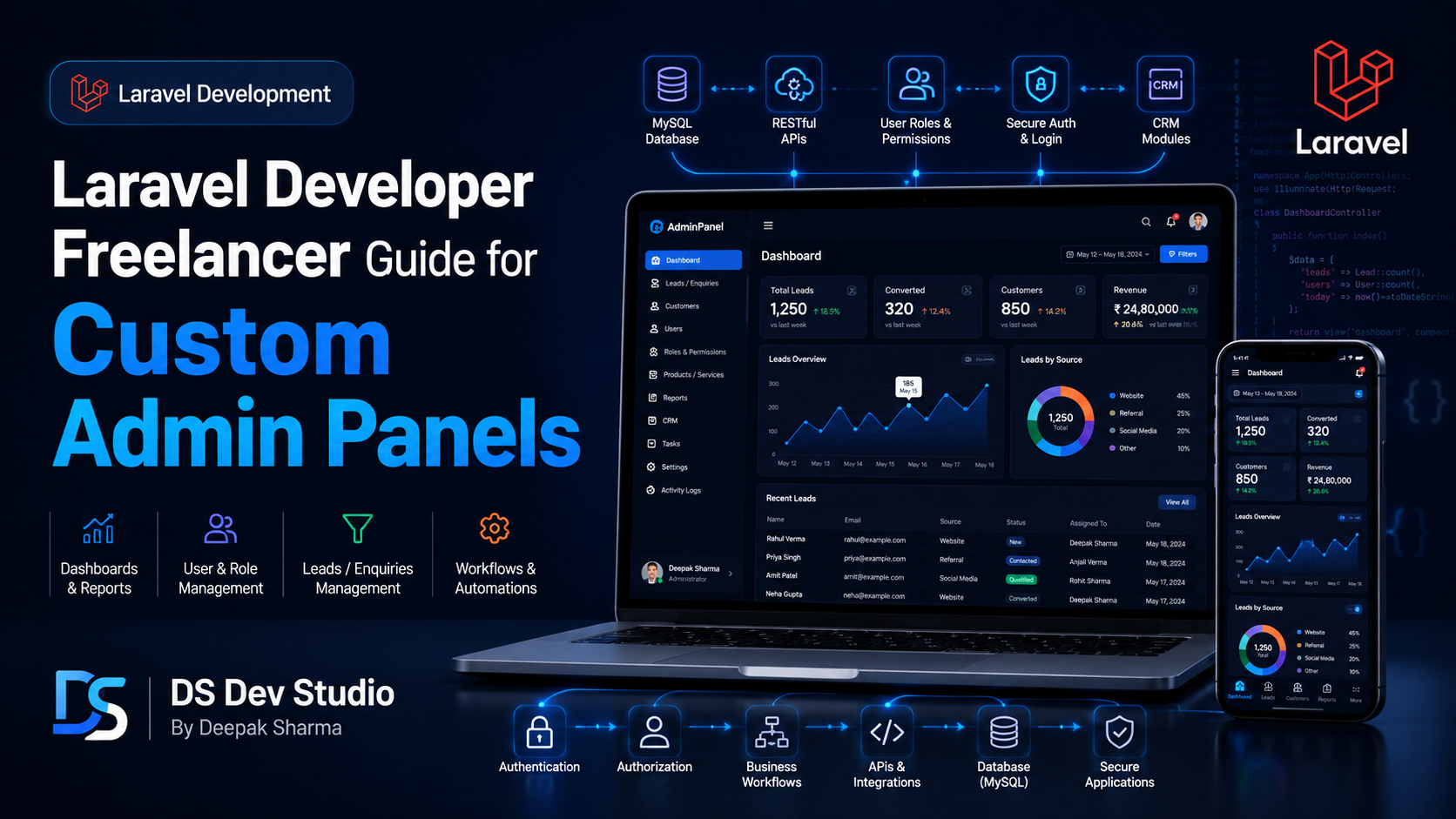
A Laravel Developer Freelancer helps businesses build custom admin panels, dashboards, CRM modules, database-driven systems, backend workflows, APIs, and secure web applications. For many businesses, a normal website is not enough after a certain point. They need a private system where team members can manage enquiries, customers, services, users, reports, content, bookings, orders, or internal records. This is where a custom Laravel admin panel becomes useful.
Laravel is a PHP framework used for building structured backend applications. It gives developers a clean way to manage routing, controllers, models, database migrations, validation, authentication, APIs, and security practices. A Laravel Developer Freelancer can use these features to build admin panels that are more organized than random PHP scripts and more flexible than basic ready-made tools.
For small businesses, service companies, startups, consultants, agencies, and growing teams, a custom admin panel can save time and reduce manual work. Instead of tracking leads in spreadsheets, checking emails manually, or updating data in different places, a business can manage important records from one dashboard. This improves workflow, reporting, and team coordination.
DS Dev Studio by Deepak Sharma helps businesses with Laravel development, PHP backend systems, custom admin panels, CRM modules, MySQL database workflows, API integration, React frontend development, responsive business websites, WordPress customization, and custom web applications. This guide explains how a Laravel Developer Freelancer can help build custom admin panels and what businesses should check before hiring one.
What does a Laravel Developer Freelancer do?
A Laravel Developer Freelancer builds backend systems and web applications using the Laravel framework. The work can include admin panels, dashboards, APIs, authentication systems, database workflows, CRM modules, user management, reporting tools, file uploads, form processing, and business automation features. Laravel is especially useful when the project needs clean architecture and long-term maintainability.
For a custom admin panel, the Laravel developer usually creates private login access, user roles, database tables, CRUD modules, dashboard cards, search filters, forms, reports, and backend logic. CRUD means create, read, update, and delete. Most admin panels are built around these actions because businesses need to add, view, edit, and manage records.
A good Backend Developer Freelancer should also understand the business workflow behind the admin panel. For example, a lead management admin panel needs lead status, follow-up notes, assigned users, source tracking, enquiry details, filters, and reports. A booking admin panel needs booking dates, customer details, service type, availability, status, and notifications. Laravel development should be planned around these real business requirements.
Why Laravel is useful for custom admin panels
Laravel is useful for custom admin panels because it provides structure. A custom admin panel can become difficult to maintain if the backend code is not organized properly. Laravel helps separate routes, controllers, models, views, requests, middleware, migrations, and business logic. This makes the project easier to improve later.
Laravel also supports important backend features such as authentication, validation, database migrations, API routes, file storage, email notifications, queues, and access control. These features are useful for admin panels where data needs to be managed securely and reliably. A Laravel Developer Freelancer can use these tools to build a system that is cleaner and safer than a quick unstructured backend.
Businesses choose Laravel when they need more than a simple form or static website. If the project includes multiple modules, user roles, reports, APIs, database relationships, and future feature expansion, Laravel can provide a better technical foundation. It is also useful when the business wants a custom system instead of adjusting itself around a ready-made tool.
What is a custom admin panel?
A custom admin panel is a private dashboard where a business can manage website or application data. It is usually protected by login access and built for internal users such as admins, managers, sales teams, support teams, or staff members. The admin panel allows users to manage records without touching code or database tables directly.
For example, a business website may collect enquiries through a contact form. A custom admin panel can show all enquiries in a table, allow the team to update status, add notes, assign users, filter by source, and export data. This turns a simple form into a practical lead management workflow.
Custom admin panels can manage many types of data, including leads, customers, services, blogs, projects, products, bookings, orders, testimonials, users, reports, documents, support tickets, and settings. The exact modules depend on the business requirement. A Custom Admin Panel Developer should build only what the business actually needs instead of adding unnecessary features.
When should you hire a Laravel Developer for an admin panel?
You should hire a Laravel Developer Freelancer when your business needs a structured backend system to manage data, users, workflows, and reports. If you are only building a simple static website, Laravel may not be necessary. But if your project needs login access, database storage, admin controls, CRM workflows, APIs, or multiple modules, Laravel can be a strong choice.
Businesses often hire Laravel developers when spreadsheets and email-based workflows are no longer enough. If your team is missing follow-ups, losing enquiry records, manually updating data, or switching between too many tools, a custom admin panel can make the process more organized.
- Hire a Laravel developer when your business needs a custom admin panel.
- Hire one when leads or enquiries need database storage.
- Hire one when you need user login and role-based access.
- Hire one when your team needs dashboards, filters, reports, and exports.
- Hire one when you need a CRM module or customer management system.
- Hire one when your website needs backend APIs.
- Hire one when your project needs structured PHP backend development.
- Hire one when future scalability and maintainability matter.
Common features of a Laravel admin panel
A Laravel admin panel can include different features based on business needs. Most admin panels start with login access, dashboard overview, user management, CRUD modules, search, filters, form validation, reports, and settings. More advanced panels may include APIs, file uploads, role-based permissions, email notifications, audit logs, charts, and export options.
The most important thing is to build features around real workflows. A lead management system should focus on lead capture, status tracking, follow-up, notes, and reports. A content admin panel should focus on managing blogs, pages, services, projects, and media. A booking admin panel should focus on dates, availability, customers, services, and status updates.
A Laravel Developer Freelancer should first understand the business process and then decide the required modules. This prevents unnecessary complexity and keeps the admin panel easier to use.
- Secure admin login.
- Dashboard cards and summary data.
- User management and role-based access.
- CRUD modules for business records.
- Search, filters, sorting, and pagination.
- Form validation and error handling.
- File upload and media management.
- Email notifications and alerts.
- Reports, charts, and export options.
- API integration with frontend websites or third-party tools.
Laravel admin panel for lead management
Lead management is one of the most useful use cases for a custom Laravel admin panel. Many businesses receive enquiries from websites, landing pages, social campaigns, phone calls, and ads. If these leads are not organized properly, follow-ups can be missed. A lead management admin panel helps keep everything in one place.
A Laravel lead management system can include lead capture forms, lead tables, status updates, follow-up dates, assigned team members, source tracking, notes, filters, and reports. The admin can view all leads, sort them by status, search by name or phone number, and update follow-up progress.
For service-based businesses, this can improve daily operations. A visitor submits an enquiry from the website. The data enters the Laravel backend. The admin panel shows the lead. The team updates status and adds notes. This creates a smoother process than managing enquiries only through email or spreadsheets.
Laravel admin panel for CRM modules
A CRM module helps businesses manage customer relationships. A Laravel Developer Freelancer can build custom CRM modules for small businesses that need lead tracking, customer records, follow-up management, notes, task assignment, and reporting. This is useful when ready-made CRM tools feel too expensive, too complex, or not aligned with the business process.
A custom CRM can include customers, leads, deals, services, follow-up dates, status labels, communication notes, assigned users, and activity history. A manager can track what is happening, while team members can update their assigned records. Laravel can handle the backend logic, database relationships, access control, and reports.
The benefit of a custom CRM is flexibility. The system can be designed around the business process instead of forcing the business to follow a fixed software structure. DS Dev Studio can help create CRM modules that match real operational needs.
Laravel admin panel for website content management
Some businesses need a custom admin panel to manage website content. This can include services, blogs, projects, testimonials, FAQs, team members, homepage banners, landing pages, and portfolio items. Instead of editing code for every content change, the admin panel allows the business to manage content from a private dashboard.
A Laravel content admin panel can be useful when the business wants more customization than WordPress or when the website is built with React frontend and needs a custom backend for content. The frontend can fetch content from Laravel APIs, and the admin panel can manage the data.
This approach is useful for custom business websites, SaaS-style websites, service portals, directories, dashboards, and web applications. A Custom Web Application Developer can decide whether Laravel content management is suitable or whether WordPress is a better fit for the project.
User roles and permissions in Laravel admin panels
User roles are important when multiple people use an admin panel. Not every user should have the same access. An admin may manage everything. A manager may view reports and assign leads. A staff member may only update assigned records. A content editor may only manage blogs or service pages.
Laravel can support role-based access through middleware, policies, gates, permissions, and structured access logic. A Backend Developer Freelancer can create user roles based on the business requirement. This protects sensitive data and keeps the system organized.
Role planning should happen before development starts. The business should explain who will use the system and what each person should be allowed to do. This helps the developer create proper access control from the beginning.
MySQL database planning for Laravel systems
Laravel admin panels usually depend on a database, and MySQL is a common choice. A MySQL Database Developer should plan the database carefully because it affects performance, reporting, data quality, and future updates. Good database design is one of the most important parts of backend development.
A lead management system may need tables for leads, users, statuses, notes, sources, follow-ups, and activities. A booking system may need customers, bookings, services, availability, payments, and notifications. A content system may need pages, posts, categories, tags, media, authors, and metadata.
Laravel migrations help manage database structure in a controlled way. This makes it easier to update the database as the application grows. A Laravel Developer Freelancer should use clean database planning instead of creating random fields without long-term thinking.
APIs in Laravel admin panel projects
Laravel is also useful for API development. APIs allow the backend to communicate with frontend websites, mobile apps, dashboards, third-party tools, or external systems. For example, a React frontend can use Laravel APIs to submit forms, fetch records, update lead status, or show dashboard data.
An API Integration Developer can also connect Laravel with tools such as email services, SMS platforms, WhatsApp APIs, payment systems, analytics tools, Google Sheets, CRM platforms, and marketing tools. These integrations can reduce manual work and improve business workflows.
APIs should be built with validation, authentication, error handling, and clear response formats. A weak API can create data problems or security risks. A Laravel Developer Freelancer should build APIs that are reliable and suitable for future expansion.
Laravel and React for modern admin panels
Laravel can be used with React to build modern admin panels. Laravel can handle the backend, database, APIs, authentication, and business logic, while React can handle the frontend interface with reusable components, tables, filters, forms, charts, and dashboard sections.
This combination is useful when the admin panel needs a more interactive and dynamic user experience. React can make dashboard screens smoother, while Laravel keeps the backend structured and secure. A Full Stack Web Developer Freelancer can handle both sides if the project scope is suitable.
For example, a Laravel backend can expose APIs for leads, customers, users, and reports. A React frontend can show those records in tables, filters, charts, and forms. This setup is useful for custom CRM systems, dashboards, and business web applications.
Security basics in Laravel admin panels
Security is important for admin panels because they manage private business data. Laravel provides useful tools for secure authentication, validation, CSRF protection, password hashing, middleware, and access control. However, the developer still needs to implement security carefully based on the project requirement.
A secure admin panel should validate all form inputs, protect restricted routes, control user access, handle file uploads carefully, avoid exposing sensitive errors, and protect database operations. If the admin panel stores leads, customer details, business notes, or internal records, security should not be ignored.
A Laravel Developer Freelancer should discuss security basics before development. Businesses do not need to know every technical detail, but they should make sure the developer understands authentication, roles, validation, and data protection.
Reports and dashboards in Laravel admin panels
Dashboards help businesses understand what is happening in the system. A Laravel admin panel can include dashboard cards, charts, reports, filtered tables, status counts, monthly summaries, recent activity, and export options. These reports help managers make better decisions.
For example, a lead dashboard can show total leads, new leads, contacted leads, converted leads, pending follow-ups, lead sources, and monthly enquiry count. A booking dashboard can show upcoming bookings, completed bookings, cancelled bookings, revenue summaries, and customer activity.
Reports should be useful, not just decorative. A Business Website Developer or Backend Developer Freelancer should understand what numbers the business actually needs. The dashboard should help with real decisions and daily workflow.
Laravel vs plain PHP vs CodeIgniter
Laravel, plain PHP, and CodeIgniter can all be used for backend development, but they fit different situations. Plain PHP can be useful for small scripts, simple forms, or lightweight backend tasks. CodeIgniter can be useful for lightweight PHP applications and maintaining existing CodeIgniter projects. Laravel is often better for structured applications with multiple modules and long-term growth.
A Laravel Developer Freelancer may be the right choice when your admin panel needs authentication, role access, APIs, migrations, reports, database relationships, and organized code structure. A CodeIgniter Developer Freelancer may be better if your existing system is already built in CodeIgniter. A PHP Developer Freelancer may be enough for smaller backend tasks.
The best choice depends on the project requirement, timeline, budget, existing system, hosting setup, and future plans. A good developer should explain the difference and recommend the right option honestly.
Responsive UI for admin panels
Admin panels also need clean and responsive UI. Many admin panels are used mainly on desktop, but the layout should still be readable and usable across common screen sizes. Tables, forms, filters, buttons, sidebars, modals, and dashboard cards should be easy to use.
A responsive admin panel helps users manage work more comfortably. For example, a manager may quickly check leads from a tablet or mobile device. A staff member may update a status while away from the office. The layout should not break or become impossible to use.
A Custom Admin Panel Developer should design the interface around usability. The goal is not only to show data, but to make data easy to manage. Clean tables, proper spacing, clear buttons, and simple forms improve daily workflow.
What to prepare before hiring a Laravel Developer Freelancer
Before hiring a Laravel developer, prepare your business workflow clearly. Explain what problem the admin panel should solve, what data should be stored, who will use the system, what roles are needed, what reports are required, and whether any integrations are needed. Clear workflow planning helps the developer build the right structure.
You do not need a technical document in the beginning, but you should describe your process. For example, if you need lead management, explain how leads are collected, what status labels are used, who follows up, what notes are required, and what reports you want. This helps the developer plan database tables, modules, and dashboard screens.
- Prepare the main goal of the admin panel.
- List the modules you need, such as leads, customers, users, reports, or content.
- Explain what data each module should store.
- Decide user roles such as admin, manager, staff, or editor.
- Share current workflow, spreadsheets, forms, or existing tools.
- Clarify whether APIs or third-party integrations are needed.
- Prepare dashboard and report requirements.
- Discuss hosting, deployment, timeline, revisions, and support.
What to check before hiring a Laravel Developer
Before you hire Laravel Developer support, check whether the developer understands backend architecture, MySQL database design, authentication, role-based access, API development, form validation, security basics, admin panel UI, and business workflows. Laravel knowledge alone is not enough if the developer does not understand the practical use case.
Ask about previous Laravel projects, admin panels, CRM modules, dashboards, APIs, database planning, user roles, reports, and deployment experience. If the developer cannot show private backend systems publicly, ask them to explain the modules and workflow they have built.
Also discuss post-launch support. Custom admin panels need maintenance, bug fixes, updates, backups, and new features over time. A good Laravel Developer Freelancer should be clear about support after delivery.
Common mistakes in Laravel admin panel projects
One common mistake is starting development without defining the workflow. If the business does not explain modules, user roles, data fields, and reports clearly, the admin panel may not match real needs. A Laravel admin panel should be built around the process, not assumptions.
Another mistake is adding too many features in the first version. A complex admin panel can become difficult to launch if everything is included from day one. It is better to start with the core workflow, launch the first version, and then add advanced features based on actual usage.
Other mistakes include poor database planning, weak access control, no validation, unorganized UI, slow dashboard tables, missing pagination, and no maintenance plan. A custom admin panel is a business system, so it should be planned carefully.
How DS Dev Studio can help
DS Dev Studio by Deepak Sharma can help businesses with Laravel development, custom admin panels, CRM modules, dashboards, PHP backend systems, MySQL database design, API development, API integrations, user roles, reports, and custom web applications. The focus is on building practical backend systems that support real business workflows.
Deepak Sharma Web Developer work includes Laravel, PHP, CodeIgniter, MySQL, React frontend development, responsive websites, admin dashboards, contact forms, CRM modules, WordPress customization, API integration, and full stack web development. This is useful for businesses that need both backend functionality and clean frontend interfaces.
If you want to hire Laravel Developer support for a custom admin panel, DS Dev Studio can help plan the database, create modules, build dashboard screens, add authentication, manage user roles, connect APIs, create reports, and prepare the system for future improvements. The project can be built around your actual business process instead of a generic template.
Conclusion
A Laravel Developer Freelancer can help businesses build custom admin panels that manage leads, customers, users, content, reports, APIs, and backend workflows. Laravel is useful when a project needs structure, authentication, role-based access, validation, MySQL database planning, and long-term maintainability. A custom admin panel can reduce manual work, organize business data, improve follow-up, and give teams better control over daily operations. DS Dev Studio by Deepak Sharma can help with Laravel development, PHP backend systems, CRM modules, dashboards, API integrations, MySQL databases, React frontend interfaces, and custom web applications. With the right planning and Laravel development approach, a business admin panel can become a practical system that supports workflow, data management, and future growth.
Useful internal links
Frequently asked questions
Can I hire Deepak Sharma as a Laravel Developer Freelancer?+
Yes. You can hire Deepak Sharma for Laravel development, custom admin panels, CRM modules, dashboards, MySQL database systems, APIs, PHP backend development, user roles, reports, and custom web applications.
Why should I use Laravel for a custom admin panel?+
Laravel is useful for custom admin panels because it provides structured backend development, authentication, validation, database migrations, APIs, role access, security basics, and maintainable code organization.
Can DS Dev Studio build CRM modules with Laravel?+
Yes. DS Dev Studio can build Laravel CRM modules for leads, customers, follow-ups, status tracking, notes, assigned users, reports, filters, and dashboard summaries.
What features can a Laravel admin panel include?+
A Laravel admin panel can include login, user roles, dashboard cards, CRUD modules, search, filters, reports, file uploads, email notifications, API integrations, lead management, content management, and export options.
Should I choose Laravel, plain PHP, or CodeIgniter?+
Choose Laravel for structured and scalable backend systems, plain PHP for smaller backend tasks, and CodeIgniter when you need a lightweight PHP framework or support for an existing CodeIgniter project.