MySQL Database Developer Guide for CRM and Admin Panel Projects
A practical guide for businesses that want to hire a MySQL Database Developer for CRM systems, admin panels, lead tracking, customer records, reports, API integration, PHP backends, Laravel systems, and CodeIgniter projects.

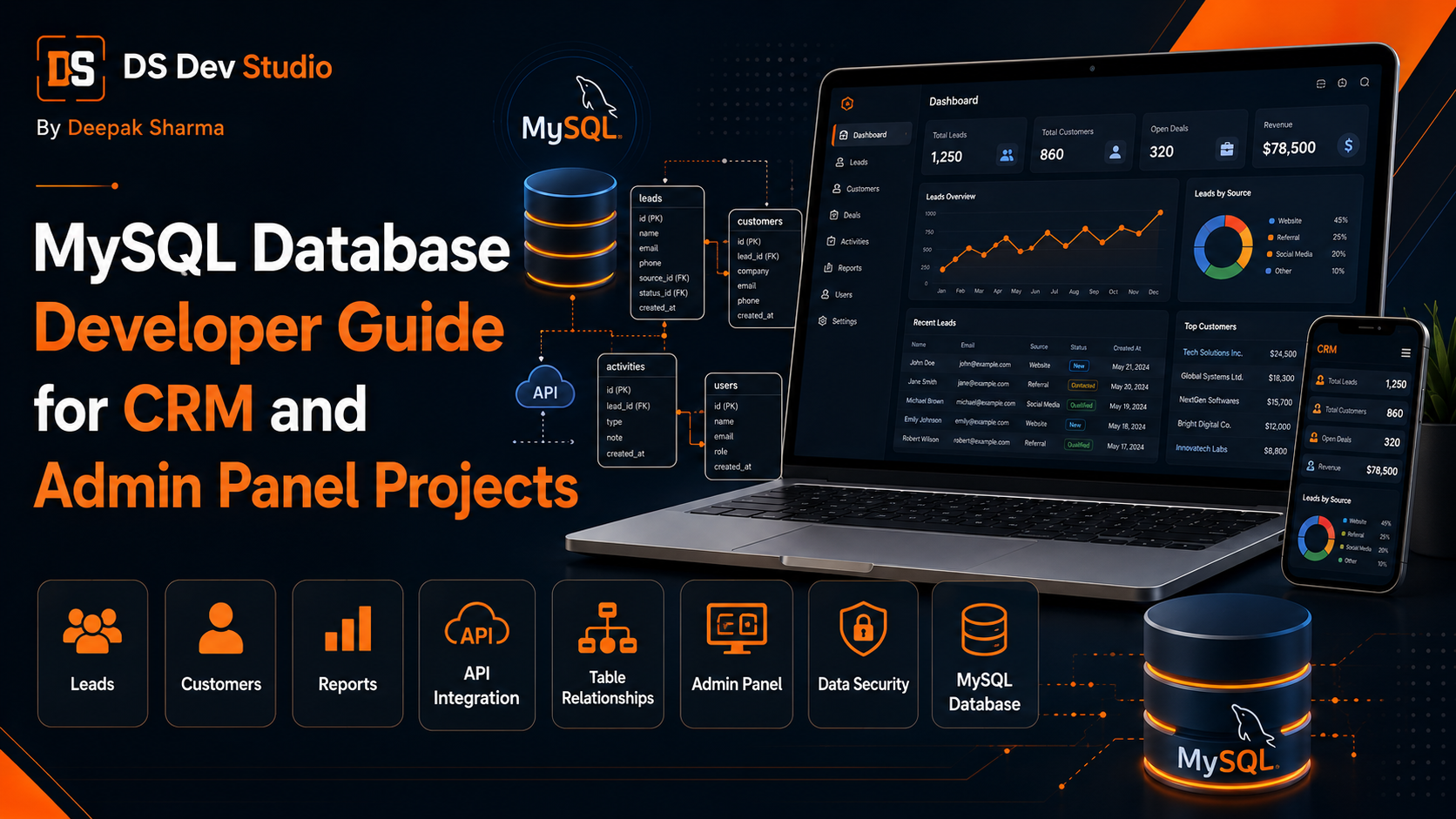
A MySQL Database Developer helps businesses plan, build, improve, and maintain database structures for CRM systems, admin panels, lead tracking tools, customer records, reports, dashboards, and custom web applications. A CRM or admin panel is only useful when the data behind it is organized properly. If the database is poorly planned, the system may become slow, confusing, difficult to update, and hard to scale as the business grows.
MySQL is commonly used in PHP business applications, Laravel projects, CodeIgniter systems, custom admin panels, CRM dashboards, website form storage, and internal management tools. It helps store data such as leads, customers, users, services, follow-ups, notes, reports, files, settings, and activity logs. A skilled MySQL Database Developer can design tables and relationships so the application works smoothly.
Many businesses focus first on dashboard design or frontend features, but database planning should happen before development starts. A beautiful admin panel can still fail if the database does not support the workflow. For example, if leads, customers, notes, statuses, and follow-ups are not connected properly, reports will be inaccurate and users will struggle to manage records.
DS Dev Studio by Deepak Sharma helps businesses with MySQL database development, CRM web applications, admin panels, PHP backend systems, Laravel development, CodeIgniter projects, React dashboards, API integration, contact forms, lead tracking systems, customer record management, and custom web applications. This guide explains how a MySQL Database Developer can support CRM and admin panel projects.
What does a MySQL Database Developer do?
A MySQL Database Developer plans and manages the database layer of a web application. The work can include table design, column planning, relationships, indexes, constraints, queries, performance optimization, data cleanup, migrations, reports, backups, and database integration with backend systems.
For CRM and admin panel projects, the developer needs to understand how business data flows. Where do leads come from? What customer information must be stored? Which users need access? What reports are required? Which fields should be searchable? How should follow-ups connect with leads? These questions shape the database design.
A Backend Developer Freelancer or Full Stack Web Developer Freelancer may also handle MySQL work, but for larger CRM and admin panel systems, database planning deserves special attention. A clean database makes the backend easier to build, the frontend easier to use, and future features easier to add.
Why MySQL matters in CRM and admin panel projects
MySQL matters because CRM and admin panel projects depend heavily on structured data. A CRM system manages leads, customers, follow-ups, notes, statuses, users, sources, and reports. An admin panel may manage blogs, services, projects, testimonials, bookings, enquiries, files, and dashboard summaries. All of this data needs a reliable database structure.
If the database is planned correctly, users can search records quickly, filter reports, view customer history, update statuses, and generate useful dashboard data. If the database is not planned correctly, even simple actions can become difficult. For example, showing all pending follow-ups may become slow or inaccurate if follow-up records are not connected properly.
MySQL also supports business growth. A small system may start with one contact form and one lead table. Later, it may need customer profiles, user roles, follow-up records, activity logs, reports, file uploads, API integrations, and dashboard charts. A good database structure can support this growth more easily.
Database planning before CRM development
Database planning should happen before CRM development starts. A CRM Web Application Developer should first define the modules, fields, relationships, user roles, workflow steps, and reports. Once these are clear, the MySQL database can be designed around real business operations.
For example, a lead tracking CRM may need modules for users, roles, leads, services, sources, statuses, notes, follow-ups, customers, files, and reports. Each module needs its own fields. Leads may connect to services, users, statuses, notes, and follow-ups. Customers may connect to projects, payments, documents, and communication history.
Skipping this planning step can create problems later. If the database is built only for the first visible screen, adding future reports, filters, and relationships may become difficult. A MySQL Database Developer should plan for the current requirement and reasonable future growth.
Common tables in a CRM database
A CRM database usually contains multiple connected tables. Each table stores one type of information. Keeping data separated properly makes the system cleaner and easier to manage. For example, users should be stored in one table, leads in another table, and follow-up records in another table.
A common mistake is storing too much information in one table. This may look easy at first, but it becomes difficult when the system grows. A lead can have many notes and many follow-ups, so notes and follow-ups should usually be stored in separate related tables instead of repeated inside one lead record.
- Users table for admin, manager, staff, and editor accounts.
- Roles table for access levels and permissions.
- Leads table for new enquiries and service requests.
- Customers table for converted leads and active clients.
- Services table for business offerings or enquiry categories.
- Sources table for website, ads, referrals, calls, WhatsApp, and social media.
- Statuses table for lead stages such as new, contacted, follow-up, converted, and closed.
- Notes table for communication history and internal updates.
- Follow-ups table for reminders, calls, meetings, and next actions.
- Files table for uploaded documents, screenshots, invoices, or attachments.
- Activity logs table for tracking user actions.
- Settings table for system configuration and business details.
Common tables in an admin panel database
An admin panel database depends on what the panel manages. A website admin panel may manage services, blogs, projects, testimonials, FAQs, contact submissions, users, and settings. A business admin dashboard may manage leads, customers, reports, bookings, orders, tasks, or internal records.
The database should match the admin panel modules. If the admin panel has a blog module, it may need tables for posts, categories, tags, authors, images, and SEO metadata. If it has a project module, it may need project title, description, images, category, technology stack, status, and display order.
- Admin users table for login and access control.
- Pages table for website page content where needed.
- Services table for business service records.
- Blogs table for articles, categories, and metadata.
- Projects table for portfolio or case study records.
- Testimonials table for customer reviews.
- FAQs table for question and answer sections.
- Contact submissions table for website enquiries.
- Media table for images, files, and uploads.
- Reports table or report views for dashboard summaries.
- Settings table for website and business configuration.
Understanding database relationships
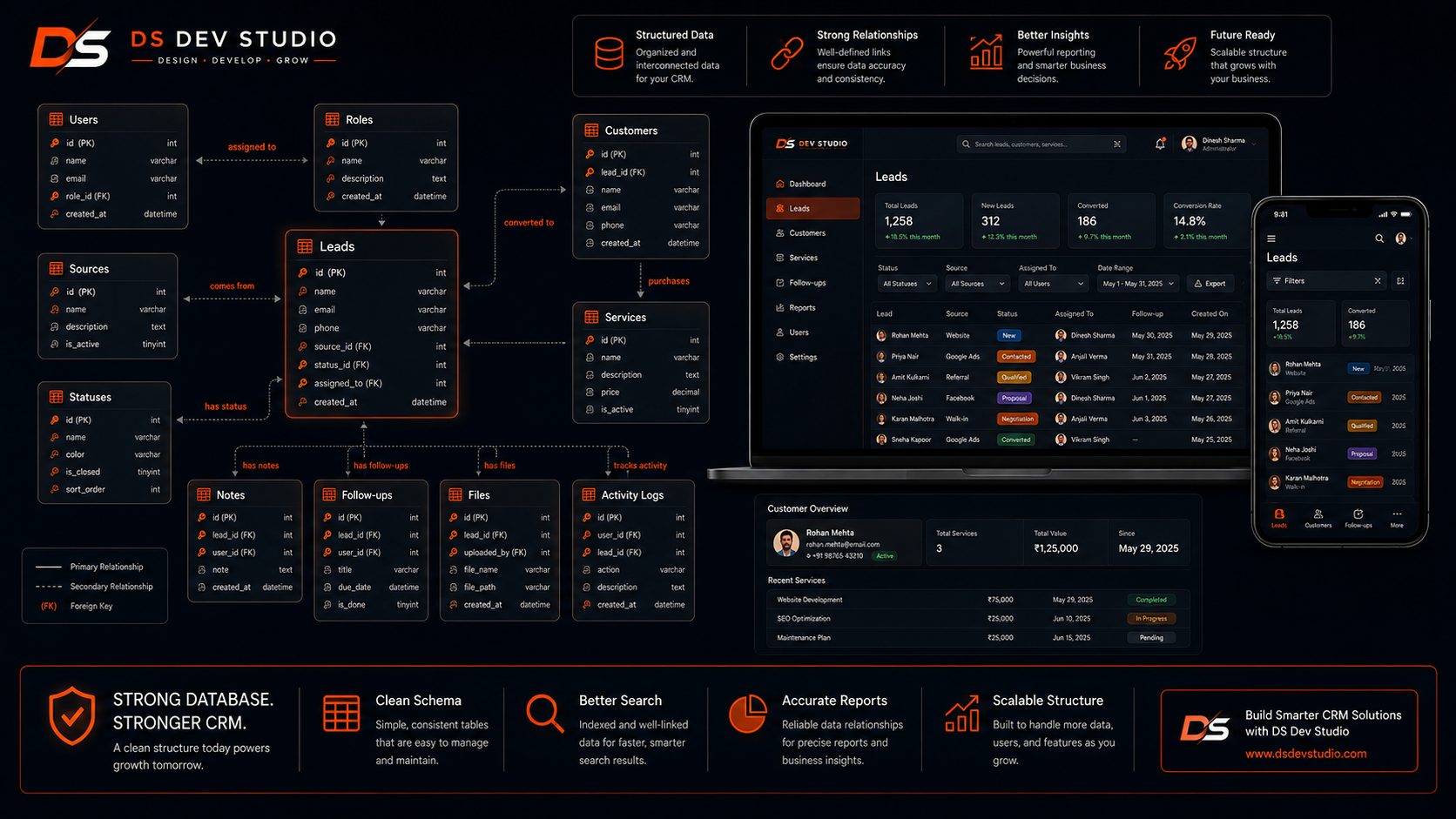
Database relationships define how tables connect with each other. This is very important in CRM and admin panel projects. A lead may belong to one service, one source, one status, and one assigned user. A lead may also have many notes and many follow-ups. These relationships should be planned clearly.
Common relationship types include one-to-one, one-to-many, and many-to-many. A user may have many assigned leads. A lead may have many notes. A blog post may belong to one category. A project may have many technologies. A customer may have many service records.
A MySQL Database Developer should design these relationships so the backend can fetch and update data correctly. Laravel and CodeIgniter can work with these relationships through models, queries, and APIs. React dashboards can then display the connected data clearly.
Primary keys and foreign keys
Primary keys and foreign keys are important for clean database structure. A primary key uniquely identifies each record in a table. For example, each lead has its own lead ID. Each customer has its own customer ID. Each user has a user ID.
A foreign key connects one table to another. For example, a lead may have a service_id that connects it to the services table. A follow-up may have a lead_id that connects it to the leads table. This helps the system understand which records belong together.
Using proper keys helps maintain data integrity. It prevents disconnected records and makes queries more accurate. In CRM systems, this is important because records like notes, follow-ups, and files should remain connected with the correct lead or customer.
Database normalization for cleaner data
Database normalization means organizing data to reduce duplication and improve consistency. Instead of repeating the same service name in every lead record, the database can store services in a services table and connect leads through service_id. This keeps the data cleaner.
Normalization is useful in CRM and admin panel projects because repeated data can create errors. If a service name changes, updating hundreds of records manually is not practical. With a separate services table, the name can be updated in one place.
However, the database should also remain practical. Overcomplicating the structure can make development slower. A MySQL Database Developer should balance clean structure with simple business use. The goal is a database that is reliable, understandable, and easy to maintain.
Lead tracking database design
Lead tracking is one of the most common CRM features. A lead tracking database should store important enquiry details and support follow-up management. A basic lead record may include name, phone, email, service, source, message, status, assigned user, created date, and last updated date.
Advanced lead tracking may include follow-up dates, notes, priority, location, campaign source, page URL, UTM fields, budget, timeline, and conversion status. These fields help the business understand lead quality and follow-up requirements.
A CRM Web Application Developer can use this database structure to build lead tables, filters, follow-up reminders, status pipelines, and reports. A React Admin Dashboard Developer can display the data in clean tables and dashboard cards.
Customer record database design
Customer record design is important after a lead becomes a customer. A customer profile may include name, phone, email, company, service history, project details, notes, documents, payment information, support status, and communication history. The exact fields depend on the business.
A customer may have many related records. For example, one customer may have multiple projects, many notes, many files, many invoices, and multiple follow-ups. These should be stored in connected tables so the dashboard can show a complete customer history.
Good customer record design helps teams provide better service. When a customer contacts again, the business can open the profile and view past details instead of searching through emails, WhatsApp chats, or spreadsheets.
User roles and permission tables
User roles and permissions are important in CRM and admin panel projects. Not every user should have access to every feature. A business owner may need full access, while staff may only manage assigned leads. A content editor may only manage blogs and service pages. A manager may view reports but not delete records.
The database may need tables for users, roles, permissions, and role-permission mapping. This allows the backend to check what each user is allowed to do. The frontend dashboard can then show relevant modules based on the user’s role.
Security should not depend only on hiding buttons in React or frontend screens. Permission checks should happen on the backend also. A Backend Developer Freelancer should build proper access logic using PHP, Laravel, CodeIgniter, or the selected backend system.
Reports and analytics database planning
Reports are useful only when the database stores data in a report-friendly way. A CRM may need reports for monthly leads, source-wise leads, service-wise enquiries, user-wise follow-ups, converted customers, pending leads, and campaign performance. The database should support these queries.
For example, if the business wants to know how many leads came from each source, the leads table should store source information clearly. If the business wants service-wise reports, each lead should connect to a service. If user performance matters, assigned user and activity records should be stored.
A MySQL Database Developer should ask what reports are needed before designing tables. Reports should not be treated as an afterthought. When reports are planned early, the admin dashboard can show useful business insights more easily.
Indexes for faster search and filters
Indexes help improve database performance when users search and filter records. CRM and admin panel systems often need filters by status, date, service, source, assigned user, customer name, phone number, or email. If indexes are not planned properly, tables may become slow as data grows.
For example, a leads table may need indexes on status_id, service_id, source_id, assigned_user_id, created_at, and phone or email depending on search needs. A follow-ups table may need indexes on lead_id, follow_up_date, and assigned_user_id.
Indexes should be used carefully. Too few indexes can make search slow. Too many unnecessary indexes can affect write performance and maintenance. A MySQL Database Developer should select indexes based on real query patterns.
Query optimization for CRM and admin panels
Query optimization is important because admin panels often load records, filters, and reports throughout the day. A slow query can make the dashboard feel heavy. If users have to wait too long for lead tables or reports, they may stop using the system properly.
Optimized queries fetch only the required data, use proper indexes, avoid unnecessary joins, apply pagination, and reduce repeated calculations. For reports, heavy calculations may need caching, summary tables, or optimized date filters depending on system size.
A Backend Developer Freelancer and MySQL Database Developer should work together on query performance. The frontend may look slow, but the real issue may be a heavy backend query or missing database index.
Pagination for large datasets
Pagination is important when CRM or admin panel tables contain many records. Loading thousands of leads, customers, or reports at once can slow the application. Pagination allows the system to load data in smaller groups, making the dashboard faster and easier to use.
Pagination can be handled on the backend and displayed on the frontend. For larger systems, backend pagination is usually better because the database sends only the records needed for the current page. React dashboards can then show page controls, result counts, and loading states.
Pagination should work with search and filters. If a user filters leads by status or source, the pagination should update correctly. A Full Stack Web Developer Freelancer can connect MySQL queries, backend APIs, and React tables into one smooth workflow.
API integration with MySQL databases
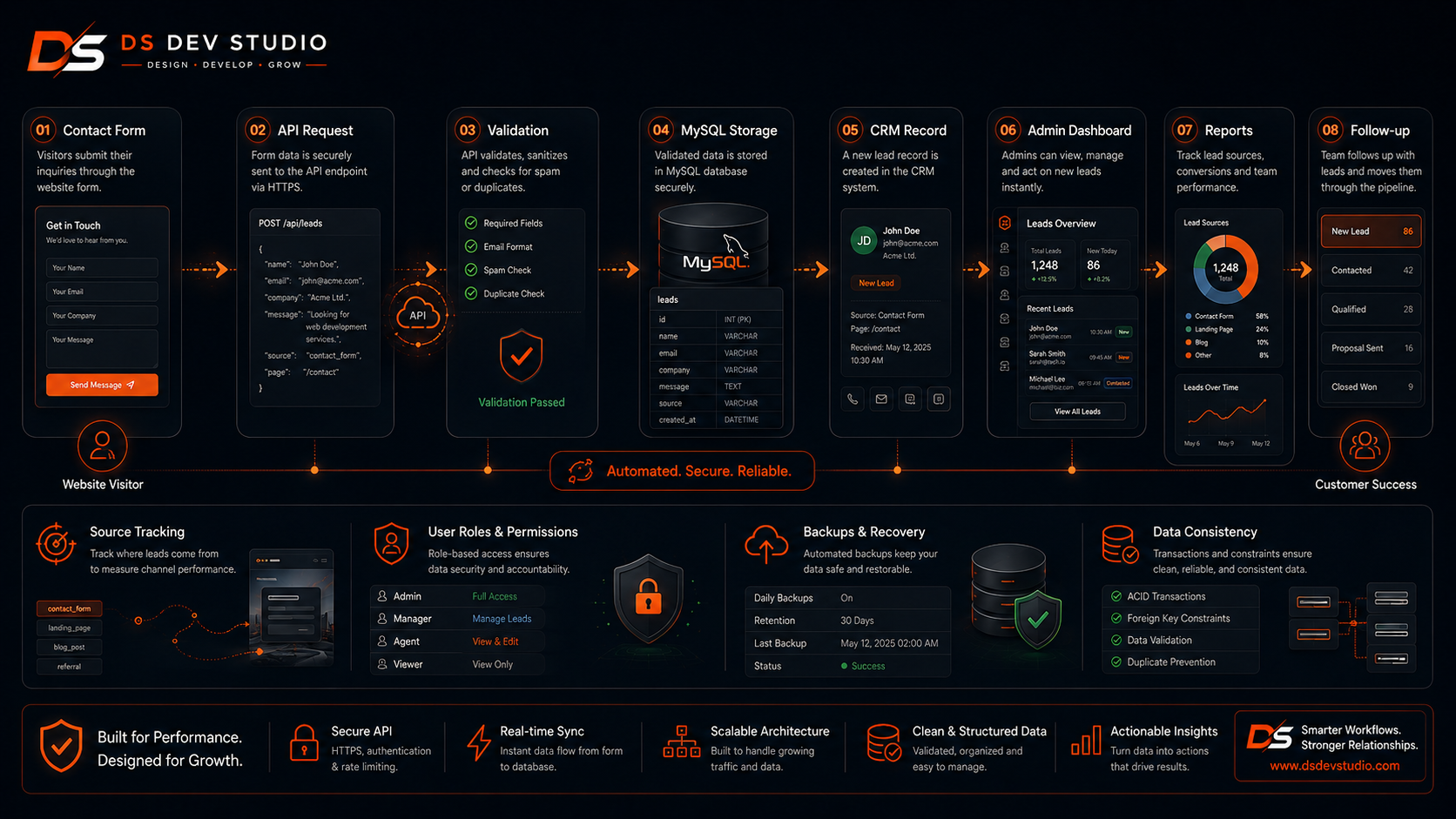
API integration allows frontend websites, React dashboards, contact forms, CRMs, and third-party tools to communicate with the MySQL database through a backend layer. The frontend should not connect directly to the database. Instead, APIs handle validation, security, business logic, and database queries.
For example, a React contact form can send lead data to a Laravel API. The Laravel backend validates the data and stores it in MySQL. A React admin dashboard can then fetch the lead records from the API and display them in a table. This creates a clean data flow.
An API Integration Developer can connect MySQL with PHP, Laravel, CodeIgniter, React, WordPress forms, CRMs, dashboards, Google Sheets, email tools, or third-party systems. API planning should include validation, authentication, error handling, and clear response messages.
MySQL with Laravel projects
Laravel works well with MySQL for CRM systems, admin panels, and custom business applications. A Laravel Developer Freelancer can use migrations, models, controllers, validation, and relationships to manage database-driven workflows. Laravel makes database structure easier to organize in larger projects.
For example, Laravel migrations can define tables for users, leads, customers, services, statuses, and follow-ups. Models can represent each table. Controllers can handle business logic. APIs can send data to React dashboards. This creates a structured backend system.
MySQL database planning still matters even with Laravel. Framework features help development, but they do not replace good database design. Tables, relationships, indexes, and report requirements should still be planned carefully.
MySQL with CodeIgniter projects
CodeIgniter is also commonly used with MySQL for lightweight PHP business applications, CRM systems, and admin panels. A CodeIgniter Developer Freelancer can build models, controllers, queries, forms, reports, and API endpoints that interact with the MySQL database.
Many existing PHP CRM systems use CodeIgniter and MySQL. These systems may need database cleanup, query optimization, new fields, new modules, improved reports, or API connections. A developer can improve the existing database structure carefully without breaking working features.
CodeIgniter and MySQL can be a practical combination when the business needs a lightweight backend system or wants to maintain an existing PHP application. Database structure should still be reviewed before adding new features.
MySQL with React admin dashboards
React admin dashboards usually connect with MySQL through backend APIs. React handles the interface, while PHP, Laravel, or CodeIgniter handles database communication. This separation keeps the system more secure and organized.
A React Admin Dashboard Developer can build tables, filters, forms, charts, and reports. The backend API sends data from MySQL to React. When a user updates a record, React sends the request to the backend, and the backend updates the database.
This setup is useful for CRM dashboards, lead tracking systems, customer management tools, admin panels, reporting dashboards, and custom web applications. A Full Stack Web Developer Freelancer can manage both frontend and backend connections.
Data validation and consistency
Data validation helps keep the database clean. Before saving records, the system should check required fields, email format, phone number format, valid dates, duplicate records, file types, and allowed status values. Validation should happen on both frontend and backend, but backend validation is essential.
Consistency is also important. If lead statuses are stored differently in different records, reports may become inaccurate. If phone numbers are saved in many formats, search may become difficult. If duplicate customer records are created, customer history may become confusing.
A MySQL Database Developer can support consistency through table design, constraints, unique keys, controlled status tables, and clean backend validation. Good data quality makes CRM and admin panel systems more reliable.
Database security basics
Database security is important because CRM and admin panel systems store business and customer information. The database may contain names, phone numbers, emails, service enquiries, notes, documents, user accounts, and internal records. This data should be protected.
Basic security practices include safe database queries, password hashing, controlled database access, input validation, role-based permissions, secure API endpoints, backups, and avoiding direct public access to the database. The frontend should never expose database credentials.
A Backend Developer Freelancer should use prepared statements or framework query builders to reduce SQL injection risk. User permissions should be handled properly so only authorized users can access sensitive data.
Backup and maintenance planning
Backup planning is important for any MySQL-based CRM or admin panel project. Business data is valuable, and losing it can create serious problems. A database should have a backup plan based on how frequently data changes and how important the system is.
Maintenance also includes checking slow queries, cleaning duplicate records, updating fields when business processes change, adding indexes, reviewing reports, and improving database structure as the application grows. A database is not a one-time setup. It needs care over time.
A MySQL Database Developer can help businesses plan backup routines, export options, data cleanup, and performance checks. This helps keep CRM and admin panel systems stable for long-term use.
Data migration from spreadsheets or old systems
Many businesses already have data in spreadsheets, old CRM systems, emails, or manual records before building a new CRM or admin panel. Data migration means moving this existing data into the new MySQL database. This should be done carefully to avoid duplicate, incomplete, or wrongly mapped records.
Before migration, data should be cleaned. Columns should be reviewed, duplicate records should be checked, missing values should be identified, and field mapping should be planned. For example, spreadsheet columns like name, phone, email, source, status, and notes should map to the correct database fields.
A MySQL Database Developer can help import data safely and test whether records appear correctly in the admin panel. Data migration should be treated as part of the project, not a last-minute task.
Common MySQL database mistakes to avoid
One common mistake is creating one large table for everything. This may seem simple at first, but it becomes difficult when the CRM needs notes, follow-ups, files, reports, and user assignments. Related data should be separated into proper tables.
Another mistake is ignoring indexes. A system may work fine with 100 records but become slow with 10,000 records if search and filters are not optimized. Index planning should match expected queries.
Other mistakes include weak naming conventions, duplicate data, no foreign keys, no validation rules, no backup plan, no activity logs, poor report planning, unsafe queries, unclear permissions, and no migration plan. A skilled MySQL Database Developer can help avoid these issues.
When should a business hire a MySQL Database Developer?
A business should hire a MySQL Database Developer when it needs a CRM system, admin panel, lead tracking dashboard, customer record system, reporting tool, API-connected backend, or custom web application that depends on structured data. If the project requires clean storage, search, filters, relationships, and reports, database planning is important.
You should also hire MySQL support when your current system is slow, reports are inaccurate, duplicate data is increasing, filters do not work properly, queries are heavy, or the old database structure is difficult to maintain. Improving the database can make the full application better.
- Hire a MySQL Database Developer when building a CRM system.
- Hire one when building a custom admin panel.
- Hire one when lead tracking and customer records need clean structure.
- Hire one when reports, filters, and dashboards depend on accurate data.
- Hire one when Laravel or CodeIgniter projects need database planning.
- Hire one when React dashboards need backend data support.
- Hire one when old databases need cleanup or optimization.
- Hire one when data migration from spreadsheets or old systems is required.
What to prepare before starting a MySQL database project
Before starting a MySQL database project, prepare the business workflow and required modules. Explain what data needs to be stored, who will use the system, what actions users will take, what reports are needed, and how the database will connect with frontend and backend systems.
Prepare sample fields for each module. For leads, fields may include name, phone, email, service, source, status, assigned user, follow-up date, and message. For customers, fields may include contact details, service history, notes, documents, and project information. For reports, define what numbers matter.
- List required modules such as leads, customers, users, services, reports, and settings.
- Define fields for each module.
- Explain relationships between records.
- Prepare user roles and access requirements.
- Share report requirements such as monthly leads, source-wise leads, and status reports.
- Clarify frontend needs such as React dashboard, admin panel, or website forms.
- Clarify backend technology such as PHP, Laravel, CodeIgniter, or custom API.
- Prepare old data if migration is required.
- Discuss backup, security, performance, hosting, and maintenance.
How DS Dev Studio can help
DS Dev Studio by Deepak Sharma can help businesses with MySQL database development for CRM and admin panel projects. Services can include database planning, table design, relationships, lead tracking structure, customer record structure, reports, query optimization, API integration, backend development, React dashboard connection, Laravel systems, CodeIgniter applications, and custom web applications.
Deepak Sharma Web Developer work includes MySQL, PHP, Laravel, CodeIgniter, ReactJS, HTML, CSS, JavaScript, APIs, frontend development, backend development, responsive UI, CRM systems, admin panels, business websites, and full stack web development. This is useful for businesses that need both database structure and application development support.
If you want to hire a MySQL Database Developer for CRM or admin panel projects, DS Dev Studio can help plan the database, create clean tables, connect backend APIs, build dashboard workflows, optimize reports, migrate old data, and prepare the system for long-term business use.
Conclusion
A MySQL Database Developer plays an important role in CRM and admin panel projects because the database controls how business data is stored, connected, searched, filtered, reported, and maintained. A strong database should have clean tables, proper relationships, primary keys, foreign keys, useful indexes, validation support, report-friendly structure, backup planning, and secure backend access. CRM systems need organized lead tracking, customer records, follow-ups, notes, users, sources, statuses, and reports. Admin panels need clean content, form, user, and dashboard data structures. DS Dev Studio by Deepak Sharma can help businesses with MySQL database development, CRM systems, admin panels, PHP backend workflows, Laravel and CodeIgniter applications, React dashboards, API integration, data migration, and custom web applications. With the right MySQL database planning, business systems become easier to manage, faster to use, and better prepared for long-term growth.
Useful internal links
Frequently asked questions
Can I hire Deepak Sharma as a MySQL Database Developer?+
Yes. You can hire Deepak Sharma for MySQL database development, CRM database planning, admin panel database structure, lead tracking systems, customer records, reports, API integration, Laravel systems, CodeIgniter projects, and custom web applications.
Why is MySQL important for CRM systems?+
MySQL is important because CRM systems need structured storage for leads, customers, users, notes, follow-ups, statuses, sources, reports, and activity records. A clean database makes the CRM easier to search, manage, and expand.
Can MySQL connect with React admin dashboards?+
Yes. React dashboards can connect with MySQL through backend APIs built in PHP, Laravel, CodeIgniter, or another backend system. React handles the interface, while the backend manages database communication.
Can DS Dev Studio improve an existing MySQL database?+
Yes. DS Dev Studio can review and improve existing MySQL databases by optimizing queries, cleaning table structure, adding indexes, improving relationships, fixing report issues, and supporting better CRM or admin panel performance.
What should I prepare before starting a CRM database project?+
You should prepare required modules, fields, user roles, workflow steps, reports, relationships, old data if migration is needed, backend technology preference, frontend dashboard needs, and future feature requirements.