React Admin Dashboard Developer Guide for Business Data Management
A practical guide for businesses that want to hire a React Admin Dashboard Developer for business data management, CRM dashboards, admin panels, API-connected systems, reports, filters, forms, and custom web applications.

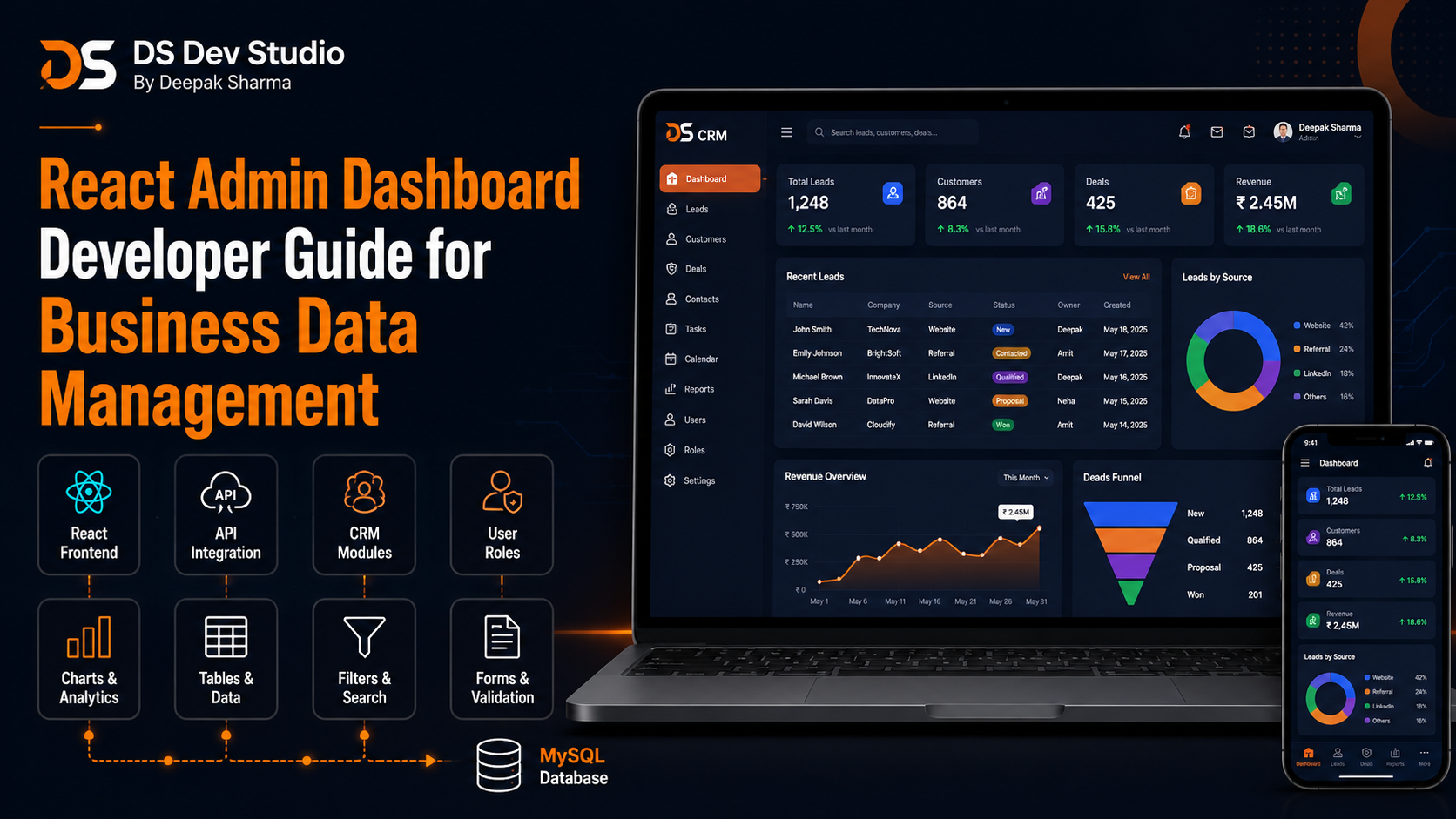
A React Admin Dashboard Developer helps businesses build modern dashboard interfaces for managing leads, customers, users, reports, services, bookings, projects, enquiries, and internal business data. As a business grows, data usually starts spreading across emails, spreadsheets, WhatsApp chats, website forms, CRM tools, and manual records. A custom admin dashboard can bring that information into one structured interface where teams can view, search, filter, update, and manage records more efficiently.
React is a strong frontend choice for admin dashboards because it supports reusable components, interactive tables, filters, forms, charts, modals, tabs, status badges, and API-connected data screens. A React dashboard can make business data easier to understand and easier to manage. Instead of using static reports or scattered sheets, a business can use a private dashboard built around its own workflow.
Business data management is not only about storing information. It is about making data useful. A good dashboard should help users find the right records, update statuses, check performance, manage follow-ups, view reports, and take quick action. A React Developer Freelancer can build the frontend interface, while a Backend Developer Freelancer can connect it with PHP, Laravel, CodeIgniter, MySQL, APIs, or CRM systems.
DS Dev Studio by Deepak Sharma helps businesses with React admin dashboard development, React frontend development, responsive UI, API integration, PHP backend systems, Laravel development, CodeIgniter projects, MySQL databases, CRM web applications, admin panels, business websites, and custom web applications. This guide explains how a React Admin Dashboard Developer can help businesses manage data more clearly and efficiently.
What does a React Admin Dashboard Developer do?
A React Admin Dashboard Developer builds the frontend interface of private dashboards and admin panels using React. The work can include dashboard layouts, sidebar navigation, top bars, cards, tables, filters, charts, forms, modals, tabs, profile pages, settings pages, role-based screens, API-connected data views, and responsive dashboard components.
An admin dashboard is different from a public website. A public website is designed for visitors, customers, and search visibility. An admin dashboard is designed for internal users such as business owners, managers, staff, sales teams, support teams, editors, or operators. The dashboard should help these users complete tasks quickly and accurately.
A good React Admin Dashboard Developer should understand both frontend development and business workflow. The developer should know how users will manage data, which actions are common, which filters are needed, which reports matter, and how the frontend will connect with backend APIs. Dashboard development is not only about attractive UI. It must support real operational use.
Why React is useful for admin dashboards
React is useful for admin dashboards because dashboards need many interactive and reusable UI elements. Tables, filters, cards, charts, forms, dropdowns, modals, tabs, menus, notifications, and status labels can all be built as reusable React components. These components can then be used across different dashboard pages.
For example, a lead table component can be used in a CRM dashboard. A user form component can be used in the user management module. A report card component can be used on the main dashboard and analytics pages. This component-based approach makes the dashboard easier to maintain and expand.
React also works well with APIs. The frontend can request data from a backend, show loading states, display records, update forms, submit changes, and show success or error messages. This makes React practical for business data management systems where the dashboard needs to communicate with a backend database or CRM.
What is business data management?
Business data management means collecting, organizing, storing, displaying, and updating important business information in a structured way. This can include leads, customers, users, enquiries, orders, appointments, services, tasks, projects, reports, payments, documents, and support requests.
Without a structured system, data often becomes scattered. Leads may stay in emails. Customer notes may stay in WhatsApp chats. Reports may stay in spreadsheets. Service requests may be handled manually. This creates confusion, missed follow-ups, duplicate work, and limited visibility for business owners.
A custom React admin dashboard can make business data easier to manage by showing records in organized modules. Users can search, filter, edit, assign, approve, export, and report data from one place. This is useful for small businesses, service companies, agencies, coaching institutes, clinics, consultants, startups, and internal business teams.
Common business use cases for React admin dashboards
React admin dashboards can be built for many business use cases. A service business may need lead tracking and customer management. A coaching institute may need student records and course enquiries. A clinic may need appointment requests. An agency may need project records and client communication. A web development business may need CRM modules, contact form submissions, and service enquiries.
The dashboard should be planned around the exact workflow. A generic dashboard with random cards and charts may look modern, but it may not help users. The best admin dashboard is one that shows the right information and supports the right actions.
- CRM dashboards for leads, customers, follow-ups, and notes.
- Admin panels for services, blogs, projects, FAQs, and testimonials.
- Lead management dashboards connected with website contact forms.
- Customer record systems with search, filters, and history.
- Booking or appointment dashboards for service businesses.
- Project management dashboards for agencies and teams.
- Report dashboards for sales, leads, sources, and performance.
- User management panels with roles and permissions.
- Internal business tools connected with MySQL databases.
- API-connected dashboards for React, Laravel, CodeIgniter, and PHP systems.
Main components of a React admin dashboard
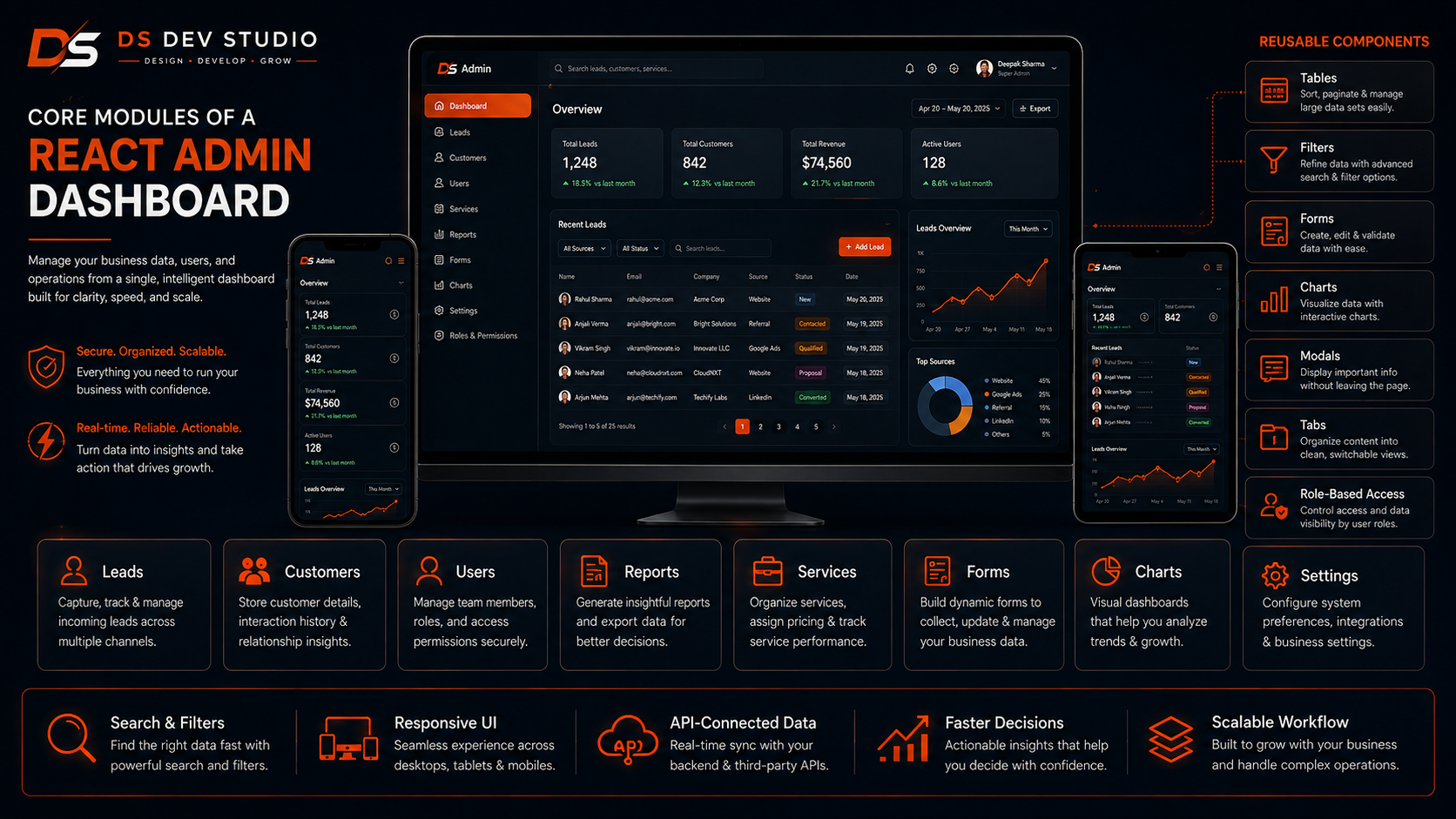
A React admin dashboard is usually built from reusable components. These components help keep the interface consistent and easier to manage. Common components include sidebar menu, top navigation bar, dashboard cards, data tables, filters, forms, charts, status badges, notification blocks, modals, tabs, and pagination controls.
Reusable components save development time when the dashboard grows. For example, the same table component can be used for leads, customers, users, services, and reports with different columns and data. The same form component style can be used across modules. This creates a consistent user experience.
- Sidebar navigation for dashboard modules.
- Top bar with search, user profile, and notifications.
- Summary cards for important business numbers.
- Data tables for leads, customers, users, and records.
- Filters for status, date, service, source, and assigned user.
- Forms for adding and editing records.
- Charts for reports and performance summaries.
- Modals for quick actions and confirmations.
- Tabs for grouped information inside one screen.
- Pagination controls for large datasets.
- Status badges for quick record identification.
- Reusable CTA and action buttons.
Dashboard layout planning
Dashboard layout planning is important before development starts. The dashboard should not be designed only for appearance. It should be planned around the user’s daily work. Users should be able to find modules quickly, view important data, and take action without confusion.
A common dashboard layout includes sidebar navigation, top header, main content area, summary cards, tables, filters, and action buttons. The sidebar can include modules such as Dashboard, Leads, Customers, Services, Reports, Users, Settings, and Support. The main content area changes based on the selected module.
A Frontend Developer Freelancer should keep the layout clean and readable. Too many cards, charts, and menus can make the dashboard difficult to use. A good dashboard shows what matters first and keeps advanced actions organized.
Data tables for business records
Data tables are one of the most important parts of a React admin dashboard. Businesses use tables to manage leads, customers, users, enquiries, services, tasks, bookings, reports, and content records. A good table should be easy to read, search, filter, sort, and update.
For example, a lead table may show lead name, phone number, email, service, source, status, assigned user, follow-up date, and action buttons. A customer table may show customer name, service history, contact details, status, and last activity. These tables help users manage records quickly.
A React Developer Freelancer can build table components with loading states, pagination, search, filters, sorting, status badges, and quick action buttons. The table should remain usable even when records increase. For large datasets, backend pagination and optimized APIs are important.
Search and filters in React dashboards
Search and filters make dashboard data useful. If users cannot find records quickly, the dashboard becomes difficult to use. A business dashboard should allow users to search records by name, phone, email, service, status, source, assigned user, date range, or category depending on the module.
Filters are especially useful in CRM dashboards. A user may want to see only new leads, pending follow-ups, converted customers, or leads from a specific service page. A manager may want date-wise reports or user-wise records. These filters help teams focus on the right data.
A good React dashboard should make filters visible and easy to reset. Users should not feel stuck after applying a filter. Filter states, loading messages, empty states, and clear results should be handled properly.
Forms for adding and updating business data
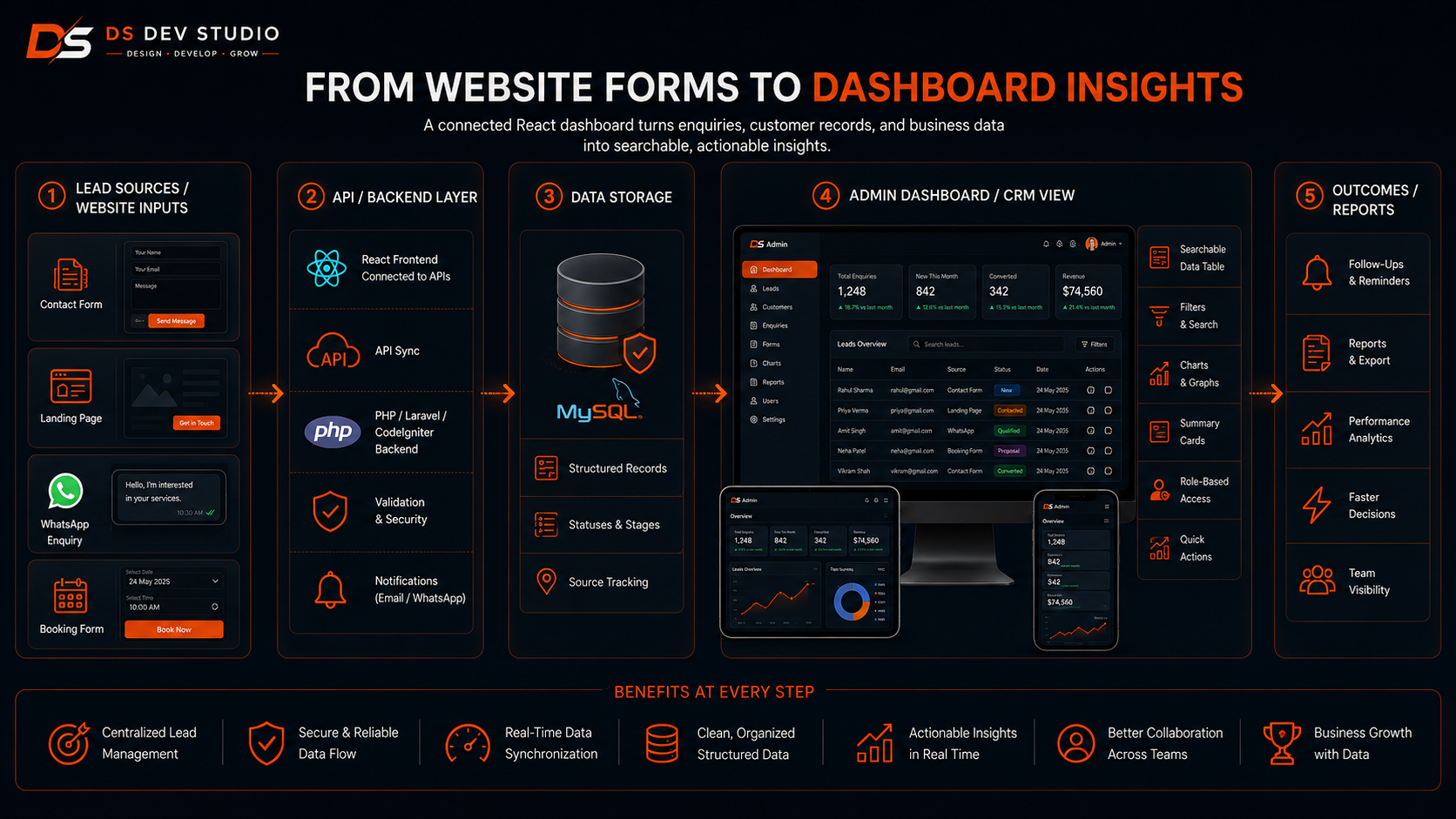
Forms are used across admin dashboards to add, edit, and update data. A user may add a lead, update a customer, create a service, edit a blog, upload a document, change a status, assign a task, or add a follow-up note. Forms should be clear, responsive, and properly validated.
A React dashboard form can include text fields, dropdowns, date pickers, checkboxes, file uploads, multi-step forms, and conditional fields. The frontend should show validation messages, loading states, success messages, and error feedback. The backend should also validate the submitted data before saving.
A Backend Developer Freelancer can connect React forms with PHP, Laravel, CodeIgniter, MySQL, or custom APIs. This connection ensures that form data is stored properly and business records stay organized.
Charts and reports for business insights
Charts and reports help business owners understand performance. A dashboard can show total leads, new enquiries, converted leads, pending follow-ups, customer growth, service-wise enquiries, source-wise leads, monthly performance, and user activity. These insights help businesses make better decisions.
React can display reports through cards, charts, progress bars, tables, and date filters. However, charts should be useful, not decorative. A dashboard with too many visual elements can become confusing. Reports should answer practical business questions.
For example, a business owner may want to know which service receives the most enquiries, which landing page creates more leads, how many leads are pending follow-up, and which users are handling records. A React Admin Dashboard Developer can create report sections that make this information easier to understand.
CRM dashboard development with React
React is useful for CRM dashboard development because CRM systems need interactive screens for leads, customers, follow-ups, notes, statuses, users, reports, and settings. A CRM Web Application Developer can use React for the frontend and PHP, Laravel, CodeIgniter, or another backend for business logic and data storage.
A React CRM dashboard can include lead lists, customer profiles, follow-up reminders, notes timeline, status pipeline, service filters, source tracking, and user-wise reports. This helps the business manage enquiries and customer records more professionally.
For businesses that receive leads from websites, service pages, landing pages, blogs, and contact forms, a React CRM dashboard can centralize all enquiries and make follow-up easier. This improves visibility and reduces missed opportunities.
User roles and permissions in admin dashboards
User roles and permissions are important because dashboards often contain business data. Not every user should see or edit every module. A business owner may need full access, while a staff member may only manage assigned leads. A manager may view reports, while an editor may only manage content.
React can show or hide interface elements based on user roles, but permission checks should also happen on the backend. The frontend improves user experience, while the backend protects data. Both sides should work together for secure access control.
Common roles can include Super Admin, Admin, Manager, Staff, Editor, Support User, and Viewer. A Custom Admin Panel Developer should plan these roles based on the business workflow before development starts.
API integration for React admin dashboards
API Integration is the bridge between a React dashboard and backend data. The React frontend sends requests to APIs, and the backend returns data from the database. APIs can be used to fetch leads, update customer records, submit forms, generate reports, manage users, upload files, and connect third-party tools.
For example, a React dashboard can call a Laravel API to fetch all leads. The API can pull records from MySQL and return them to the dashboard. When a user updates a lead status, React sends the update back to the API, and the backend saves it in the database.
An API Integration Developer should build APIs with validation, authentication, authorization, error handling, and proper response messages. React dashboards depend heavily on API reliability, so integration must be tested carefully.
React dashboard with Laravel backend
Laravel is a strong backend option for React admin dashboards because it provides structured routing, controllers, models, migrations, validation, authentication, middleware, and API support. A Laravel Developer Freelancer can build backend APIs and database logic while React handles the user interface.
This setup is useful for CRM systems, admin panels, lead tracking dashboards, customer management systems, reporting tools, and custom business applications. Laravel can manage users, roles, database records, file uploads, and reports. React can display the data in a modern dashboard.
A Full Stack Web Developer Freelancer can connect React and Laravel into a complete business data management system. This approach is useful when businesses need both frontend flexibility and strong backend structure.
React dashboard with CodeIgniter backend
CodeIgniter can also work with React dashboards, especially when a business already has an existing CodeIgniter CRM or PHP application. A CodeIgniter Developer Freelancer can create APIs that allow React to fetch and update business data from the existing backend.
This is useful for modernizing old PHP systems. Instead of rebuilding the full backend, a business can improve the user interface with React and connect it to the current CodeIgniter system through APIs. This can make the dashboard feel modern while keeping existing business logic.
CodeIgniter can handle backend logic, MySQL queries, authentication, validation, and API endpoints. React can handle tables, forms, filters, charts, and interactive screens. This combination can be practical for lightweight CRM and admin dashboard improvements.
MySQL database for dashboard systems
MySQL is commonly used to store dashboard data such as users, leads, customers, services, reports, follow-ups, notes, settings, and content records. A React dashboard does not store permanent data by itself. It usually connects to a backend that stores and retrieves data from a database.
A MySQL Database Developer should plan tables, fields, relationships, indexes, and data rules carefully. Poor database design can make dashboards slow and difficult to expand. Good database planning supports search, filters, reports, and future modules.
For example, a CRM dashboard may need tables for users, leads, customers, services, sources, statuses, notes, follow-ups, and activity logs. These tables should connect logically so the dashboard can show complete records and useful reports.
Responsive dashboard design
Responsive dashboard design is important because business users may open admin panels from laptops, tablets, or mobile devices. While dashboards are often easier to use on desktop, they should still work properly on smaller screens for basic tasks such as checking leads, updating status, or viewing reports.
A Responsive Website Developer or React Developer Freelancer should make dashboard layouts flexible. Sidebar menus may collapse on smaller screens. Tables may need horizontal scrolling, card layouts, or mobile-friendly list views. Forms should remain usable on mobile. Action buttons should be easy to tap.
Not every complex dashboard feature needs to be perfect on very small screens, but important tasks should remain accessible. The developer should discuss which dashboard actions matter most on mobile and design accordingly.
Dashboard security basics
Dashboard security is important because admin dashboards contain private business data. A React frontend should not expose sensitive information or rely only on hidden buttons for security. Real permission checks should happen on the backend. The dashboard should use secure login, protected routes, user roles, and safe API communication.
Basic security considerations include authentication, authorization, token handling, session management, protected API endpoints, input validation, secure file uploads, and role-based access. If a user is not allowed to access a module, the backend should reject the request even if the frontend is modified.
A Backend Developer Freelancer and React Developer Freelancer should work together to protect the full system. Dashboard security is a full-stack concern, not only a frontend task.
Performance in React admin dashboards
Performance matters because dashboards are used for daily work. If tables load slowly, filters lag, or reports take too long, users may avoid using the dashboard properly. A React admin dashboard should be fast, stable, and practical even when data grows.
Frontend performance can be improved with clean components, proper state management, optimized rendering, lazy loading, efficient table handling, and avoiding unnecessary libraries. Backend performance depends on optimized queries, database indexes, pagination, caching, and efficient API responses.
For large datasets, the dashboard should not load all records at once. Backend pagination, server-side filtering, and optimized API calls are important. A MySQL Database Developer can also improve performance through proper indexes and query planning.
Admin dashboard for lead tracking
Lead tracking is one of the most common uses of admin dashboards. A business can use a React dashboard to view new leads, update status, assign users, add notes, set follow-up dates, and view source information. This is useful when leads come from website forms, landing pages, service pages, blogs, calls, or campaigns.
A lead dashboard can include columns such as name, phone, email, service, source, status, assigned user, follow-up date, and last update. Filters can show new leads, pending follow-ups, converted leads, or service-specific leads. This helps teams work more systematically.
An API Integration Developer can connect website contact forms with the dashboard so new enquiries appear automatically. This reduces manual entry and improves response time.
Admin dashboard for customer records
Customer record management helps businesses store and manage information about people or companies they serve. A React dashboard can show customer profiles, contact details, service history, notes, documents, follow-ups, project status, and communication history.
Customer records are useful because they create continuity. If a customer contacts again, the team can open the dashboard and see previous details. This is better than searching through emails, WhatsApp chats, spreadsheets, or manual notes.
A CRM Web Application Developer can build customer modules with searchable profiles, related records, activity logs, and file management. This helps businesses maintain better customer relationships.
When should a business hire a React Admin Dashboard Developer?
A business should hire a React Admin Dashboard Developer when it needs a custom interface for managing data, reports, users, leads, customers, services, or internal workflows. If the business is using spreadsheets or emails for important operations, a dashboard may improve organization.
You should also hire React dashboard support when your backend system exists but the interface is outdated or difficult to use. React can improve the frontend experience while APIs connect it with Laravel, CodeIgniter, PHP, MySQL, or existing CRM systems.
- Hire a React dashboard developer when business data needs a custom interface.
- Hire one when leads and customers need better tracking.
- Hire one when users need tables, filters, forms, and reports.
- Hire one when an existing PHP CRM needs a modern frontend.
- Hire one when admin panel users need role-based views.
- Hire one when React must connect with Laravel, CodeIgniter, or PHP APIs.
- Hire one when MySQL data needs dashboard visualization.
- Hire one when the business needs a custom web application dashboard.
What to prepare before starting a React admin dashboard project
Before starting a React admin dashboard project, prepare your business workflow clearly. List what data needs to be managed, who will use the dashboard, what modules are required, what actions users should take, and what reports are important. Clear planning helps the developer build the right dashboard structure.
Prepare sample fields for each module. For leads, this may include name, phone, email, service, source, status, assigned user, follow-up date, and notes. For customers, it may include contact details, service history, documents, and activity logs. For reports, define which numbers matter.
- List required modules such as leads, customers, users, reports, services, and settings.
- Define fields for each module.
- Prepare user roles such as admin, manager, staff, editor, and viewer.
- Explain workflows such as lead assignment, follow-up, approval, or conversion.
- Share reporting needs such as date filters, source reports, and user-wise summaries.
- Clarify backend technology such as Laravel, CodeIgniter, PHP, or MySQL.
- Clarify API requirements for forms, CRM, website, or third-party tools.
- Discuss responsive design, security, testing, deployment, and maintenance.
What to check before hiring a React dashboard developer
Before hiring a React dashboard developer, check whether they understand React components, tables, forms, filters, charts, state management, API integration, responsive UI, error handling, loading states, and dashboard user experience. Dashboard development requires more than basic website design.
Ask whether the developer can work with backend APIs. A React dashboard usually needs data from Laravel, CodeIgniter, PHP, MySQL, or another backend system. The developer should understand how to fetch data, submit forms, handle errors, and protect routes based on authentication.
Also discuss maintainability. Admin dashboards often grow over time with new modules, new fields, new filters, and new reports. A good React Developer Freelancer should build reusable components and a clean structure that can support future changes.
Common React admin dashboard mistakes to avoid
One common mistake is focusing only on visual design and ignoring workflow. A dashboard can look modern but still be difficult to use if users cannot find records, apply filters, update status, or understand reports. Dashboard design should support tasks.
Another mistake is loading too much data at once. Large tables without pagination and backend filters can slow down the system. A dashboard should handle data efficiently from the beginning.
Other mistakes include poor API error handling, no loading states, weak mobile layout, unclear form validation, no role-based UI, unsafe permission handling, inconsistent components, confusing navigation, and no maintenance plan. A skilled React Admin Dashboard Developer can help avoid these issues through better planning and development.
How DS Dev Studio can help
DS Dev Studio by Deepak Sharma can help businesses with React admin dashboard development for business data management. Services can include dashboard planning, responsive UI development, data tables, forms, filters, reports, charts, CRM dashboards, admin panels, API integration, Laravel backend connection, CodeIgniter backend connection, PHP systems, and MySQL database workflows.
Deepak Sharma Web Developer work includes ReactJS, HTML, CSS, JavaScript, PHP, Laravel, CodeIgniter, MySQL, APIs, frontend development, backend development, responsive UI, business websites, admin panels, CRM systems, and full stack web development. This is useful for businesses that need both dashboard interface development and backend data integration.
If you want to hire a React Admin Dashboard Developer for business data management, DS Dev Studio can help plan modules, design dashboard layouts, build reusable React components, connect APIs, create forms and tables, add filters and reports, integrate with backend systems, and prepare the dashboard for long-term business use.
Conclusion
A React Admin Dashboard Developer can help businesses build custom dashboards for managing leads, customers, users, services, reports, enquiries, and internal workflows. React is useful for business data management because it supports reusable components, interactive tables, filters, forms, charts, API-connected screens, and responsive dashboard layouts. A strong admin dashboard should be planned around real workflows, not only visual design. It should include clear modules, searchable records, useful filters, secure access, backend API integration, MySQL database support, and practical reports. DS Dev Studio by Deepak Sharma can help businesses with React admin dashboard development, CRM dashboards, admin panels, API integration, Laravel and CodeIgniter backend systems, PHP development, MySQL databases, responsive UI, and custom web applications. With the right React dashboard development approach, business data becomes easier to manage, easier to understand, and more useful for daily decision-making.
Useful internal links
Frequently asked questions
Can I hire Deepak Sharma as a React Admin Dashboard Developer?+
Yes. You can hire Deepak Sharma for React admin dashboard development, business data management systems, CRM dashboards, admin panels, responsive UI, API integration, Laravel backend connection, CodeIgniter backend connection, PHP systems, and MySQL database workflows.
What does a React Admin Dashboard Developer build?+
A React Admin Dashboard Developer builds dashboard interfaces with sidebar navigation, data tables, filters, forms, charts, reports, user management screens, CRM modules, API-connected data views, and responsive admin panel layouts.
Can React dashboards connect with Laravel or CodeIgniter?+
Yes. React dashboards can connect with Laravel, CodeIgniter, PHP, or other backend systems through APIs. The backend handles authentication, validation, database logic, and business rules, while React handles the frontend interface.
Can DS Dev Studio build a CRM dashboard in React?+
Yes. DS Dev Studio can build React CRM dashboards with lead management, customer records, follow-ups, notes, user roles, reports, filters, source tracking, and backend API integration.
Why is React useful for business data management dashboards?+
React is useful because it supports reusable components, interactive tables, filters, forms, charts, API-connected screens, loading states, error handling, and scalable dashboard interfaces for business data management.