React Website vs WordPress Website: Which Should Small Businesses Choose?
A practical comparison guide for small businesses choosing between a React website and a WordPress website, covering responsive design, service pages, blogs, contact forms, SEO-friendly structure, backend features, performance, cost, and long-term growth.

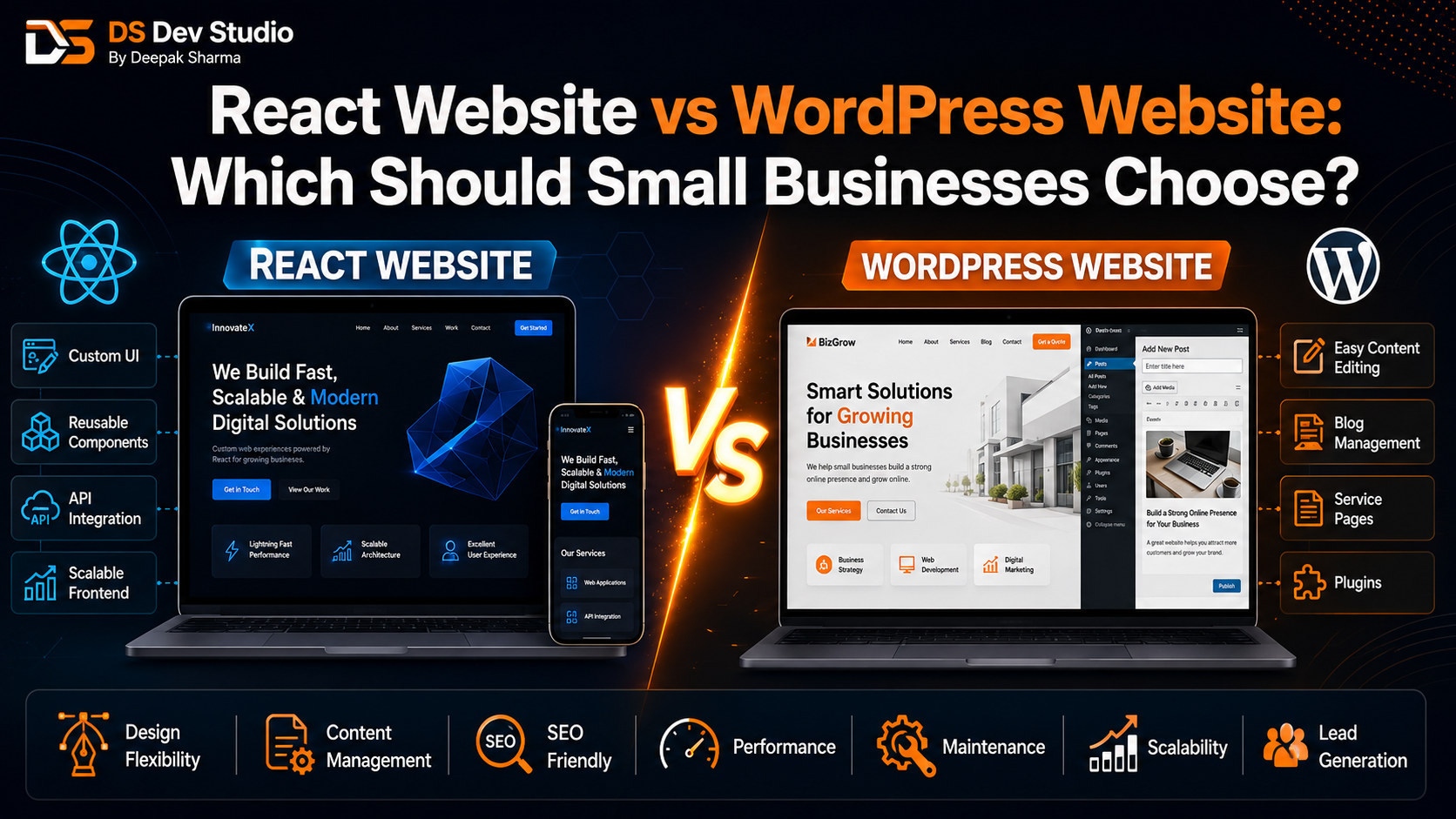
Choosing between a React Website and a WordPress Website is an important decision for small businesses that want a professional online presence. Both options can help a business build service pages, landing pages, contact forms, blogs, and lead generation paths, but they work in different ways. React is a frontend JavaScript library used for custom interfaces and component-based website development. WordPress is a content management system that helps business owners manage pages, blogs, images, and website content from a dashboard.
For small businesses, the right choice depends on the website goal. A business that needs easy blog publishing and regular content updates may prefer WordPress. A business that needs custom UI, fast frontend interactions, reusable components, API-connected forms, dashboards, or future web application features may prefer React. Neither option is automatically better for every small business. The best choice depends on practical requirements.
Many business owners choose technology based on what they hear from others, but that can create problems. Some choose WordPress because it is popular, but later need custom features that are difficult to manage with plugins. Some choose React because it feels modern, but later realize they also need a simple content management system for blogs and page updates. A Business Website Developer should explain both options clearly before the project starts.
DS Dev Studio by Deepak Sharma helps small businesses with React website development, WordPress website development, responsive website development, service pages, landing pages, contact forms, PHP backend systems, Laravel development, CodeIgniter projects, API integration, MySQL databases, CRM modules, admin panels, and custom web applications. This guide compares React Website vs WordPress Website so small businesses can choose the right path.
What is a React Website?
A React Website is a website built using ReactJS for the frontend interface. React allows a developer to create reusable components such as hero sections, service cards, CTA blocks, forms, FAQ accordions, blog cards, dashboard widgets, tables, and landing page sections. These components can be reused across different pages, which helps keep the website consistent and easier to expand.
React is useful when a small business wants a custom website design instead of a basic theme-based structure. A React Developer Freelancer can build a website with custom sections, responsive UI, smooth interactions, API-connected forms, dynamic data, and future dashboard features. React is also useful when a website may later become a custom web application.
However, React by itself is not a complete content management system. If a business wants to edit blog posts, service pages, images, and content without developer support, that needs extra planning. React can be connected with a CMS, custom backend, API, or admin panel, but those features increase project scope.
What is a WordPress Website?
A WordPress Website is built using WordPress, a content management system that allows business owners to manage website pages, blog posts, images, menus, categories, and basic content from an admin dashboard. WordPress is widely used by small businesses, consultants, agencies, service providers, bloggers, and local companies because it makes content updates easier.
A WordPress Developer Freelancer can customize themes, build service pages, create landing pages, set up blogs, add contact forms, improve responsive layouts, configure SEO-friendly settings, optimize images, and create a professional business website. WordPress is practical when the business wants to publish content regularly and manage pages without touching code.
WordPress can also support advanced features through plugins and custom PHP development. However, too many plugins or poorly built themes can slow down the website and make maintenance harder. A WordPress website should be developed carefully, not simply installed with a heavy theme and many plugins.
React Website vs WordPress Website: quick comparison
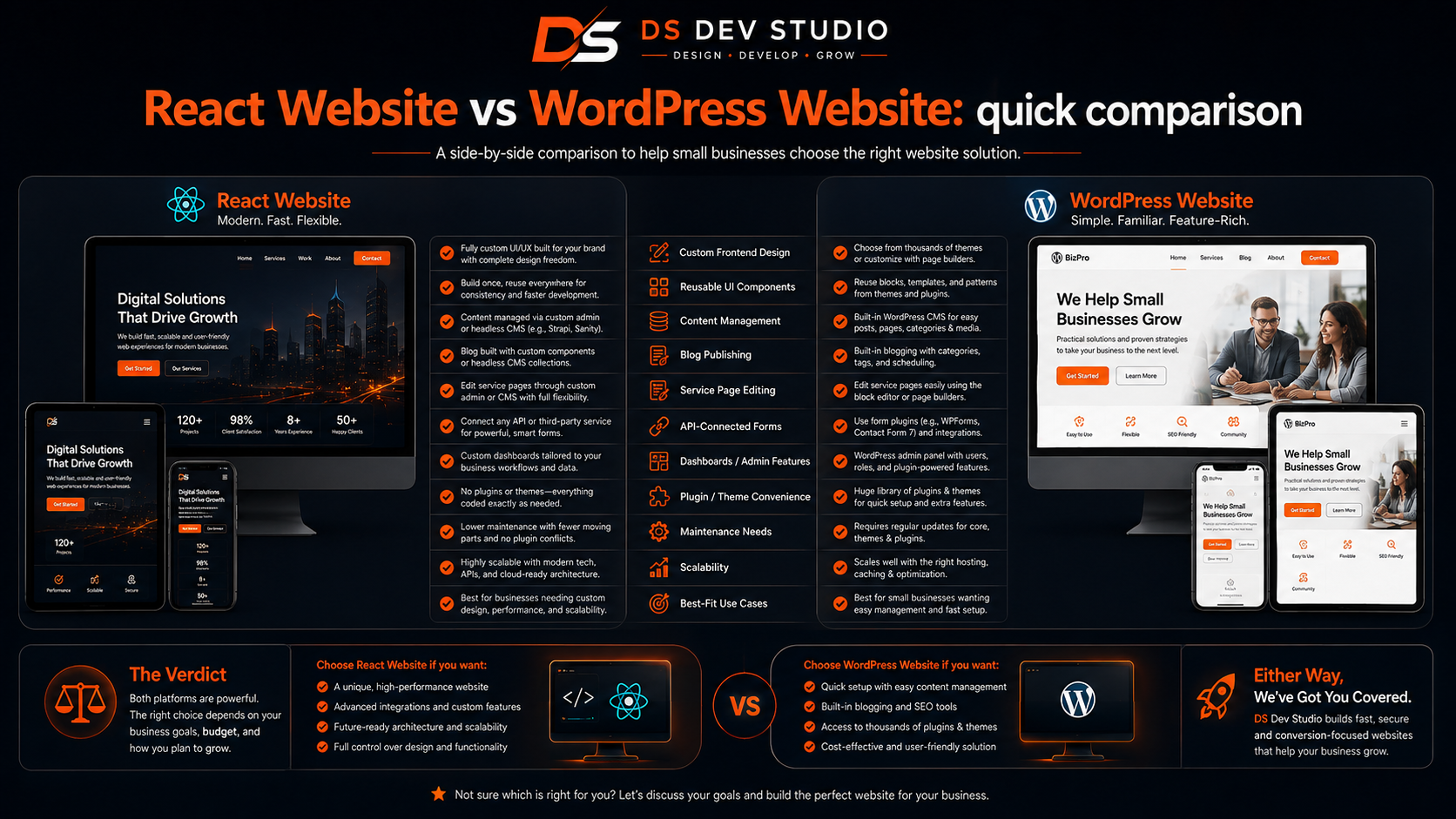
React and WordPress solve different problems. React gives more frontend control and is useful for custom interfaces. WordPress gives stronger content management and is useful for blogs, page updates, and regular publishing. For small businesses, the decision should be based on what the website needs to do after launch.
- Choose React when you need custom frontend design, reusable UI components, API-connected forms, dashboards, or future web application features.
- Choose WordPress when you need easy content management, blogs, service page editing, and regular updates from a dashboard.
- Choose React when you want more control over custom layouts and interactions.
- Choose WordPress when your business needs a practical marketing website with service pages and blogs.
- Choose React when your project needs CRM, admin panel, database workflows, or backend API integration.
- Choose WordPress when your main focus is publishing content and managing pages easily.
- Choose a hybrid approach when you need both WordPress content management and custom React features.
Which option is better for small business websites?
For many small businesses, WordPress is better when the website needs standard pages, blogs, service pages, portfolio sections, contact forms, and easy content updates. A small company owner may want to publish blogs, change service descriptions, update images, and add new pages without asking a developer every time. WordPress supports this requirement well.
React is better when the small business needs a custom frontend experience, API-connected features, advanced landing pages, dynamic content, dashboards, CRM views, admin panels, or future application modules. React gives more freedom for building interfaces exactly as required. It is useful when the website is not only a static business website but part of a larger digital system.
A Website Developer for Small Business should first understand the goal, not directly recommend one technology. A simple service-based business website may work best in WordPress. A custom web platform or dashboard-connected business website may work better with React and backend APIs.
Design flexibility comparison
React gives strong design flexibility because the developer can create custom components from scratch. A React Developer Freelancer can build unique homepage sections, service cards, landing page layouts, animation effects, dashboard screens, form experiences, and reusable page structures. This is useful for businesses that want a custom look and do not want to depend on a prebuilt theme.
WordPress design flexibility depends on the theme, page builder, and customization approach. A good WordPress Developer Freelancer can create a professional design, but some themes may limit layout control. Deep customization is possible in WordPress, but it should be done carefully to avoid performance and maintenance issues.
If a small business needs a clean, professional, and manageable website, WordPress design may be enough. If the business wants a custom user interface or a unique design system with reusable components, React may be a better fit.
Content management comparison
Content management is one of the biggest strengths of WordPress. Business owners can log in to the WordPress dashboard and update pages, publish blogs, upload images, manage categories, edit menus, and update basic content. This is useful for small businesses that want to keep the website active without depending on a developer for every content change.
React does not include content management by default. A React website can show content beautifully, but editing that content may require code changes unless a CMS or admin panel is added. A Custom Website Developer can connect React with a CMS, database, or custom backend, but that adds planning and development work.
If your business will publish blogs regularly, update service pages often, or manage content internally, WordPress may be more practical. If content changes are rare or the website needs a custom interface more than a CMS, React can work well.
SEO-friendly structure comparison
Both React and WordPress can support SEO Friendly Website Development when built correctly. WordPress makes SEO basics easier through editable titles, meta descriptions, blog categories, URLs, headings, image alt text, and plugins. This helps small businesses manage SEO-friendly content without needing technical work for every page.
React can also be SEO-friendly, but it requires careful implementation. The developer should ensure proper page structure, readable content, clean URLs, metadata, internal links, performance optimization, and correct rendering approach. A React website should not be built in a way that hides important content from search engines or creates slow pages.
For small businesses, SEO-friendly structure should include dedicated service pages, helpful blogs, internal links, readable headings, mobile-friendly design, fast loading, and clear content. The technology matters, but planning and execution matter more.
Responsive design comparison
Responsive Website Development is important whether a small business chooses React or WordPress. A website should work properly on mobile, tablet, laptop, and desktop. Many visitors open small business websites from mobile phones through Google Search, WhatsApp, Instagram, Facebook, LinkedIn, ads, and referrals.
React allows a Frontend Developer Freelancer to build mobile-first components with full control over layout behavior. Service cards, menus, CTA buttons, forms, and landing page sections can be designed carefully for different screen sizes. This gives strong control over responsive UI.
WordPress themes are often responsive, but real testing is still required. A theme may look good in demo content but break when real service sections, images, forms, and blog content are added. A Responsive Website Developer should test both React and WordPress websites before launch.
Performance and speed comparison
Performance depends on how the website is developed. A React Website can be fast if the developer uses optimized code, clean components, compressed assets, image optimization, proper routing, and good hosting. React gives the developer more control over what is loaded and how the interface behaves.
A WordPress Website can also be fast when built with a lightweight theme, optimized images, limited plugins, caching, clean hosting, and careful development. However, WordPress websites can become slow when too many plugins, heavy page builders, large images, and unnecessary scripts are used.
Small businesses should not assume React is always fast or WordPress is always slow. A poorly built React website can also perform badly. A well-built WordPress website can work smoothly. The developer’s approach is more important than the label.
Blogging comparison
WordPress is usually stronger for blogging because it was built around content publishing. A small business can create blog posts, categories, tags, featured images, author sections, internal links, and content updates from the dashboard. This makes WordPress practical for businesses that want to grow online visibility through regular blog content.
React can support blogs, but the content management system must be planned. A React blog can be built using static content, a custom backend, a headless CMS, or an admin panel. This can be powerful, but it requires more setup than WordPress.
If a small business wants to publish many blogs without technical help, WordPress may be the easier choice. If the blog is part of a custom React website with a planned content system, React can also work well.
Service pages comparison
Service pages are important for small business websites because they explain what the business offers. WordPress makes it easy to create and edit service pages from the dashboard. A WordPress Developer Freelancer can create reusable service page templates so the business can add or update services later.
React gives more control over service page design and reusable sections. A React Developer Freelancer can create custom components for service benefits, process steps, FAQs, CTA sections, and related service links. This is useful when service pages need a highly customized layout.
For a small business that wants to update service content regularly, WordPress may be more convenient. For a business that wants fully custom service page UI and API-connected forms, React may be better.
Landing page comparison
Landing pages are useful for small businesses running ads, WhatsApp campaigns, email outreach, LinkedIn promotions, or service-specific offers. Both React and WordPress can support landing pages, but the development approach is different.
WordPress landing pages can be created using page templates, builders, or custom sections. This is practical when the business wants to manage or duplicate campaign pages quickly. A WordPress Developer Freelancer can create landing page layouts with forms, testimonials, FAQs, and CTA sections.
React landing pages can be highly custom, fast, and interactive. A Landing Page Developer using React can build reusable campaign components and connect forms with APIs, CRM systems, or admin dashboards. This is useful for businesses that need advanced tracking or custom workflows.
Contact forms and lead management comparison
Contact forms are important for small business lead generation. WordPress can handle forms using plugins or custom form development. Forms can send emails, store submissions, and connect with third-party tools depending on the setup. This is enough for many small business websites.
React forms are usually connected with backend APIs. A React contact form can send data to PHP, Laravel, CodeIgniter, MySQL, CRM systems, Google Sheets, or admin dashboards. This gives more control over validation, user experience, loading states, success messages, and lead tracking.
If the business only needs simple enquiry forms, WordPress may be practical. If the business needs CRM-connected forms, source tracking, database storage, custom validation, or admin dashboard records, React with backend API integration may be a stronger choice.
Backend and database requirements
Small businesses should discuss backend requirements before choosing between React and WordPress. If the website only needs pages, blogs, images, and basic forms, WordPress can handle most requirements. If the website needs custom database workflows, user roles, CRM dashboards, reports, lead tracking, or admin panels, custom backend development may be needed.
React works well with backend technologies such as PHP, Laravel, CodeIgniter, MySQL, and custom APIs. A Backend Developer Freelancer can build APIs, database tables, authentication, validation, and business workflows. React can then provide the frontend interface.
WordPress can also be extended with custom PHP and plugins, but it may not always be the cleanest option for complex business applications. If the project is closer to a CRM or web application, React plus a custom backend may be better.
Admin panel and dashboard needs
WordPress already includes an admin dashboard for managing content. This is useful for pages, blogs, images, menus, and basic website settings. For many small businesses, this dashboard is enough because they mainly need content control.
React can be used to build custom admin dashboards for managing leads, customers, users, reports, services, bookings, files, and CRM data. A React Admin Dashboard Developer can create dashboards with tables, filters, charts, forms, status updates, and API-connected screens.
If the business only needs to edit website content, WordPress is convenient. If the business needs to manage operational data such as leads, follow-ups, customer records, and reports, a React admin dashboard with backend support may be more suitable.
Cost comparison for small businesses
Cost depends on scope, not only technology. A basic WordPress Website may be more affordable because content management, themes, plugins, and standard features are already available. This can be useful for small businesses with limited budgets and standard website needs.
A React Website may cost more if it requires custom design, reusable components, backend APIs, CRM integration, admin dashboards, database workflows, or content management features. React development is usually more custom, so planning and coding time can be higher.
However, a low-cost WordPress website can become expensive later if it needs heavy customization or suffers from plugin problems. A React website can be a better investment when custom workflows are required. Small businesses should compare long-term value, not only starting cost.
Timeline comparison
WordPress websites can usually be launched faster for standard business websites because many content management features are already available. If the content, logo, images, and page list are ready, a WordPress website with service pages, blogs, and forms can move quickly.
React websites may take more time when custom components, page structures, APIs, and backend connections are required. A simple React website may still be completed efficiently, but a React website with CRM, dashboards, and database workflows needs more planning.
Small businesses should discuss timeline based on real scope. Pages, content readiness, revisions, responsive testing, forms, backend work, and deployment can affect both React and WordPress projects.
Maintenance comparison
WordPress maintenance usually includes plugin updates, theme updates, backups, security checks, content updates, and speed optimization. WordPress makes content updates easy, but the technical setup still needs care. Outdated plugins and heavy themes can create problems.
React maintenance depends on how the website is built. A simple React website may need less frequent content maintenance if content is static. A React website with APIs, backend systems, dashboards, and databases needs ongoing technical maintenance, testing, backups, and updates.
Before choosing, small businesses should ask who will manage updates after launch. If the business wants to manage content internally, WordPress is easier. If developer-led technical updates are acceptable and custom features matter more, React can be suitable.
Security comparison
Security matters for both React and WordPress websites. WordPress websites need secure hosting, strong passwords, plugin updates, backups, spam protection, and careful plugin selection. Many WordPress issues happen because plugins or themes are not maintained properly.
React websites also need security planning, especially when they connect with backend APIs. Sensitive logic should not be handled only in the frontend. APIs should use validation, authentication, authorization, safe database queries, and proper error handling. If the website has forms, admin panels, or CRM data, backend security becomes important.
A Backend Developer Freelancer should handle security carefully in both cases. Security is not only about technology choice; it depends on setup, maintenance, hosting, and development quality.
Scalability comparison
WordPress is scalable for content growth. A small business can add many blogs, service pages, landing pages, categories, testimonials, and project pages. This makes WordPress useful for content-heavy websites and SEO-friendly publishing.
React is scalable for custom interface and application growth. If the business plans to add dashboards, client portals, CRM modules, API workflows, dynamic data, reporting tools, or admin panels, React may offer better flexibility. React components can be reused as the system grows.
If your growth plan is mostly content and marketing, WordPress may be enough. If your growth plan includes custom tools and digital systems, React with backend support may be a better foundation.
When should small businesses choose WordPress?
Small businesses should choose WordPress when they need a professional website with easy content management, blogs, service pages, landing pages, contact forms, and regular updates. WordPress is practical for consultants, agencies, coaches, service providers, local businesses, portfolio websites, and companies that want to manage content themselves.
WordPress is also suitable when the business wants a faster launch and does not need complex backend workflows. A clean WordPress setup can support SEO-friendly website structure, mobile-friendly design, and content growth.
- You want to publish blogs regularly.
- You want to update service pages without developer support.
- You need a professional small business website with manageable cost.
- You need standard forms, service pages, blogs, and landing pages.
- You want a dashboard for managing website content.
- You do not need a complex CRM, custom dashboard, or advanced backend workflow.
When should small businesses choose React?
Small businesses should choose React when they need a custom frontend, reusable UI components, interactive sections, API-connected forms, dashboards, CRM views, admin panels, or future web application features. React is useful when the website must do more than display static pages and blog content.
React is also suitable when the business wants a unique design and strong frontend control. A React website can be connected with Laravel, CodeIgniter, PHP, MySQL, CRM systems, and APIs. This makes React practical for businesses that need custom workflows.
- You need a custom website design with reusable components.
- You need API-connected contact forms or lead tracking.
- You need CRM dashboards, admin panels, or reports.
- You need a custom frontend for a business web application.
- You want strong control over UI and user experience.
- You plan to expand the website into a custom digital system.
Can a business use both React and WordPress?
Yes, a business can use both React and WordPress in some cases. WordPress can manage content such as pages and blogs, while React can be used for custom frontend sections, landing pages, dashboards, or application interfaces. This approach is often called a hybrid or headless setup depending on how it is built.
For example, a small business may use WordPress for blogs and service content, while a React dashboard manages leads and customer records. Another business may use React for the full frontend and WordPress as a content backend. This gives content control and frontend flexibility, but it requires more technical planning.
A Full Stack Web Developer Freelancer can help decide whether this combined approach is worth it. For simple websites, it may be unnecessary. For growing businesses with content and custom system needs, it can be useful.
Questions to ask before choosing React or WordPress
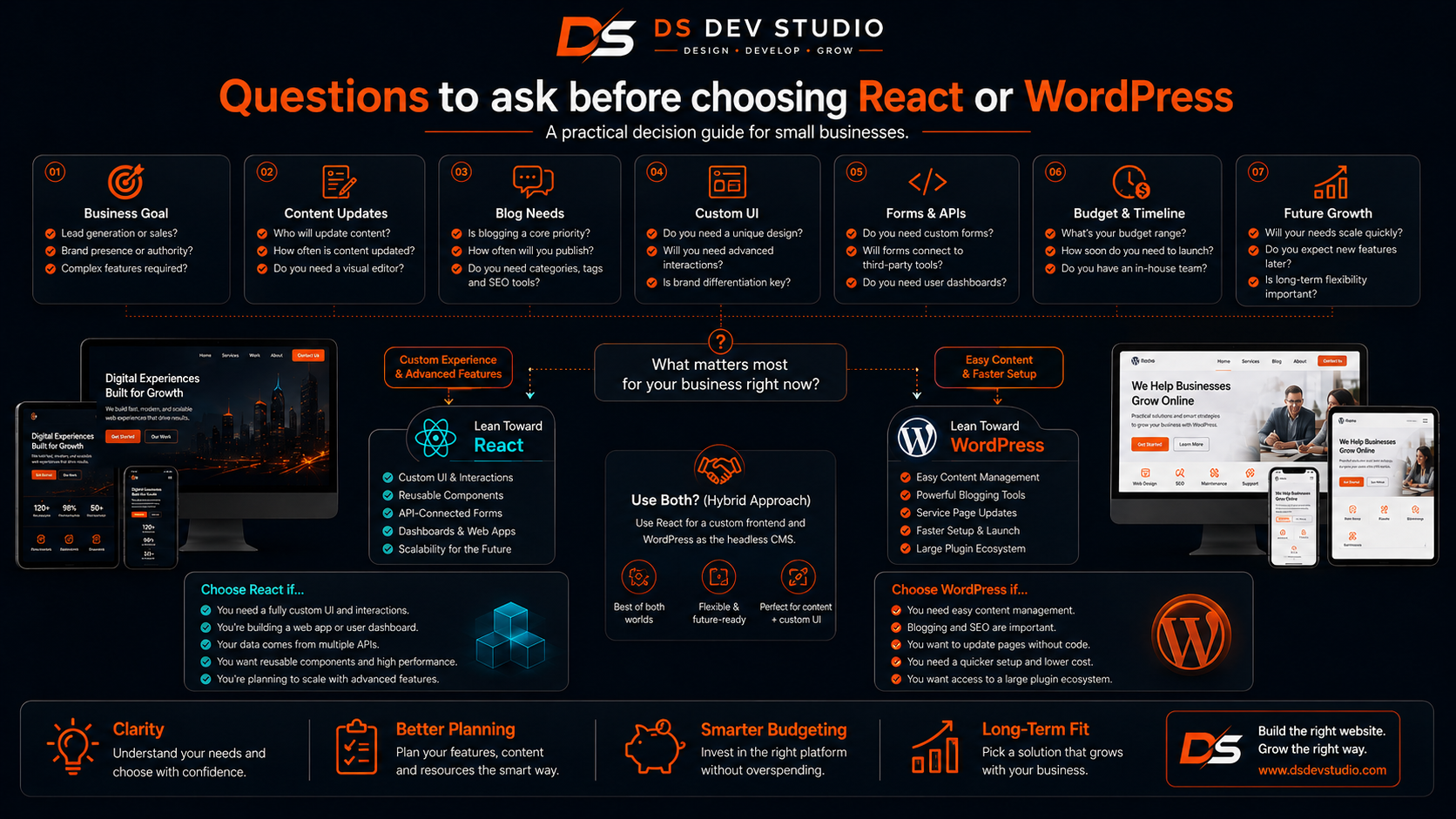
Before choosing between React and WordPress, small businesses should ask practical questions about website usage after launch. The right option depends on who will update the website, what features are needed, how leads will be managed, and how the website may grow in the future.
- Will the business owner need to update pages and blogs regularly?
- Does the website need custom UI or advanced frontend interactions?
- Will the website need CRM, admin panel, reports, or customer records?
- Should contact forms connect with APIs, Google Sheets, MySQL, or CRM?
- Is fast content publishing more important than custom interface control?
- Will the website grow into a custom web application later?
- What is the available budget and expected timeline?
- Who will maintain the website after launch?
- Which option supports the business goal better?
Common mistakes small businesses should avoid
One common mistake is choosing React only because it sounds modern. React is powerful, but it may be unnecessary for a simple content-managed business website. If the main need is blogs and easy updates, WordPress may be more practical.
Another mistake is choosing WordPress only because it is familiar or cheaper. If the business needs custom dashboards, CRM workflows, advanced forms, API integration, and custom UI, WordPress may become difficult to manage without heavy customization.
Other mistakes include ignoring mobile experience, no SEO-friendly planning, weak service pages, no lead tracking, too many WordPress plugins, no content management plan for React, poor hosting, no maintenance plan, and unclear scope. A skilled Website Developer Freelancer can help avoid these problems.
What to prepare before hiring a developer
Before hiring a developer, prepare your website goal, target audience, required pages, service list, blog plan, contact form requirements, backend needs, design references, branding assets, and future growth expectations. Clear requirements help the developer recommend React, WordPress, or a hybrid approach.
Also explain whether your team wants to manage content after launch. If yes, WordPress or a custom CMS may be required. If the website needs data workflows, explain CRM, admin panel, API, or MySQL requirements in advance. This prevents wrong technology selection.
- Prepare required pages such as Home, About, Services, Blog, Projects, and Contact.
- List services that need dedicated pages.
- Decide whether blogs and regular updates are important.
- Prepare contact form fields and lead tracking expectations.
- Clarify backend needs such as CRM, admin panel, reports, or database storage.
- Share design references and brand assets.
- Discuss timeline, budget, hosting, deployment, and maintenance.
How DS Dev Studio can help
DS Dev Studio by Deepak Sharma can help small businesses choose between a React Website and a WordPress Website based on real business needs. Services can include React frontend development, WordPress customization, responsive website development, service pages, landing pages, contact forms, blogs, PHP backend systems, Laravel development, CodeIgniter projects, API integration, MySQL databases, CRM modules, admin panels, and custom web applications.
Deepak Sharma Web Developer work includes HTML, CSS, JavaScript, ReactJS, WordPress, PHP, Laravel, CodeIgniter, MySQL, APIs, frontend development, backend development, responsive UI, business websites, admin dashboards, CRM systems, and full stack web development. This is useful for small businesses that need practical technical guidance before starting a website project.
If you are comparing React Website vs WordPress Website, DS Dev Studio can help review your website goal, page structure, content management needs, mobile requirements, SEO-friendly structure, lead tracking, backend features, and future growth plan. The goal is to choose the technology that fits your business instead of forcing one solution for every project.
Conclusion
React Website vs WordPress Website is not a one-answer decision for every small business. WordPress is usually better when the business needs easy content management, blog publishing, service pages, landing pages, and regular updates from a dashboard. React is usually better when the business needs custom frontend design, reusable components, API-connected forms, CRM dashboards, admin panels, reports, database workflows, or future custom web application features. Both options can be responsive, SEO-friendly, fast, and professional when developed correctly. Small businesses should choose based on goals, content needs, budget, timeline, maintenance, and future growth. DS Dev Studio by Deepak Sharma can help businesses with React frontend development, WordPress customization, responsive website development, service pages, landing pages, contact forms, PHP backend systems, Laravel and CodeIgniter projects, MySQL databases, API integration, CRM modules, admin panels, and custom web applications. With the right planning, small businesses can choose a website approach that supports trust, visibility, enquiries, and long-term growth.
Useful internal links
Frequently asked questions
Can I hire Deepak Sharma for React Website or WordPress Website development?+
Yes. You can hire Deepak Sharma for React website development, WordPress website development, responsive websites, service pages, landing pages, blogs, contact forms, backend systems, API integration, CRM modules, admin panels, and custom web applications.
Is React better than WordPress for small businesses?+
React is better when a small business needs custom frontend design, API-connected forms, dashboards, CRM features, admin panels, or future web application features. WordPress is better when easy content management, blogs, and regular page updates are important.
Is WordPress easier to manage than React?+
Yes. WordPress is usually easier for non-technical users because it provides a dashboard for editing pages, publishing blogs, managing images, and updating content. React needs a CMS or admin panel if non-technical content editing is required.
Can React websites be SEO-friendly?+
Yes. React websites can be SEO-friendly if they are built with proper page structure, metadata, clean URLs, internal links, readable content, fast loading, and correct rendering approach. The developer must plan SEO-friendly structure carefully.
Can DS Dev Studio build a React website with CRM or admin panel?+
Yes. DS Dev Studio can build React websites with API-connected forms, CRM modules, admin panels, MySQL databases, Laravel or CodeIgniter backend systems, reports, user roles, and custom business workflows.