Service Page Development Guide for SEO-Friendly Business Websites
A practical guide for businesses that want service page development for SEO-friendly business websites, clear content structure, responsive design, landing pages, contact forms, internal links, and better lead generation.

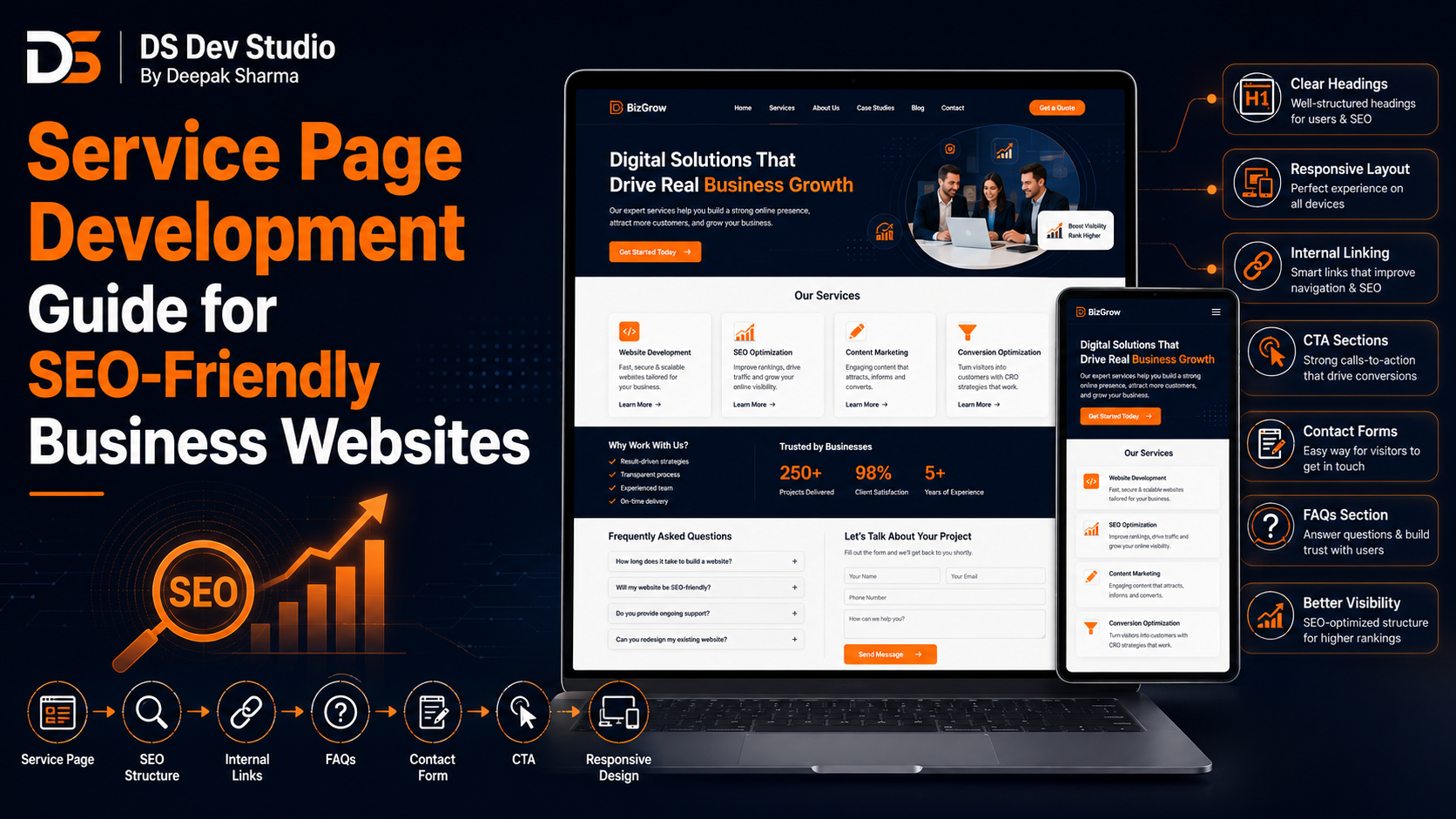
Service Page Development is one of the most important parts of building an SEO-friendly business website. A homepage can introduce your business, but service pages explain what you actually offer in detail. When visitors want to understand a specific service, they need more than a short card or one-line description. A proper service page helps users understand the service, compare options, trust your business, and contact you with confidence.
Many small business websites make the mistake of listing all services only on the homepage. This may look simple, but it limits clarity and growth. If each important service has its own page, the website becomes easier to understand, easier to link internally, and better structured for search visibility. A service page can answer customer questions, explain benefits, show process, add FAQs, include testimonials, and guide users toward enquiry.
SEO Friendly Website Development is not only about adding keywords. It is about building useful pages with clear topics, proper headings, readable content, fast loading, mobile-friendly layout, internal links, image alt text, and contact options. Service pages are central to this structure because they connect business offerings with customer search intent.
DS Dev Studio by Deepak Sharma helps businesses with service page development, responsive website development, SEO-friendly website structure, React frontend development, WordPress customization, landing pages, contact forms, PHP backend systems, API integration, admin panels, CRM modules, and custom web applications. This guide explains how service page development can improve SEO-friendly business websites and support better online growth.
What is Service Page Development?
Service Page Development means creating dedicated website pages for individual business services. Each page explains one specific service in detail. For example, a web development business may have separate pages for website development, React frontend development, WordPress customization, landing page development, backend development, API integration, admin panels, and CRM web application development.
A service page is not just a design section. It includes content planning, page layout, headings, CTA placement, responsive design, internal linking, FAQ structure, contact form flow, SEO basics, and user experience. A Business Website Developer should build service pages so visitors can understand the offer and take action easily.
Good service page development also supports long-term website expansion. As your business adds more services, new pages can be created using a consistent structure. This makes the website easier to manage and keeps content organized.
Why service pages are important for business websites
Service pages are important because customers usually want details before contacting a business. A visitor may not be ready to call after seeing only a short homepage section. They may want to know what the service includes, who it is for, how the process works, what benefits they get, and what kind of results or support are expected.
A dedicated service page gives enough space to explain these details clearly. It also helps reduce repeated basic questions because the page can answer common doubts in advance. When visitors understand the service better, they are more likely to submit an enquiry or contact the business.
Service pages also make the website look more professional. A business with organized service pages appears more serious and structured than one with only a short service list. This matters for small businesses, freelancers, agencies, consultants, and service providers who want to build trust online.
How service pages support SEO-friendly website structure
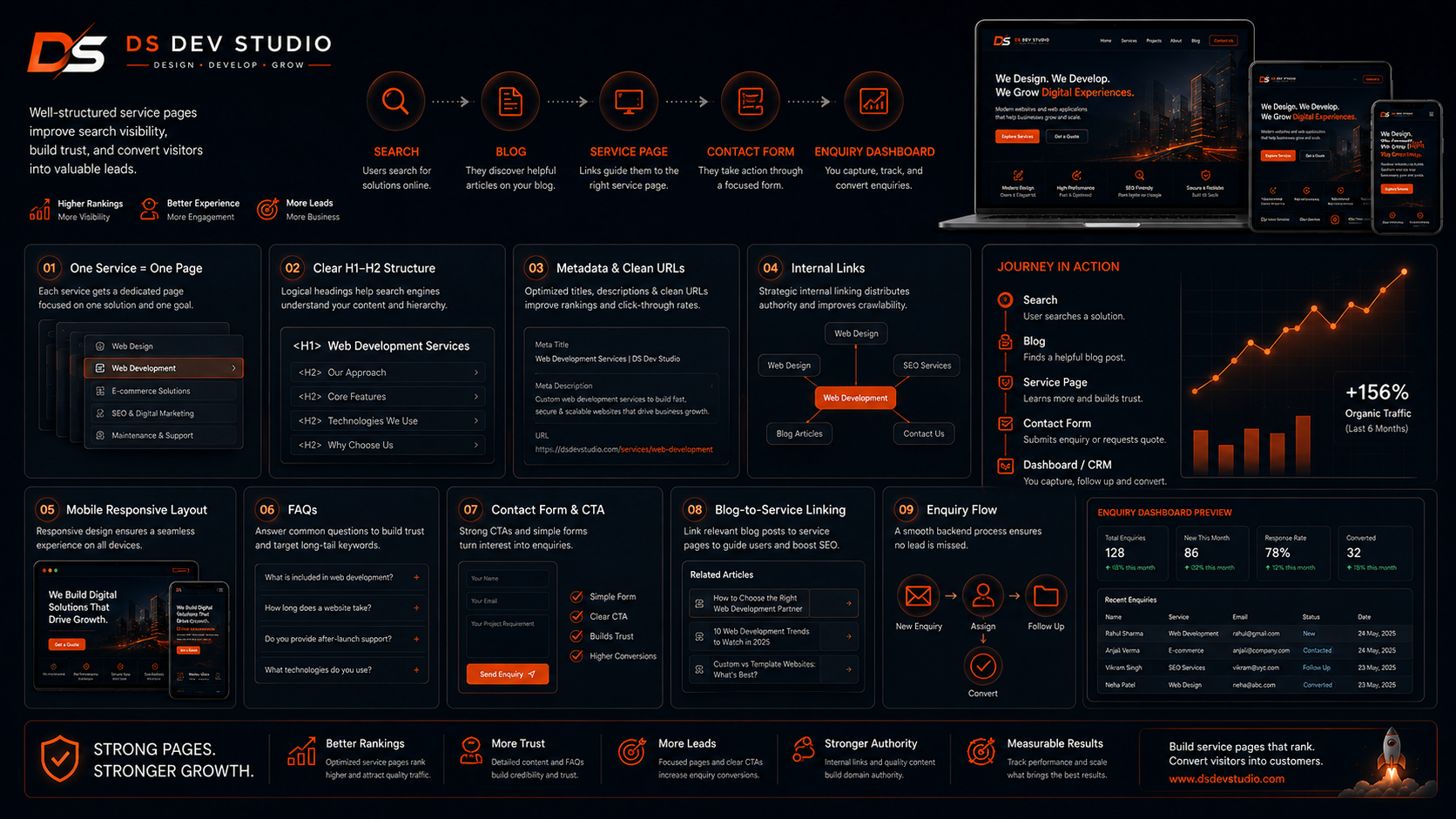
Service pages support SEO-friendly website structure because each page can focus on one clear topic. Instead of trying to rank one homepage for every service, the website can create dedicated pages for different services. This creates a cleaner content structure and helps users find the exact information they need.
For example, a page about React frontend development can focus on React services, reusable components, responsive UI, API-connected interfaces, and dashboards. A page about WordPress customization can focus on WordPress themes, blogs, service pages, forms, and content management. Each page has a specific purpose.
An SEO Friendly Website Developer should create proper headings, metadata, clean URLs, internal links, image alt text, and useful content on each service page. The goal is to make the page understandable for both visitors and search engines without forcing keywords unnaturally.
Basic structure of a strong service page
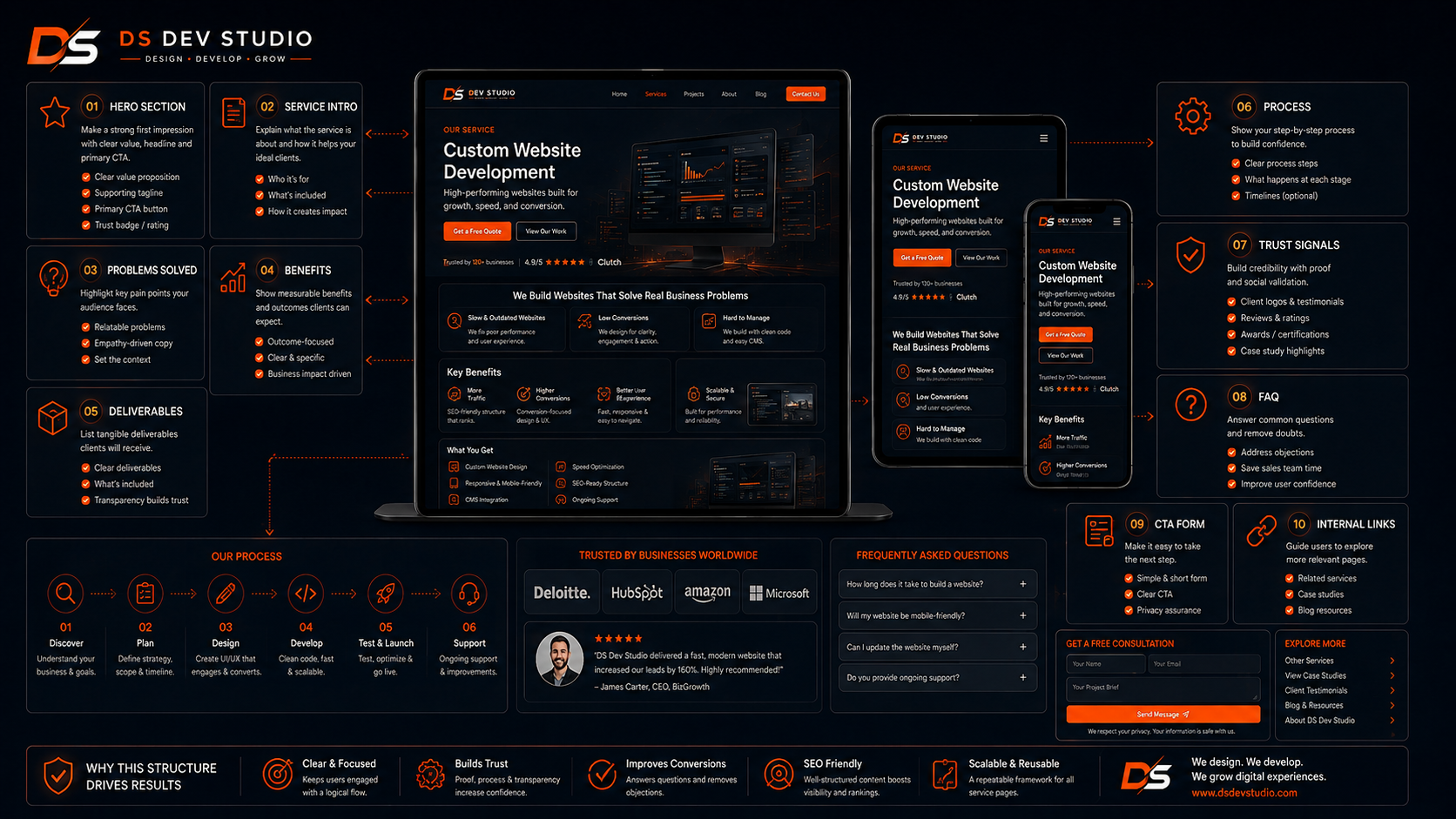
A strong service page should follow a clear structure. It should begin with a direct headline and short introduction. Then it should explain the service, who needs it, what problems it solves, what is included, how the process works, what benefits the customer receives, and how to contact. The page should end with a clear CTA.
The exact sections may change depending on the business, but the basic flow should help visitors move from awareness to action. A service page should not feel like a random collection of blocks. Every section should answer a question or reduce doubt.
- Hero section with clear service name and short value statement.
- Short introduction explaining what the service is.
- Problem section showing why the service is needed.
- Benefits section explaining business value.
- Feature or deliverable section showing what is included.
- Process section explaining how the work is done.
- Use cases or suitable business types.
- Testimonials, project examples, or trust signals.
- FAQ section answering common questions.
- CTA section with contact form, WhatsApp, call, or quote request.
- Internal links to related services, blogs, and contact page.
Hero section for service pages
The hero section is the first part visitors see on a service page. It should quickly explain the service and why it matters. A weak hero section with vague text can make visitors leave. A strong hero section tells users exactly what the page is about and what action they can take next.
For example, instead of a generic headline like “Professional Solutions,” a stronger service page headline could say “Responsive Website Development for Small Businesses” or “React Frontend Development for Custom Business Websites.” This gives visitors a clear signal immediately.
The hero section should also include a short supporting line and CTA button. On mobile, the headline should remain readable and the button should be easy to tap. A Responsive Website Developer should make sure the first screen works well across devices.
Service introduction section
The introduction section should explain the service in simple language. Many businesses make service pages too technical or too short. A good introduction should tell visitors what the service is, who it is for, and what kind of problem it helps solve.
For example, a website development service page can explain that the service helps businesses build professional websites with responsive layouts, service pages, contact forms, and SEO-friendly structure. A CRM development service page can explain that the service helps manage leads, customers, follow-ups, and reports.
The introduction should not be overloaded with keywords. It should be clear and useful. A visitor should understand the basic service within the first few lines.
Problem and solution section
A strong service page should show that the business understands the customer’s problem. This section can explain common pain points and then show how the service solves them. This makes the page more relatable and practical.
For example, a business may have an outdated website, poor mobile experience, broken contact forms, weak service pages, or no lead tracking. The service page can explain these problems and show how responsive website development, redesign, API integration, or CRM development can help.
This section is useful because customers often search when they have a problem. If your page reflects their issue clearly, they are more likely to trust your service. A Custom Website Developer should structure this section around real customer needs.
Benefits section for service pages
The benefits section explains why the service matters for the customer. Benefits should focus on business value, not only technical features. A feature may be responsive design, but the benefit is that users can easily access the website on mobile. A feature may be API integration, but the benefit is better lead tracking and less manual work.
Service pages should explain benefits in a direct and practical way. Customers want to know how the service helps them. For business websites, benefits may include better online presence, more professional appearance, improved mobile experience, clearer service explanation, easier enquiries, better content structure, and smoother lead management.
- Better clarity for visitors who want service details.
- Improved trust through organized content and proof points.
- Better mobile experience with responsive layouts.
- More focused enquiry flow through CTA buttons and forms.
- Improved SEO-friendly structure through dedicated service topics.
- Stronger internal linking between services, blogs, and contact pages.
- Better support for landing pages and future content growth.
What to include in each service page
Each service page should include details that help visitors make a decision. A page should not be too thin. Thin service pages with only a few lines may not give enough value to users. At the same time, the page should not be filled with unnecessary text. The content should be useful, structured, and easy to scan.
A service page can include what the service covers, what is not included, who the service is suitable for, project process, expected deliverables, tools or technologies used, support options, FAQs, and contact options. The exact content depends on the business service.
For technical services such as React development, WordPress customization, PHP CRM development, Laravel admin panels, or API integration, it is useful to explain the service in business language. Not every visitor understands technical terms, so the page should connect technical work with business outcomes.
Responsive design for service pages
Responsive Website Development is essential for service pages because many visitors read service details on mobile devices. A service page may have long content, multiple sections, cards, images, FAQs, and forms. All of these must work properly on small screens.
On mobile, service sections should stack clearly. Text should be readable. Buttons should be easy to tap. Images should not overflow. FAQ accordions should open smoothly. Forms should be simple. Sticky elements should not cover important content. A Responsive Website Developer should test service pages carefully.
A business can lose leads if a service page is difficult to read on mobile. Responsive design is not optional for modern business websites. It directly affects user experience and enquiry flow.
SEO-friendly headings for service pages
Headings help organize service page content. A service page should have one main H1 heading and clear H2 sections for different topics. Headings should describe the content accurately. They should not be vague or stuffed with repeated keywords.
For example, a service page can use headings like “What is React Frontend Development?”, “Why businesses need responsive UI”, “What is included in this service?”, “How the development process works”, and “Frequently asked questions.” These headings help users scan the page quickly.
An SEO Friendly Website Developer should also keep heading hierarchy clean. Proper headings improve readability and make the page structure easier to understand. This is useful for both visitors and search engines.
Internal linking between service pages
Internal links help users move between related pages. A service page should not exist alone. It should connect with related services, blog posts, landing pages, project pages, and contact pages. This improves navigation and helps visitors discover more relevant information.
For example, a website development service page can link to responsive website development, React frontend development, WordPress customization, landing page development, and contact page. A CRM service page can link to PHP development, Laravel admin panels, CodeIgniter CRM development, API integration, and admin dashboard services.
Internal linking should be natural. The goal is to help users find useful next steps. A Website Developer Freelancer should plan internal links while building the page structure instead of adding random links later.
CTA placement on service pages
CTA placement is important because service pages are built to guide visitors toward action. A CTA can be a button, form, WhatsApp link, call link, quote request, or consultation prompt. The CTA should appear at natural points where visitors may be ready to contact.
A service page can include CTA buttons in the hero section, after benefits, after process, near FAQs, and at the end of the page. The CTA text should be clear. Examples include “Request a Quote,” “Contact Deepak Sharma,” “Start Your Website Project,” “Discuss Your CRM Requirement,” or “Get React Frontend Support.”
CTA buttons should also work well on mobile. They should be large enough, easy to tap, and placed with proper spacing. A Frontend Developer Freelancer should make CTA design consistent across all service pages.
Contact forms on service pages
Contact forms on service pages can improve lead generation because users can submit an enquiry without searching for the contact page. A form should be simple and relevant to the service. It should ask for the information needed to start a conversation.
For a service page, a form may include name, phone, email, service requirement, message, budget, timeline, or preferred contact method. The form should not be too long unless the service requires detailed information. The easier the form is to complete, the better the chance of submission.
A Backend Developer Freelancer can connect service page forms with email notifications, MySQL databases, Google Sheets, CRM systems, admin dashboards, or custom APIs. This helps the business track enquiries properly after submission.
FAQ sections for service pages
FAQs are useful because they answer common questions before visitors contact the business. A service page FAQ section can cover pricing approach, timeline, process, technology, support, revisions, maintenance, content requirements, and next steps. Good FAQs reduce uncertainty and make the page more helpful.
For example, a website development service page can answer questions about timeline, content preparation, mobile responsiveness, WordPress vs React, hosting, and maintenance. A CRM development page can answer questions about lead tracking, user roles, database storage, reports, and API integration.
FAQs should be specific to the service. Generic FAQs repeated across every page do not add much value. A service page should answer the real doubts customers may have before contacting.
Service pages for small business websites
Small business websites benefit strongly from service pages because customers often compare options before contacting. A small business may provide multiple services, and each service may need its own explanation. Dedicated pages help avoid confusion and improve the website’s professionalism.
For a local business, service pages can explain service area, process, benefits, pricing approach, booking method, and contact options. For a professional service provider, pages can explain expertise, service details, consultation process, and proof of work. For a web development business, pages can explain development services, technologies, and project workflow.
A Website Developer for Small Business should build service pages that are easy to read, mobile-friendly, and focused on the customer’s need. The language should be simple and practical, not overly technical.
Service pages vs landing pages
Service pages and landing pages are related, but they are not exactly the same. A service page is usually part of the main website and explains a service in detail for general visitors. A landing page is usually built for a specific campaign, offer, audience, or conversion goal.
A service page may include broad information and internal links to related pages. A landing page may focus on one action and reduce distractions. Both are useful for business websites. A Landing Page Developer can create campaign pages, while a Business Website Developer can create evergreen service pages.
For example, a website development service page can explain the full service. A landing page can focus only on “small business website development package” or “website redesign consultation.” The right page type depends on the traffic source and goal.
WordPress service page development
WordPress is useful for service page development when the business wants easy content management. A WordPress Developer Freelancer can build service page templates, edit layouts, add forms, manage images, set up FAQs, and allow the business owner to update content later from the WordPress dashboard.
WordPress service pages should still be customized properly. A generic theme layout may not explain the service clearly. The page should include clear headings, responsive sections, SEO-friendly metadata, internal links, optimized images, and strong CTA placement.
WordPress is especially useful when the business plans to add blogs and update pages regularly. The developer should keep the setup lightweight and avoid unnecessary plugin dependency.
React service page development
React is useful for service page development when the business needs custom frontend design, reusable components, smooth UI, dynamic sections, API-connected forms, or future web application features. A React Developer Freelancer can create reusable service page components such as hero sections, service cards, FAQ accordions, CTA blocks, and contact forms.
React service pages can be useful for modern business websites that need consistent design across multiple pages. Once the component structure is ready, new service pages can be added with similar layout and different content. This makes the website easier to scale.
React should still be planned with performance and SEO-friendly structure in mind. A service page should not become heavy or difficult to index only because it uses React. The developer should build the frontend carefully.
Backend and API support for service pages
Service pages may need backend and API support when they include contact forms, quote request forms, lead capture, booking systems, CRM integration, or dashboard tracking. A service page should not only collect form data; it should send that data to the right place.
A Backend Developer Freelancer can connect forms with PHP, Laravel, CodeIgniter, MySQL, email notifications, Google Sheets, CRM systems, or admin dashboards. This makes service page enquiries easier to manage after submission.
An API Integration Developer can also connect service pages with third-party tools. For example, a lead form can create a CRM record, send an email alert, and store source information. This supports better lead tracking and follow-up.
Common service page development mistakes to avoid
One common mistake is creating very thin service pages. A page with only one heading, one paragraph, and one button may not provide enough value. Visitors need useful information before contacting. Search visibility also benefits from a clearer and more complete topic structure.
Another mistake is using the same generic content on every service page. Each service should have unique details, benefits, process, FAQs, and CTA language. Repeating the same text with only the service name changed makes the website feel weak and less helpful.
Other mistakes include poor mobile layout, weak headings, no internal links, unclear CTA buttons, long forms, slow images, no FAQ section, no service-specific content, no lead tracking, and no SEO-friendly metadata. A skilled SEO Friendly Website Developer can help avoid these issues through better planning and development.
Service page development checklist
Before publishing a service page, businesses should review the page carefully. A checklist helps ensure the page is useful, responsive, and ready for visitors. The page should explain the service clearly, work on mobile, include CTAs, and connect with the larger website structure.
- Use one clear H1 heading for the service.
- Write a simple introduction explaining the service.
- Add problem, solution, benefits, and deliverables sections.
- Explain who the service is suitable for.
- Include process steps or how the service works.
- Add FAQs specific to the service.
- Use CTA buttons in natural places.
- Add a short and mobile-friendly contact form where needed.
- Add internal links to related services, blogs, and contact page.
- Optimize images with proper size and alt text.
- Check mobile layout, speed, forms, and button clicks.
- Add SEO-friendly title, description, URL, and metadata.
What to prepare before service page development
Before hiring a developer for service page development, prepare your service list, service descriptions, target audience, benefits, process, FAQs, images, testimonials, pricing approach if relevant, and contact details. The clearer your service information is, the better the page can be built.
Also prepare reference pages if you like a certain layout style. You can share examples of service pages you like, but the content should be built around your own business. A Custom Website Developer can use references for direction and create a structure suitable for your brand.
- Prepare a list of all services that need separate pages.
- Write a short description for each service.
- Define the target audience for each service.
- List benefits, features, process, and common customer questions.
- Prepare images, project examples, testimonials, or proof points.
- Decide CTA goals such as quote request, call, WhatsApp, or contact form.
- Clarify whether forms should connect with email, CRM, or admin dashboard.
- Discuss whether the pages should be built in WordPress, React, or custom code.
How DS Dev Studio can help
DS Dev Studio by Deepak Sharma can help businesses with service page development for SEO-friendly business websites. Services can include page planning, responsive service page layouts, content structure, SEO-friendly headings, internal linking, CTA placement, contact forms, WordPress customization, React frontend development, backend form handling, API integration, and CRM-connected lead tracking.
Deepak Sharma Web Developer work includes HTML, CSS, JavaScript, ReactJS, WordPress, PHP, Laravel, CodeIgniter, MySQL, APIs, frontend development, backend development, responsive UI, admin panels, CRM systems, business websites, and full stack web development. This is useful for businesses that need both public service pages and backend lead management support.
If you want SEO-friendly service pages for your business website, DS Dev Studio can help plan the page structure, create responsive layouts, write clear section flow, add CTAs, connect forms, improve internal links, and prepare your website for better visibility, clarity, and enquiry generation.
Conclusion
Service Page Development is essential for SEO-friendly business websites because it gives each important service a clear, useful, and searchable page. A strong service page should explain the service, address customer problems, show benefits, describe the process, include FAQs, use internal links, place CTA buttons clearly, work smoothly on mobile, and connect enquiries with the right backend workflow. Businesses should avoid thin pages, repeated generic content, poor mobile design, weak headings, and unclear contact options. DS Dev Studio by Deepak Sharma can help businesses with service page development, responsive website development, SEO-friendly website structure, React frontend development, WordPress customization, landing pages, contact forms, backend systems, API integration, admin panels, CRM modules, and custom web applications. With the right service page strategy, a business website can become clearer, more professional, more useful for visitors, and better prepared for long-term online growth.
Useful internal links
Frequently asked questions
Can I hire Deepak Sharma for Service Page Development?+
Yes. You can hire Deepak Sharma for service page development, SEO-friendly business websites, responsive website development, React frontend development, WordPress customization, contact forms, backend systems, API integration, admin panels, and CRM modules.
Why are service pages important for business websites?+
Service pages are important because they explain each service in detail, help visitors understand the offer, support SEO-friendly website structure, improve internal linking, and guide users toward enquiry or contact.
What should a service page include?+
A service page should include a clear headline, service introduction, problems solved, benefits, deliverables, process, suitable use cases, FAQs, CTA buttons, contact form, trust signals, and internal links to related pages.
Can service pages be built in WordPress or React?+
Yes. WordPress is useful for easy content management and blog-connected websites. React is useful for custom frontend interfaces, reusable components, dynamic sections, and API-connected forms. The right choice depends on your business requirement.
Can DS Dev Studio connect service page forms with CRM or admin dashboard?+
Yes. DS Dev Studio can connect service page forms with email notifications, MySQL databases, Google Sheets, CRM systems, admin dashboards, or custom APIs for better lead tracking and follow-up management.